
Best AI apps for autism masking burnout in 2026
Compare the best AI apps for autism masking burnout. Choose Lovon for voice support, or text tools for boundaries and planning, with clear limits on app use.

Key Takeaways
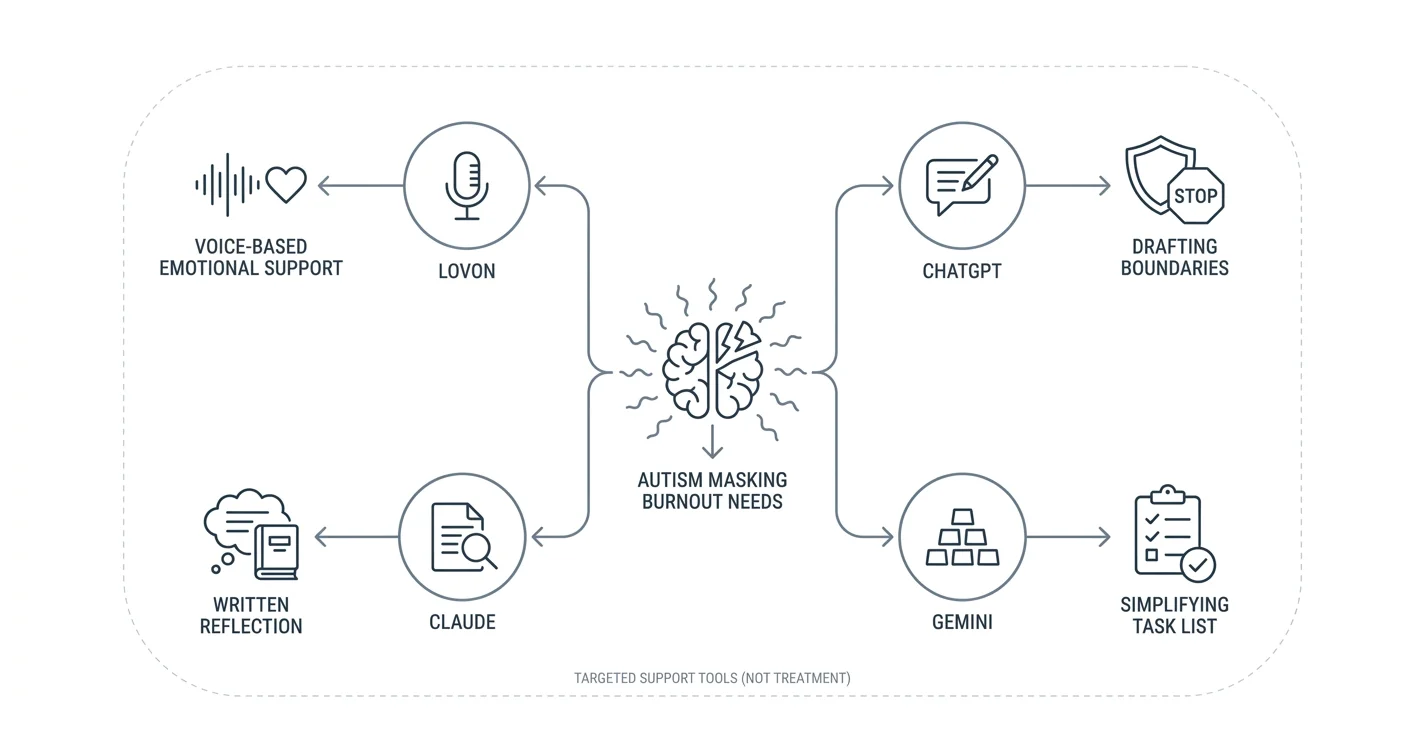
- Among the best AI apps for autism masking burnout, Lovon fits voice-based emotional support when speaking feels
- ChatGPT fits boundary drafts; Claude fits written reflection; Gemini fits turning a task list into a smaller plan.
- Choose support that reduces demands, not advice that pushes you to hide autistic needs.
- AI support does not replace autism-informed clinical care, practical accommodations, or crisis services.
Best for voice-based emotional support: Lovon. Best for drafting boundaries: ChatGPT. Best for written reflection: Claude. Best for simplifying a task list: Gemini. This 2026 guide matches each option to a practical need during autism masking burnout, not to a claim that an app treats autistic burnout.
TL;DR
- Among the best AI apps for autism masking burnout, Lovon fits voice-based emotional support when speaking feels comfortable.
- ChatGPT fits boundary drafts; Claude fits written reflection; Gemini fits turning a task list into a smaller plan.
- Choose support that reduces demands, not advice that pushes you to hide autistic needs.
- AI support does not replace autism-informed clinical care, practical accommodations, or crisis services.
Why this matters
Masking means hiding or changing autistic traits to meet social expectations. That can include forcing eye contact, suppressing stimming, rehearsing responses, or concealing sensory distress. You do not need to do all of these for masking to feel exhausting.
Autistic burnout involves more than feeling tired after a difficult day. Exhaustion, reduced capacity for everyday tasks, and greater difficulty tolerating sensory input can affect daily life. An app cannot determine whether burnout, depression, a sleep problem, or another health condition explains those changes.
Lovon is best for people who want voice-based emotional support rather than another writing task. Speaking is not automatically easier, though. If conversation feels like another demand, written support—or no app at all—is a better starting point.
The useful question is not which app makes you more productive. It is which option helps you identify a need without adding another performance to your day.
What makes the best AI apps for autism masking burnout?
Use these criteria when choosing support in 2026. A familiar interface matters less than whether you can use it without pushing past your limits.
- Communication fit: Choose voice or text according to what feels manageable now, not what usually works.
- Respect for autistic needs: Reject advice that treats eye contact, suppressed stimming, or appearing less autistic as recovery goals.
- Low demand: Ask for short answers, fewer questions, and a clear stopping point.
- Practical usefulness: Look for help naming a need, drafting a boundary, or reducing an immediate obligation.
- Privacy clarity: Read current data-use and deletion information before sharing sensitive details.
- Clear limits: Treat generated suggestions as suggestions, not diagnosis, treatment, or a safety assessment.
No option needs to handle every need. A tool that helps you write a message can still be the wrong place to discuss a frightening change in your health.
Your 2026 options at a glance
These recommendations assign different jobs to the apps. They are not a ranking of clinical effectiveness or proof that one general-purpose assistant understands autistic burnout better than another.
| Item | Best for | Standout use | Key limitation |
|---|---|---|---|
| Lovon | Voice-based emotional support | Talking through feelings and exploring coping tools | Not a licensed clinician; voice requires energy and privacy |
| ChatGPT | Drafting boundaries | Turning a need into a short message | A plausible draft can still miss context or safety concerns |
| Claude | Written reflection | Organizing a description into needs and questions | Generated interpretations can be inaccurate |
| Gemini | Simplifying tasks | Sorting obligations into a smaller proposed plan | Cannot know which responsibilities are safe to postpone |
The general-purpose assistants overlap. Their assigned use cases give you a starting point, not a reason to install several apps or repeat the same personal story across them.
1. Lovon: best for voice-based emotional support
Lovon offers voice conversations for emotional support, coping tools, and self-reflection. It is built with input from PhD psychologists and positions itself as a companion, not a replacement for licensed clinical care. Its role here is support with feelings around exhaustion, stress, and difficult interactions—not autism assessment or specialist burnout treatment.
You can start with plain language: describe what happened, what feels difficult, and whether you want reflection or a practical suggestion. There is no need to explain your experience neatly before asking for support.
Lovon pros:
- Voice offers an alternative when writing feels effortful.
- Emotional support is part of its stated purpose.
- Coping tools and self-reflection guidance are part of its offer.
Lovon cons:
- Speaking can be tiring or inaccessible during overload.
- A voice conversation requires a setting where you feel comfortable being overheard.
- It is not a licensed clinician or a substitute for autism-informed care.
Best for: Someone who wants to talk about an exhausting day and finds speaking more manageable than typing.
Verdict: Hold if talking adds strain; choose it when voice reduces effort.
2. ChatGPT: best for drafting boundaries
ChatGPT is a general-purpose assistant that can generate and revise text. A useful role during masking burnout is drafting a message when you know what you need but cannot find the wording. Keep the task narrow rather than asking it to decide what your relationships or workplace require.
For example, ask for a brief message declining an optional gathering without disclosing a diagnosis. Specify the tone, what information to leave out, and whether you want an alternative arrangement included. Read the result before sending it.
ChatGPT pros:
- Can turn rough notes into a readable message.
- Can revise wording to be shorter or more direct.
- Lets you request a practical draft without discussing your full history.
ChatGPT cons:
- Can produce overly apologetic or unrealistic wording.
- Does not know your workplace rules or relationship dynamics.
- A polished message is not legal, employment, or clinical advice.
Best for: Someone who needs help expressing a specific boundary, such as requesting written instructions or declining an optional call.
Verdict: Hold until you check that the draft protects your needs and fits the situation.
3. Claude: best for structured written reflection
Claude is a general-purpose assistant that can summarize and organize text. Its recommended role here is helping you separate an event, its demands, and the support you want. That is different from asking it to explain your personality or diagnose the cause of your exhaustion.
You might describe a difficult meeting and request a short summary under three headings: what happened, what felt demanding, and what you want to change. Correct any interpretation that does not match your experience. The output is a draft, not an authoritative account of your mind.
Claude pros:
- Can organize an unstructured written account.
- Can help prepare questions for a clinician or trusted person.
- Supports a specific writing task without requiring spoken conversation.
Claude cons:
- Reading and typing still take energy.
- Can infer feelings or motives you did not describe.
- Repeated analysis can become another obligation rather than useful support.
Best for: Someone who prefers writing and wants a concise summary of an experience before discussing it with another person.
Verdict: Hold if reflection turns into repeated analysis without a useful next step.
4. Gemini: best for simplifying an overloaded task list
Gemini is a general-purpose assistant that can help organize text and propose plans. Use it to sort a list of obligations into possible next steps, not to judge your capacity. State clearly that the goal is reducing demands rather than fitting more work into the day.
Ask it to distinguish essential tasks, tasks you can discuss postponing, and tasks someone else might help with. Check the proposed categories yourself. An assistant cannot know the consequences of delaying medication, caregiving, bills, or other responsibilities from a short description.
Gemini pros:
- Can turn a scattered list into readable categories.
- Can draft a request for practical help.
- Can revise a plan around limits you explicitly describe.
Gemini cons:
- A tidy plan can still ask too much of you.
- Suggested priorities can miss important consequences.
- Planning does not remove sensory demands or create accommodations.
Best for: Someone facing a crowded list who needs help deciding what to review, delegate, or discuss postponing.
Verdict: Skip any proposed plan that increases your workload or overrides essential needs.
How we ranked these options
This 2026 shortlist prioritizes communication fit, low demands, practical usefulness, privacy questions, and clear boundaries around care. Lovon comes first for its stated voice-based emotional support role. The other options receive distinct writing and planning tasks rather than claims of specialist autism expertise.
No clinical outcome scores or hands-on testing results underpin this order. Use the assigned roles to choose a starting point, then judge whether the interaction actually feels manageable to you.
How to use an app without adding another demand
Start with a small, optional task. The following limits are suggested boundaries for an interaction, not a treatment schedule or a measure of recovery.
Name the need
Choose a concrete goal: wording a boundary, describing a feeling, or deciding which obligation needs discussion. If identifying a goal is itself too much, you can stop here. You do not owe an app an explanation.
Set the limits
Try an optional 2-minute check-in rather than committing to a long conversation. Ask for 1 question at a time and no more than 3 suggestions. These limits keep the request small; they do not guarantee that an answer will feel helpful.
A useful instruction is to request practical support without advice about appearing more socially typical. Also say whether you want suggestions at all. Sometimes you only want help putting an experience into words.
Check the response
Look for assumptions before acting. Does the answer treat sensory discomfort as something to push through? Does it frame a reasonable boundary as avoidance, or suggest disclosing personal information you want to keep private?
Reject advice that conflicts with your needs or safety. You do not have to persuade the assistant that your discomfort is real.
Stop or act
Choose one manageable action, such as saving a draft or asking someone for help. Stop if the interaction becomes tiring, confusing, or repetitive. Completing the conversation is not the goal.
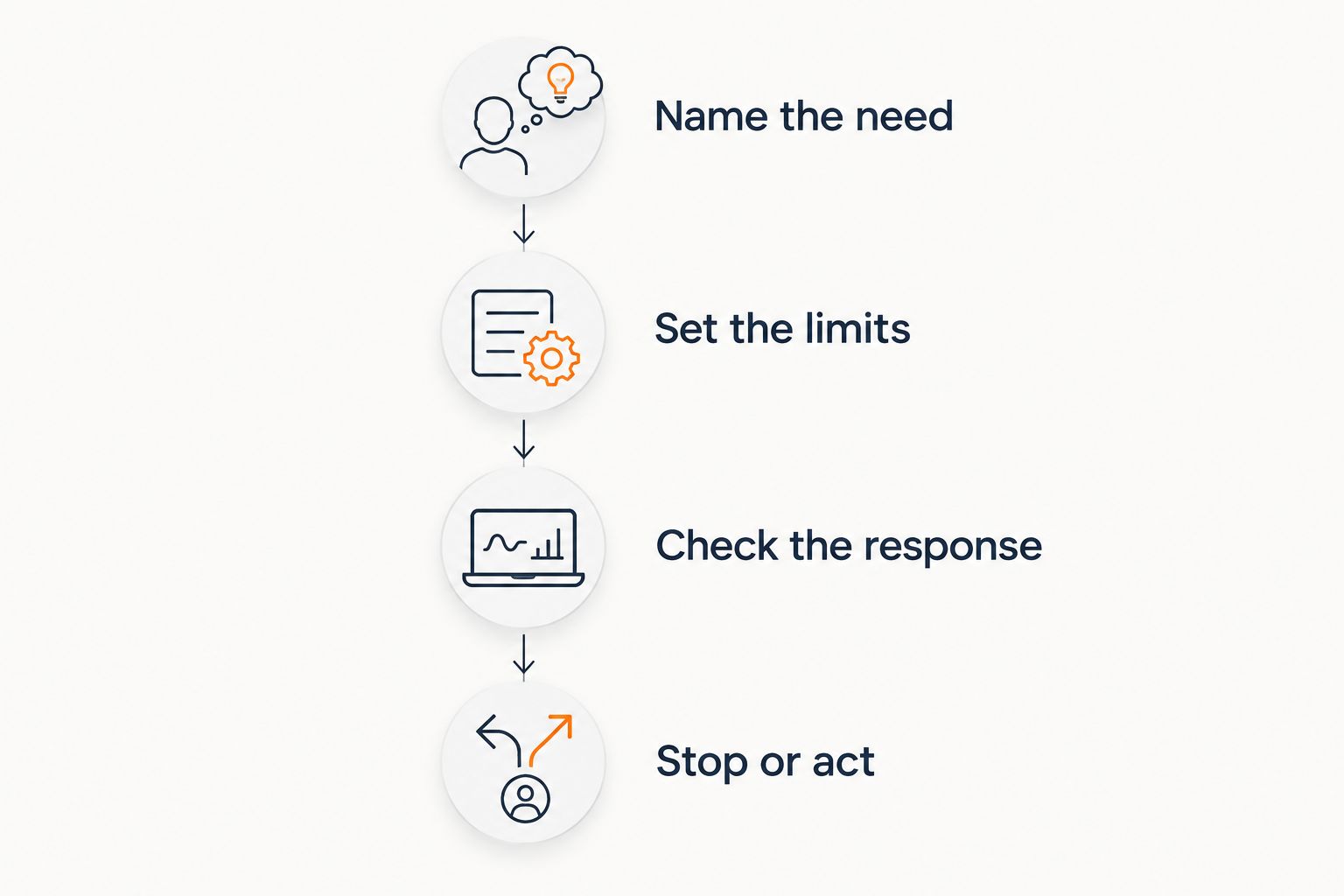 Four steps for keeping an app interaction small and optional
Set a stopping point before the conversation becomes another demand.
Privacy and care boundaries in 2026
Before sharing sensitive information, check the app's current privacy terms and controls. Look for what it stores, how conversations are used, and what deletion means. Do not assume that a mental health label creates the same confidentiality protections as a licensed clinician relationship.
Keep identifying details out of drafting tasks where possible. A boundary message usually does not require your employer's name, another person's medical history, or your full address. Share only what the task needs.
Seek professional assessment when exhaustion or changes in functioning interfere with eating, sleeping, hygiene, work, or basic safety. Burnout and other health problems can overlap. You do not need to settle on the correct label before asking for help.
If you are in immediate danger, call 911. In the United States, call or text 988 for suicide or mental health crisis support. Do not wait for an app to recognize an emergency.
Which app should you choose?
For 2026, start with your least-demanding communication format, not the longest feature list. Choose voice support when speaking feels easier. Choose a narrow text task when you need wording, a summary, or a smaller proposed plan.
If you are undecided, begin with one boundary draft rather than a broad conversation about your whole life. If even that feels draining, skip the app and ask a trusted person for practical support. Reducing an obligation can matter more than generating another coping suggestion.
FAQ
What's the best AI app for autism masking burnout?
Lovon is the voice-support pick in this guide when speaking feels easier than writing. ChatGPT, Claude, and Gemini fit narrower writing or planning tasks; none replaces autism-informed clinical care.
Can an AI app diagnose autistic burnout?
No. An AI app cannot establish why your energy, sensory tolerance, or everyday functioning has changed. A qualified clinician can assess possible causes and overlapping health concerns.
Is voice better than text during autistic burnout?
Neither format is always better. Choose voice when speaking reduces effort, and text when speaking feels tiring or you need quiet. You can also choose not to use an app.
Can I ask an AI assistant to help me unmask?
You can ask for help identifying needs or drafting boundaries, but do not let an assistant decide when disclosure or unmasking is safe. Consider your environment, relationships, and access to support before making changes.
What should I tell an app when I feel overwhelmed?
State the immediate need and set a limit on the response. Ask for one question at a time, a short answer, or help with a single message rather than a broad recovery plan.
Should I keep using an app if it makes me feel worse?
No. Stop an interaction that increases distress, confusion, or pressure to perform. Turn to a trusted person or qualified professional when you need support beyond a generated response.
When should I seek human support instead?
Seek human support when changes in functioning affect basic needs, persist, or feel frightening. Use emergency or crisis services for immediate safety concerns rather than relying on an app.
One last thing
You can mask in an app conversation, too. If you notice yourself polishing every sentence, apologizing for needing support, or agreeing with advice that feels wrong, stop and simplify the task. Support should not require you to perform being okay.
Related guides
How AI Support Helps You Heal
AI emotional support isn't about replacing human connection — it's about filling the gaps. The moments when you need to talk at 2 AM, when you don't want to burden your friends again, or when you simply need someone to listen without judgment.
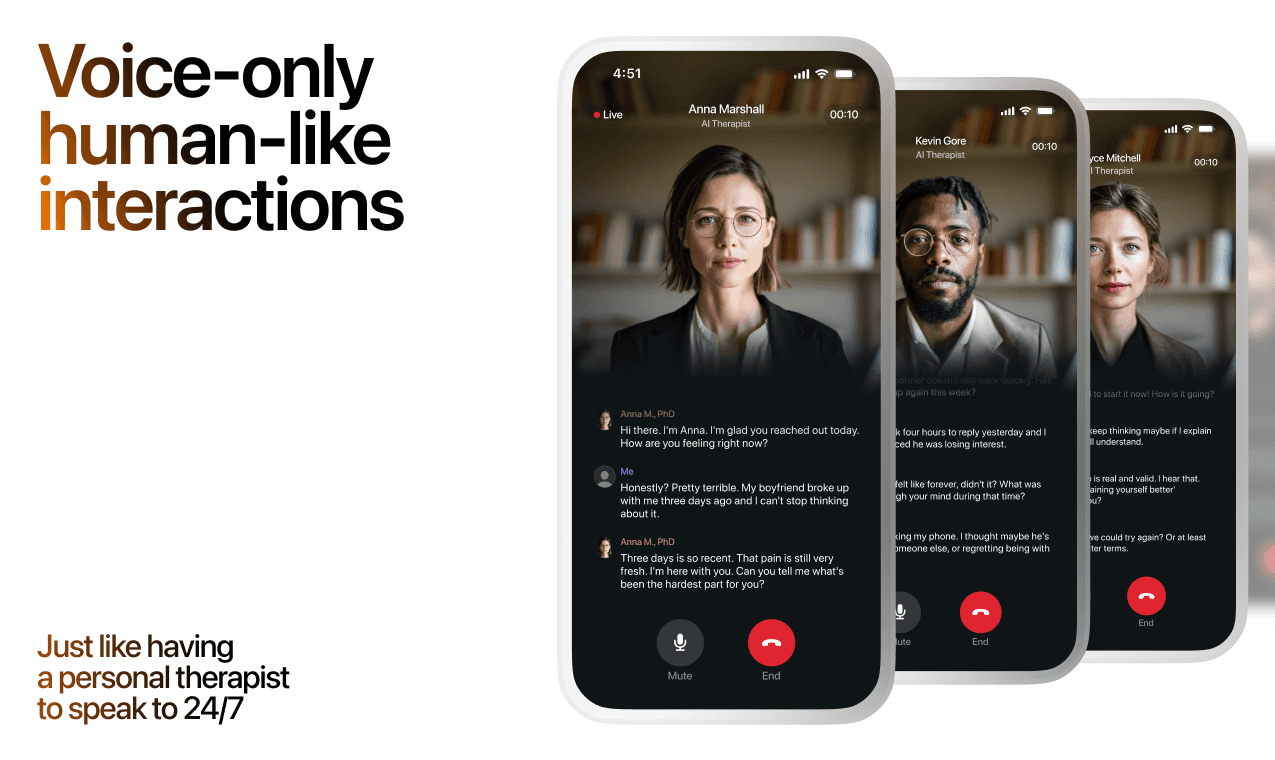
Here's what happens in a typical Lovon session:
You share what's on your mind
There's no script, no intake form, no waiting room. You speak or type whatever you're feeling — in your own words, at your own pace.
Lovon validates and explores
Using frameworks from CBT (Cognitive Behavioral Therapy) and motivational interviewing, Lovon acknowledges your feelings first, then gently helps you explore them. No dismissive "just move on" advice.
You build coping skills together
Lovon doesn't just listen — it actively works with you on evidence-based techniques: thought reframing, urge surfing, behavioral experiments, and more.
What a Session with Lovon Looks Like
When to Seek Professional Help
AI support is a valuable tool, but it's not a replacement for professional care. Please consider reaching out to a licensed therapist if you experience any of the following:
- Persistent thoughts of self-harm or suicide
- Inability to perform daily activities (work, eating, sleeping) for more than 2 weeks
- Turning to alcohol or substances to cope
- Intense anger or desire to harm your ex-partner
- Complete emotional numbness that doesn't improve over time
Crisis Resources (US): If you're in immediate danger, call 988 (Suicide & Crisis Lifeline) or text HOME to 741741 (Crisis Text Line). Available 24/7, free, and confidential.
Outside the US? Find a crisis line in your country
Ready to Start?
Your healing journey can begin right now
A 7-day trial. No judgment. Just a safe space to process what you're going through.
Frequently Asked Questions
Is Lovon a replacement for a real therapist?
Is my conversation with Lovon AI private?
How is Lovon different from ChatGPT for emotional support?
Can I use Lovon if I'm already seeing a therapist?
Can I try Lovon before subscribing?
About the Author
The Lovon Editorial Team
Mental Health & Wellness Content Team
The Lovon Editorial Team develops mental health and wellness content designed to make psychological concepts accessible and actionable. Our goal is to bridge the gap between clinical research and everyday life - helping you understand why your mind works the way it does and what you can do about it....
Related articles
- Best vent apps for venting your feelings in 2026
Compare the best vent apps for talking, journaling, and recording feelings. Choose spoken support or a simple outlet…
- AI Therapy App for Autism Masking Burnout (2026 Pick)
Best ai therapy app for autism masking burnout in 2026: voice-first sessions, 24/7 access, and what to avoid. Lovon…
- Best AI apps for shift workers in 2026
The best AI apps for shift workers: Lovon for voice support, plus picks for planning, messages, and notes. Compare uses…
- Best AI apps for caregiver burnout in 2026
Compare the best AI apps for caregiver burnout. Choose Lovon for voice support, or a writing assistant for practical…
See also
Quizzes
- Empath Test: Do Other People's Moods Become Yours?
See how much of other people's moods you take on.
- Overthinking Test: Am I an Overthinker? 12-Question Quiz
See which overthinking loop runs you, in 3 minutes.
Free tools
- What to Say When They Are Struggling
A chat, not a list. Tell the coach who this person is to you, what they are going through, and what you already said…
- 5-4-3-2-1 Grounding Exercise
A guided run through the 5-4-3-2-1 technique, with paced breathing first if you need it. No sign-up, nothing stored…
From the wiki
- What to do if you have no friends?
Pick one activity that repeats weekly with the same people, and go for six to eight weeks straight. Repetition, not…
Disclaimer: This article is for informational purposes only and does not constitute medical advice, diagnosis, or treatment. Always seek the advice of your physician or other qualified health provider with any questions you may have regarding a medical condition. If you are in crisis or think you may have an emergency, call 988 (Suicide & Crisis Lifeline) or go to the nearest emergency room. Outside the US? Find a crisis line in your country.