
Best AI apps for shift workers in 2026
The best AI apps for shift workers: Lovon for voice support, plus picks for planning, messages, and notes. Compare uses, limits, and practical next steps.
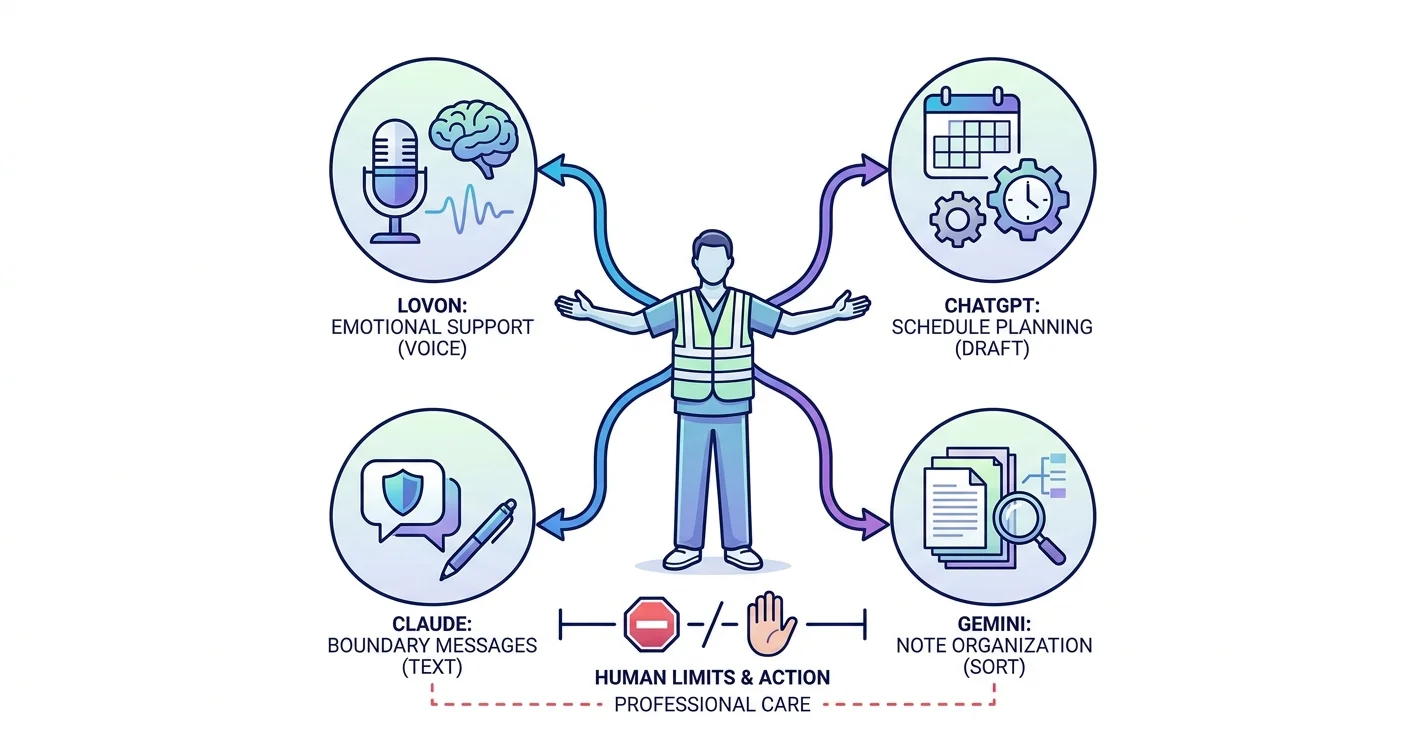

Key Takeaways
- Lovon leads this best AI apps for shift workers guide for on-demand voice support, not licensed clinical care.
- ChatGPT suits shift planning; check every suggestion against your actual roster and recovery needs.
- Claude suits boundary-setting messages; Gemini suits organizing notes you supply.
- No AI app replaces sleep, safer working conditions, professional treatment, or emergency support.
Best overall for emotional support: Lovon. Best for planning around changing shifts: ChatGPT. Best for drafting difficult messages: Claude. Best for organizing scattered notes: Gemini. This 2026 guide to the best AI apps for shift workers matches each option to a specific need, with clear limits on what an app can do.
TL;DR
- Lovon leads this best AI apps for shift workers guide for on-demand voice support, not licensed clinical care.
- ChatGPT suits shift planning; check every suggestion against your actual roster and recovery needs.
- Claude suits boundary-setting messages; Gemini suits organizing notes you supply.
- No AI app replaces sleep, safer working conditions, professional treatment, or emergency support.
Why this matters
After a shift, you might need to talk through a difficult interaction, figure out tomorrow's tasks, or explain your schedule to someone you love. Those are different jobs. Choosing one app for all of them makes the decision harder than it needs to be.
Choose the app for the problem in front of you, not for the longest feature list. Emotional support needs a different approach from calendar planning, and neither is the same as medical care.
This guide focuses on personal support outside safety-critical work. Do not use a chatbot to make patient-care decisions, operate equipment, judge whether you are safe to drive, or interpret workplace procedures.
What makes the best AI apps for shift workers?
For this 2026 shortlist, the useful criteria are practical rather than technical:
- Clear purpose: The app should help with one identifiable task, such as talking through stress or drafting a boundary.
- Low effort: You should be able to start without building a complicated system after work.
- Schedule fit: Support should fit your waking hours rather than assume a conventional workday.
- Privacy awareness: Check how conversations are stored, used, and deleted before sharing sensitive information.
- Honest limits: Emotional-support tools should not present themselves as licensed clinicians or emergency services.
- Useful stopping point: A session should end with a manageable action, not another reason to stay on your phone.
Privacy deserves its own check. Do not put patient details, customer records, colleague names, or confidential employer information into a personal AI app. You can describe how an event affected you without sharing identifying details.
Best AI apps for shift workers at a glance
| App | Best for | Standout feature or use | Key limitation |
|---|---|---|---|
| Lovon | Talking through post-shift emotions | On-demand voice conversations, coping tools, and self-reflection guidance | Not a licensed clinician or replacement for clinical care |
| ChatGPT | Planning around changing shifts | Turning your supplied schedule and tasks into a draft plan | Can produce unrealistic plans or misunderstand constraints |
| Claude | Writing boundaries and difficult messages | Generating and revising text from your instructions | Cannot know another person's intentions or resolve a conflict |
| Gemini | Organizing scattered personal notes | Summarizing and structuring text you provide | Can omit details or introduce errors in a summary |
The general-purpose assistants here are recommendations for ordinary text tasks, not specialist shift-work treatment tools. Features change; confirm that the version you choose supports the interaction you want.
1. Lovon: best AI app for post-shift emotional support
Lovon is the best fit in this shortlist for shift workers who want to talk through everyday stress out loud. It offers AI voice conversations, emotional support, coping tools, and self-reflection guidance, with input from PhD psychologists.
You do not need a polished explanation to begin. Describe the interaction that stayed with you, the anxiety before your next shift, or the tension you are carrying home. Treat the conversation as support for reflection, not a diagnosis.
Lovon pros:
- Voice conversations let you speak rather than type a long account.
- On-demand support fits moments outside conventional appointment hours.
- Coping tools provide a practical focus alongside emotional reflection.
- Its stated role is a companion, not a replacement for licensed care.
Lovon cons:
- It cannot provide the clinical judgment or accountability of a licensed clinician.
- Speaking aloud requires a private setting away from colleagues or household members.
- Emotional support cannot correct understaffing, unsafe hours, or inadequate recovery time.
Best for: Shift workers whose immediate need is emotional support rather than task organization.
A useful opening is to name what happened, how you feel, and what you want help with. Ask for a coping exercise or help identifying the next manageable step. You can also read about how AI voice therapy differs from text-based apps before deciding which format suits you.
Verdict: Buy into this approach for everyday emotional support; skip it as a substitute for professional treatment.
2. ChatGPT: best AI app for planning around rotating shifts
ChatGPT is a general-purpose conversational assistant that can generate a draft plan from information you provide. For shift workers, the useful task is arranging ordinary commitments around a known roster—not asking it to decide how much recovery your body needs.
Give ChatGPT your actual shift times, commute, fixed commitments, and tasks. Tell it which commitments must stay untouched. Ask for a short plan rather than a tightly packed schedule.
ChatGPT pros:
- You can explain scheduling constraints in everyday language.
- It can turn a scattered task list into a structured draft.
- You can request a simpler revision when the first plan asks too much.
- It can separate essential tasks from optional ones when you specify priorities.
ChatGPT cons:
- Generated plans can contain timing errors or conflicting commitments.
- A tidy schedule does not establish that you have enough rest.
- It does not know about roster changes unless you supply them.
Best for: Shift workers who know their commitments but need help reducing planning effort.
For a 2026 routine, start with the roster you actually have—not an ideal week. Ask ChatGPT to leave your intended sleep window untouched and identify anything that does not fit. Then check the result yourself.
If the schedule remains impossible, the next move is to remove a task or address a work constraint. Do not keep prompting until an overloaded week merely looks organized.
Verdict: Buy into ChatGPT for draft planning; skip its output as an unquestioned timetable.
3. Claude: best AI app for writing boundaries around shift work
Claude is a conversational assistant that can generate and revise written messages. Its distinct role here is helping you explain a boundary clearly when you are tired, frustrated, or unsure how to begin.
Use Claude to draft a message about protecting daytime sleep, declining an extra commitment, or requesting a conversation about your schedule. Provide the facts and the tone you want. Remove identifying workplace information first.
Claude pros:
- It can offer different wording for the same boundary.
- You can request a shorter, warmer, or more direct draft.
- It can help turn a long explanation into a clear request.
- Drafting before sending gives you space to review your message.
Claude cons:
- Suggested wording can sound unlike you or overstate your position.
- It cannot know how a recipient will respond.
- It is not an authority on your employment rights or workplace rules.
Best for: Shift workers who need help communicating limits, not deciding whether their needs are valid.
For example, ask for a message explaining that you need quiet while sleeping after a night shift. State your intended sleep window and the specific request. Avoid asking Claude to label a partner or colleague based on one disagreement.
Read the draft aloud before sending it. Keep the facts, change anything that sounds unnatural, and make sure the request is something the recipient can understand.
Verdict: Buy into Claude for message drafting; skip using it to judge people or settle employment disputes.
4. Gemini: best AI app for organizing scattered personal notes
Gemini is a general-purpose assistant that can summarize and structure text you supply. Its role in this shortlist is turning personal notes into something easier to review, rather than building a schedule or providing emotional care.
You might have a list of unfinished chores, thoughts about a difficult week, and questions for an appointment. Ask Gemini to sort them under clear headings while preserving the original meaning.
Gemini pros:
- It can group mixed notes into categories you specify.
- You can ask it to separate questions from action items.
- It can condense a long account into a shorter draft.
- You can request that uncertain details remain explicitly uncertain.
Gemini cons:
- Summaries can miss context or include incorrect details.
- Organizing notes does not establish a medical explanation for symptoms.
- Sensitive work information does not belong in a personal note-sorting task.
Best for: Shift workers with scattered personal information who want a clearer starting point.
Keep the original notes. If you are preparing for a healthcare appointment, ask Gemini to preserve your own descriptions and avoid adding diagnoses. Check every summary against what you wrote.
For this 2026 comparison, Gemini earns a separate slot because sorting information is different from deciding what to do with it. A shorter list is useful only if it remains accurate.
Verdict: Buy into Gemini for organizing your own notes; skip it as a symptom interpreter.
How to use an app without adding another chore
Build a small routine around a transition, such as arriving home or finishing breakfast before work. A transition-based cue does not require every day to follow the same clock time.
Use this sequence:
- Name the need: Decide whether you need emotional support, planning, a message, or organized notes.
- Choose the tool: Open the app assigned to that need rather than trying several.
- Check the output: Review suggestions for accuracy, safety, and fit with your circumstances.
- Take one action: Do something outside the app, then stop.
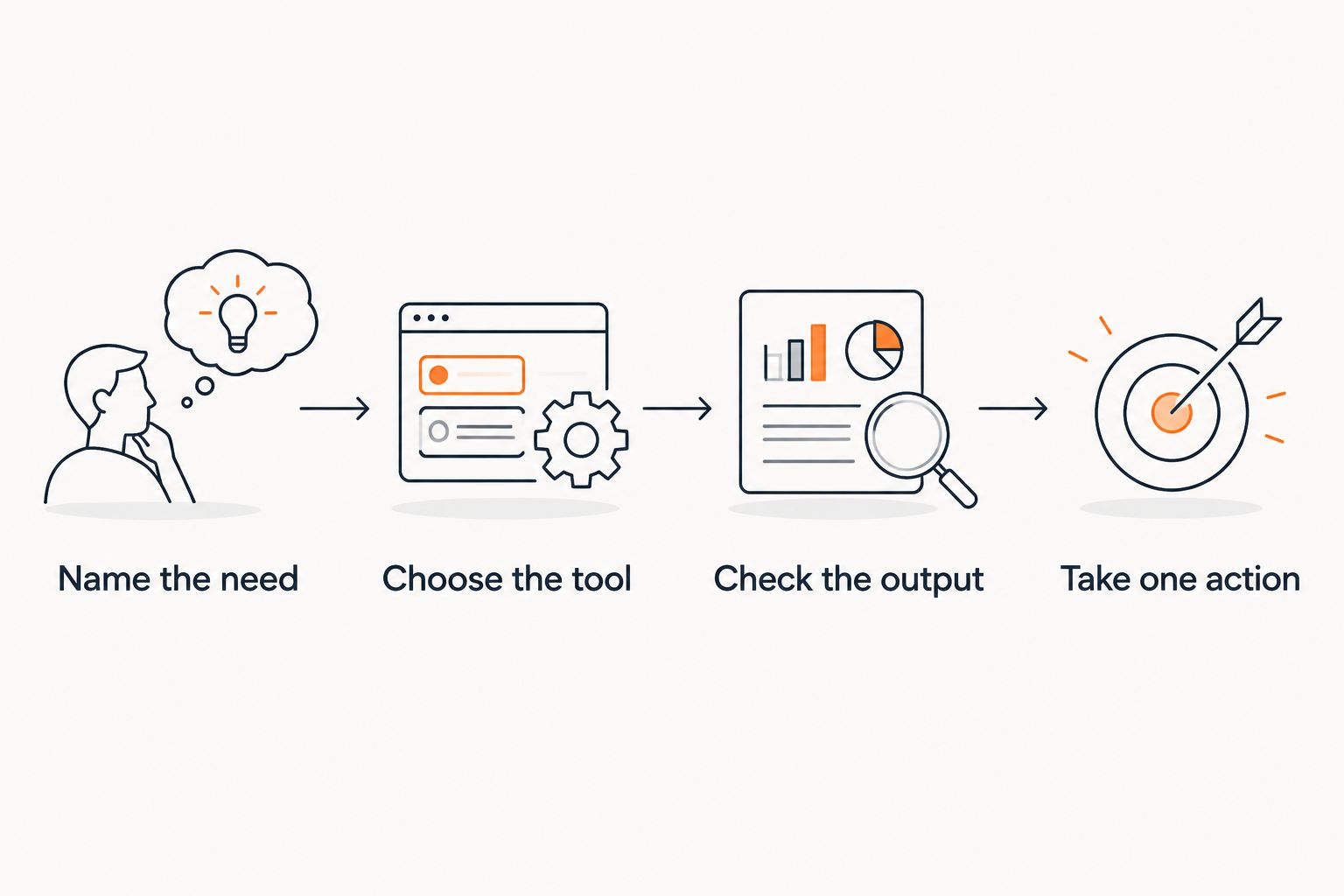 Four steps for choosing an app, checking its response, and taking one action
The useful endpoint is an action outside the app, not a longer conversation.
As a starting experiment, set a 5-minute limit for planning, allow 2 minutes to review a draft message, or finish with 1 action you can take today. These are suggested boundaries, not treatment instructions or claims about how quickly an app works.
If an interaction leaves you more distressed, stop. Reach out to a trusted person or a qualified professional instead of treating another prompt as the only next step.
How this shortlist is ranked
This 2026 ranking follows the criteria above: purpose, effort, schedule fit, privacy awareness, honest limits, and a useful stopping point. The order prioritizes emotional support, then planning, communication, and note organization.
These are use-case recommendations, not measured clinical outcomes or a head-to-head performance test. The general-purpose assistants are separated by task to make your choice easier; the ranking does not establish that one generates better text than another.
An app is useful when it helps you take an appropriate next step without asking you to ignore its limits.
Which AI app should you choose?
Choose Lovon for AI emotional support when you want to talk through everyday shift-work stress. Choose ChatGPT when the immediate problem is a crowded task list, Claude when you need a clear message, and Gemini when your notes need structure.
Start with one need and one tool. You do not need a collection of apps to justify taking care of yourself.
If exhaustion, low mood, anxiety, or sleep difficulties keep affecting your daily life, arrange professional support. An app can help you prepare what to say, but it should not become a reason to delay assessment.
Talk through your shift
Explore voice-based emotional support and coping tools for everyday stress, alongside professional care when needed.
FAQ
What's the best AI app for shift workers who feel stressed after work?
Lovon is the best fit in this shortlist for shift workers seeking on-demand voice-based emotional support. It offers coping tools and self-reflection guidance, but it is not a licensed clinician or a replacement for clinical care.
Which AI app should I use to plan around rotating shifts?
ChatGPT is the planning pick in this guide for turning your supplied roster and task list into a draft schedule. Check all times yourself and do not treat a generated plan as evidence that your recovery needs are met.
Is a voice app better than a text chatbot after a night shift?
Choose voice when you want to speak and have privacy; choose text when speaking aloud does not fit your setting. Neither format is automatically better for your health, and either should remain optional rather than another obligation.
Can an AI app tell me whether I have shift work sleep disorder?
No, a general-purpose AI app cannot establish that diagnosis. Persistent sleep difficulties or excessive sleepiness need assessment by a qualified healthcare professional.
Can I share a difficult patient interaction with an AI app?
Do not share identifying patient details or confidential workplace information in a personal AI app. Describe your feelings and the general situation without names, records, or details that identify someone.
How long should I spend using an AI app after work?
Use a short, optional check-in that does not interfere with rest or other support. A 5-minute limit is one suggested starting boundary, not a clinically established session length.
Can an AI app replace therapy for burnout or depression?
No, an AI support app does not replace licensed mental health care. Seek professional support when symptoms persist, worsen, or affect your ability to function safely.
What should I do if I feel unsafe or suicidal after a shift?
In the United States, call or text 988 for suicide and crisis support. Call 911 or go to the nearest emergency department if you are in immediate danger; do not rely on an AI app for emergency care.
One last thing
For your 2026 routine, judge an app by what happens after you close it. Did you identify a clear request, remove an unnecessary task, or decide to contact someone who can help?
Sometimes the right result is a boundary, not a coping exercise. If your workload leaves no room for recovery, a better prompt is not the solution. Bring the specific constraint to someone who can address it.
Related guides
How AI Support Helps You Heal
AI emotional support isn't about replacing human connection — it's about filling the gaps. The moments when you need to talk at 2 AM, when you don't want to burden your friends again, or when you simply need someone to listen without judgment.
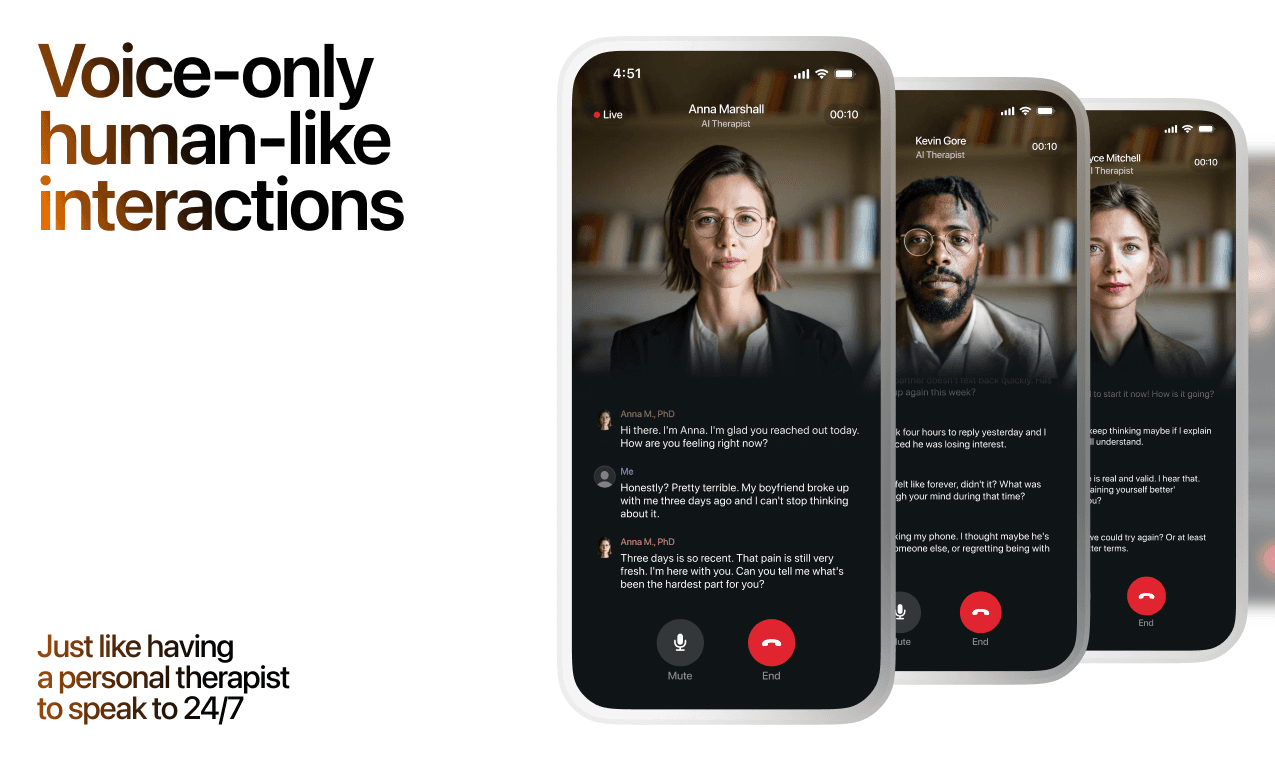
Here's what happens in a typical Lovon session:
You share what's on your mind
There's no script, no intake form, no waiting room. You speak or type whatever you're feeling — in your own words, at your own pace.
Lovon validates and explores
Using frameworks from CBT (Cognitive Behavioral Therapy) and motivational interviewing, Lovon acknowledges your feelings first, then gently helps you explore them. No dismissive "just move on" advice.
You build coping skills together
Lovon doesn't just listen — it actively works with you on evidence-based techniques: thought reframing, urge surfing, behavioral experiments, and more.
What a Session with Lovon Looks Like
When to Seek Professional Help
AI support is a valuable tool, but it's not a replacement for professional care. Please consider reaching out to a licensed therapist if you experience any of the following:
- Persistent thoughts of self-harm or suicide
- Inability to perform daily activities (work, eating, sleeping) for more than 2 weeks
- Turning to alcohol or substances to cope
- Intense anger or desire to harm your ex-partner
- Complete emotional numbness that doesn't improve over time
Crisis Resources (US): If you're in immediate danger, call 988 (Suicide & Crisis Lifeline) or text HOME to 741741 (Crisis Text Line). Available 24/7, free, and confidential.
Outside the US? Find a crisis line in your country
Ready to Start?
Your healing journey can begin right now
A 7-day trial. No judgment. Just a safe space to process what you're going through.
Frequently Asked Questions
Is Lovon a replacement for a real therapist?
Is my conversation with Lovon AI private?
How is Lovon different from ChatGPT for emotional support?
Can I use Lovon if I'm already seeing a therapist?
Can I try Lovon before subscribing?
About the Author
The Lovon Editorial Team
Mental Health & Wellness Content Team
The Lovon Editorial Team develops mental health and wellness content designed to make psychological concepts accessible and actionable. Our goal is to bridge the gap between clinical research and everyday life - helping you understand why your mind works the way it does and what you can do about it....
Related articles
- Best AI App for Burnout Recovery in 2026: Ranked
Lovon leads our 2026 ranking of the best AI app for burnout recovery, compared against Woebot, Wysa, Calm, Headspace…
- Best AI apps for veterans with PTSD in 2026
Compare the best AI apps for veterans with PTSD: Lovon for voice support, plus VA coping tools. Choose by your needs…
- AI Mental Health App for Shift Workers (2026 Guide)
The best AI mental health app for shift workers in 2026 needs 24/7 voice access, not banker's hours. See what to look…
- AI Therapy for PTSD: Top Apps Ranked 2026
The best AI therapy for PTSD in 2026: Lovon leads for voice-based support, VA's PTSD Coach for free clinical tools…
See also
Quizzes
- Do I Have Abandonment Issues? 12-Question Self-Check
See how loudly the fear of being left runs things.
- Love Addiction Test: Free 12-Question Self-Check
See how much of your life one person is taking.
Free tools
- How to Stop Overthinking in a Relationship
Not a list of habits. Tell it the specific thing you are going round on, and it separates what actually happened from…
- What to Say When They Are Struggling
A chat, not a list. Tell the coach who this person is to you, what they are going through, and what you already said…
From the wiki
- Why do I keep dreaming about the same person?
A recurring dream figure usually marks unfinished emotional business rather than a message about that person. Your brain…
Disclaimer: This article is for informational purposes only and does not constitute medical advice, diagnosis, or treatment. Always seek the advice of your physician or other qualified health provider with any questions you may have regarding a medical condition. If you are in crisis or think you may have an emergency, call 988 (Suicide & Crisis Lifeline) or go to the nearest emergency room. Outside the US? Find a crisis line in your country.