
Best AI apps for grandparents raising grandchildren in 2026
Best AI apps for grandparents raising grandchildren: Lovon for caregiver stress, plus tools for school messages, chores, and homework—with clear safety limits.

Key Takeaways
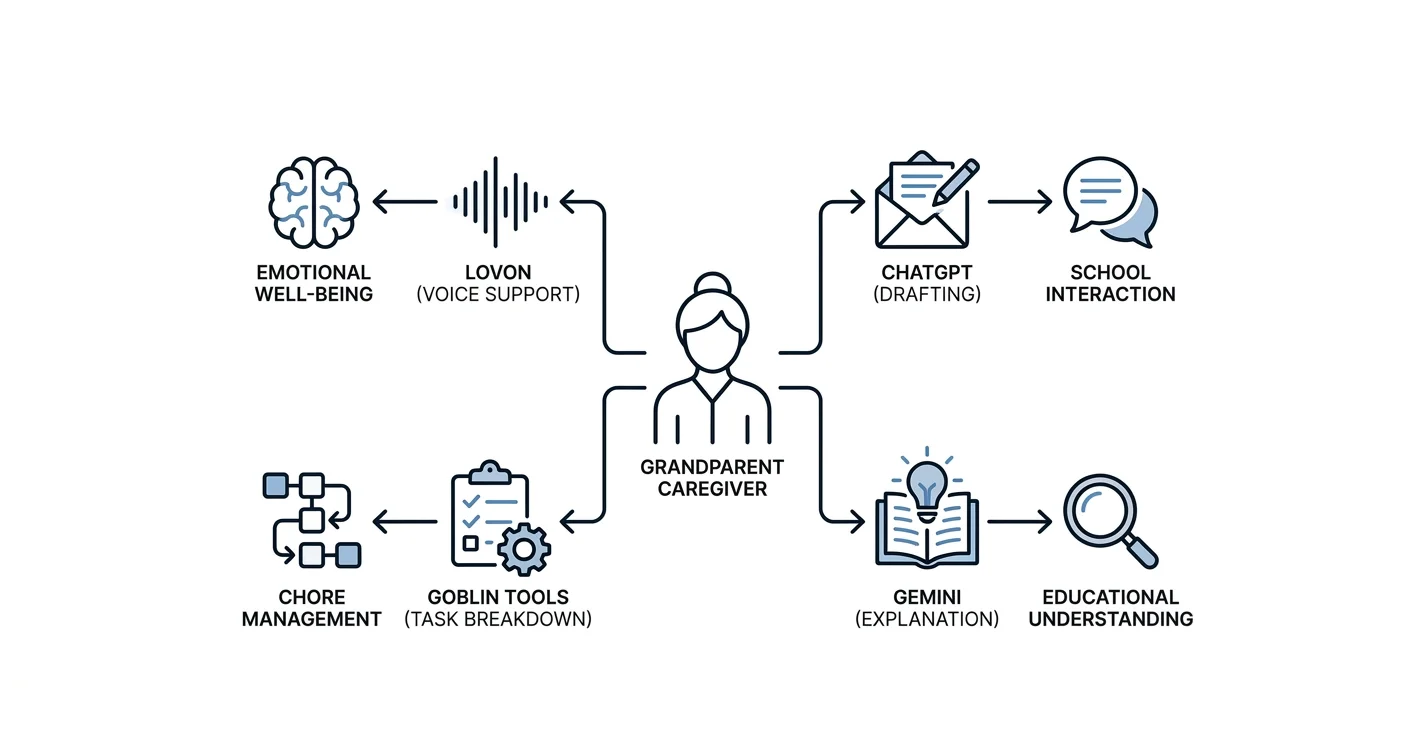
- The best AI apps for grandparents raising grandchildren serve different needs: emotional support, school
- Lovon is best for grandparents seeking voice-based emotional support for their own caregiving stress.
- ChatGPT drafts messages; Goblin Tools breaks down tasks; Gemini explains concepts for adult review.
- Use these tools yourself, protect your grandchild’s information, and keep clinical and custody decisions with
Best overall for caregiver emotional support: Lovon, an AI voice support app; best for drafting school messages: ChatGPT. For breaking chores into smaller steps, choose Goblin Tools; for explaining homework concepts before you help a grandchild, choose Gemini—each fills a different role in this 2026 guide.
TL;DR
- The best AI apps for grandparents raising grandchildren serve different needs: emotional support, school communication, chores, and homework.
- Lovon is best for grandparents seeking voice-based emotional support for their own caregiving stress.
- ChatGPT drafts messages; Goblin Tools breaks down tasks; Gemini explains concepts for adult review.
- Use these tools yourself, protect your grandchild’s information, and keep clinical and custody decisions with qualified professionals.
Why this matters
Raising a grandchild involves more than getting through the school run. You might also be handling difficult family conversations, adjusting your own plans, or trying to stay patient when you feel worn out.
An app should help with a specific part of that load. Emotional support, a clearer message to a teacher, and a manageable evening checklist are different needs—not interchangeable features.
Keep this shortlist adult-focused. These recommendations are for your use as a caregiver, not for giving a child an unsupervised chatbot or replacing a child’s mental health care.
What makes the best AI apps for grandparents raising grandchildren?
For this 2026 shortlist, the main question is simple: does the app fit the task without asking you to trust it beyond its limits?
- Clear purpose: Choose emotional support, writing help, task planning, or explanations before opening an app.
- Comfortable interaction: Try the actual experience. Voice, typing, reading, and editing place different demands on you.
- Useful output: Look for a coping prompt, a draft you can correct, or a next step you can carry out.
- Privacy checks: Read how the service handles conversations, recordings, account access, and deletion before sharing sensitive information.
- Honest boundaries: Reject advice that treats generated answers as a diagnosis, legal ruling, or substitute for professional judgment.
- Adult control: You should review every message, explanation, and plan before it reaches your grandchild or another caregiver.
Do not assume that a warm response proves accuracy. A tool can sound understanding while misunderstanding the situation.
The shortlist at a glance
This 2026 comparison ranks the apps by their fit for distinct caregiving tasks. It is not a ranking of clinical effectiveness or a claim that any app specializes in kinship care.
| Rank and app | Best for | Standout function | Key limitation |
|---|---|---|---|
| 1. Lovon | Your own caregiving stress | Voice conversations for emotional support and self-reflection | Not a licensed clinician or replacement for clinical care |
| 2. ChatGPT | Drafting school and family messages | Turning instructions into editable text | Can invent details or misread family dynamics |
| 3. Goblin Tools | Breaking down household tasks | Magic ToDo divides tasks into smaller steps | Suggested steps still need your judgment |
| 4. Gemini | Understanding homework concepts | Conversational explanations and examples | Explanations can be wrong or differ from classroom methods |
1. Lovon: best AI support app for your own caregiving stress
Lovon is best for grandparents who want voice-based emotional support for their own caregiving stress. The app offers conversations, coping tools, and self-reflection guidance, with input from PhD psychologists.
The useful distinction is whose needs the conversation serves: yours. You can talk about feeling overwhelmed without asking your grandchild to carry those feelings or solve the problem.
For example, describe a difficult handoff in general terms and ask for help separating your feelings from your next action. Keep names, addresses, and identifying family details out of the conversation.
Lovon pros:
- Voice conversation gives you an alternative to writing out your feelings.
- Emotional support and coping tools match the needs of an overwhelmed caregiver.
- Self-reflection provides a focus beyond simply retelling a difficult day.
Lovon cons:
- It is not a licensed clinician and cannot replace clinical assessment or treatment.
- Talking aloud requires a setting where other people cannot overhear sensitive details.
- It cannot resolve practical needs such as respite care, custody arrangements, or school services.
Best for: An adult caregiver who wants to talk through everyday stress, anxiety, low mood, or relationship strain.
Verdict: Buy for adult emotional support—not for diagnosis, crisis care, or decisions about your grandchild’s treatment.
2. ChatGPT: best AI app for drafting school messages
ChatGPT generates and revises text from your instructions. Its clearest role here is helping you write a calm, specific message when you know what you need to say but cannot find the words.
Use it to organize a question for a teacher, prepare an appointment agenda, or shorten a message to another adult. Supply only the facts you want included, then check that the draft has not added promises or accusations.
A useful request is to draft a brief teacher email asking for a meeting about homework difficulties, using neutral language and leaving the child unnamed. Add identifying details yourself after moving the draft into your own message.
ChatGPT pros:
- Produces an editable starting point instead of a blank page.
- Can revise a draft for a calmer tone or shorter length.
- Can organize several concerns into a clear meeting agenda.
ChatGPT cons:
- Can add details that you never provided.
- Does not know your school’s rules or your family’s agreements unless you explain them accurately.
- A polished message still needs your judgment about tone and boundaries.
Best for: A grandparent handling school communication and everyday coordination with adults.
Verdict: Buy for drafting and editing messages; skip it as the authority on school rights, custody, or family disputes.
3. Goblin Tools: best AI app for breaking chores into steps
Goblin Tools includes Magic ToDo, a tool that breaks a task into smaller tasks. Use it when an instruction such as getting ready for tomorrow feels too broad to start.
Ask it to break down packing a school bag or preparing the kitchen for breakfast. Review the result, remove unnecessary steps, and keep responsibility for adult tasks with an adult.
A checklist should reduce friction, not become another standard you have to meet. If the suggested plan looks exhausting, shorten it rather than treating every item as necessary.
Goblin Tools pros:
- Turns a broad task into concrete actions.
- Provides a starting point for a household checklist.
- Keeps the interaction focused on completing a task rather than discussing every worry.
Goblin Tools cons:
- Does not know your grandchild’s abilities, household routines, or safety needs.
- Can suggest more steps than you need.
- Does not provide the emotional support or practical assistance behind the task.
Best for: A grandparent who needs help turning an overwhelming chore into a workable sequence.
Verdict: Buy for task breakdown; skip any suggested step that does not fit your household.
4. Gemini: best AI app for explaining homework concepts
Gemini can generate explanations, examples, and follow-up answers. Use it to refresh your own understanding before helping with homework—not to complete an assignment for your grandchild.
Ask for a plain-language explanation of a concept, then compare it with the teacher’s example or textbook. Request a different explanation if the first one is unclear, but do not mistake repetition for verification.
Keep the request general. Explaining equivalent fractions does not require uploading a worksheet showing your grandchild’s name, school, or learning records.
Gemini pros:
- Offers another way to approach an unfamiliar concept.
- Can adjust an explanation when you ask for simpler language.
- Supports follow-up questions while you work through an example.
Gemini cons:
- Can produce incorrect explanations or calculations.
- Might use a method different from the one taught in class.
- Does not replace a teacher’s guidance or an assessment of learning needs.
Best for: A grandparent refreshing subject knowledge before supporting a child’s learning.
Verdict: Buy for adult preparation; skip generated answers you cannot check against reliable learning materials.
How to choose without adding another chore
Start with the moment that is hardest for you, not the app with the longest feature list. In 2026, a narrow, useful role is a better selection rule than expecting one chatbot to handle your whole family situation.
Use this sequence to keep the choice manageable:
- Name the need: Decide whether you need emotional support, a message draft, a task breakdown, or an explanation.
- Check privacy: Read the relevant settings and policies before entering personal information.
- Try a task: Use a low-stakes example that contains no identifying family details.
- Review the result: Check accuracy, tone, and whether the response gives you a useful next step.
- Choose human help: Take health, safety, custody, and benefits questions to the appropriate professional.
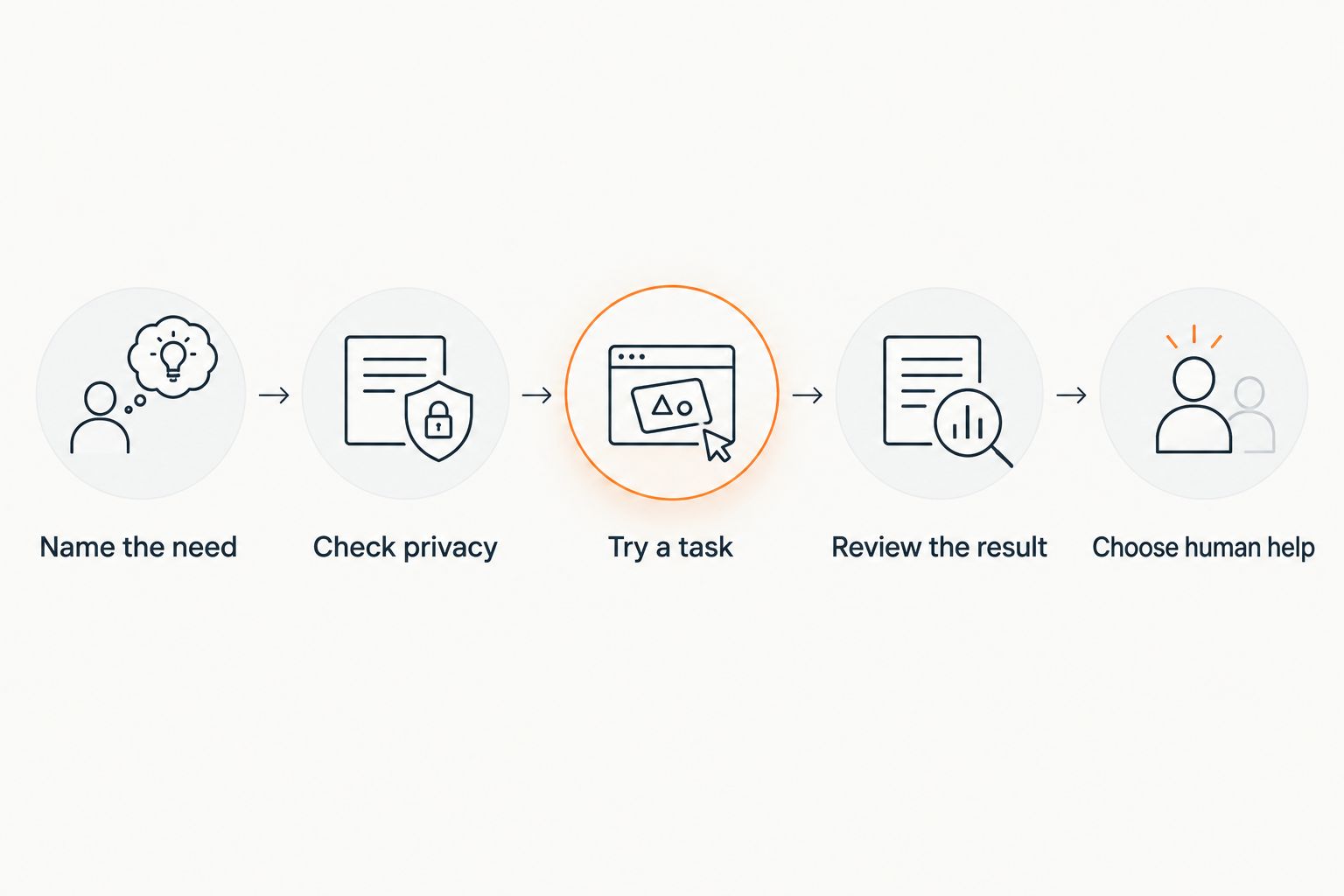 Five steps for choosing an app and keeping human judgment in charge
Choose an app for one task, then review its response before acting.
For a small trial, set aside 2 minutes to describe your need, ask for 3 next steps, and keep 1 sentence that helps you act. These are suggested limits for the exercise, not a treatment schedule or a promise of results.
If speaking suits you better than typing, compare the practical differences in this guide to AI voice therapy versus text-based apps. Neither format removes the need to check what you share and how you use the response.
Privacy and safety come before convenience
A family story can contain sensitive information about several people. Describe your own experience without uploading custody orders, school records, medical documents, or a child’s identifying details.
Before using any app in 2026, check these points directly:
- Whether it stores voice recordings, transcripts, or conversation history.
- How its policy describes using your conversations to improve its services.
- What deletion controls exist and what those controls cover.
- Who can access the account or see notifications on a shared device.
- Whether you understand the terms well enough to make an informed choice.
Do not assume a consumer app has the same privacy arrangements as your clinician. If the policy is unclear, leave sensitive information out.
An app is not an emergency service. In the United States, call or text 988 for suicide or mental health crisis support; call 911 for an immediate life-threatening emergency. Do not wait for a chatbot to recognize danger or decide whether you deserve help.
For persistent distress, trouble functioning, or concerns about your grandchild’s mental health, contact a qualified health professional. For custody, consent, and benefits questions, seek advice from a qualified professional familiar with your circumstances and jurisdiction.
How the apps are ranked
The ranking follows the criteria above: a clear purpose, a usable interaction, a practical output, privacy checks, and firm limits. Emotional support comes first because this guide focuses on the adult caregiver’s wellbeing; writing, planning, and learning help fill separate roles.
This is a task-fit guide, not a hands-on accessibility test or a clinical comparison. No ranking here establishes that an app improves mental health outcomes for grandparents raising grandchildren.
Which app should you choose?
Choose Lovon if your main need is voice-based emotional support for the stress of raising a grandchild. Choose ChatGPT for messages, Goblin Tools for task breakdown, or Gemini for explanations you will verify yourself.
Start with the app that addresses your current need. Keep it only if it helps you take a useful step without adding confusion, pressure, or unnecessary disclosure.
FAQ
What are the best AI apps for grandparents raising grandchildren in 2026?
The best fit depends on the task: choose a voice-based emotional support app for your own stress, ChatGPT for drafting messages, Goblin Tools for breaking down chores, or Gemini for explaining concepts. This shortlist is for adult caregivers, not unsupervised child use.
Can an AI app replace a therapist for a grandparent caregiver?
No, an AI app does not replace a licensed therapist. Use it for limited support or reflection, and contact a qualified professional for assessment, treatment, or persistent distress.
Should I let my grandchild use the same emotional support app?
Do not assume an adult support app is suitable for your grandchild. Check the service’s age requirements and involve the child’s pediatrician or mental health professional when choosing support.
Can ChatGPT help me write to my grandchild’s teacher?
ChatGPT can help draft and revise a message to a teacher. Leave identifying details out of the prompt, check every fact, and add personal details yourself before sending.
Is it safe to upload custody papers or school records?
Keep custody papers and school records out of general chatbot conversations. Ask a general question without identifying details, and take document-specific questions to an appropriate professional.
Can an AI app tell me whether my grandchild has anxiety or ADHD?
No, a chatbot cannot provide a reliable clinical diagnosis for your grandchild. Discuss concerns with the child’s pediatrician or a qualified mental health professional rather than treating generated explanations as an assessment.
What should I do if I need help right now?
In the United States, call or text 988 for suicide or mental health crisis support, or call 911 for an immediate life-threatening emergency. Do not rely on an AI app to assess or respond to an emergency.
One last thing
The most useful app session can end with a request to another person. Draft a specific ask: help with a school pickup, company during a difficult appointment, or time to talk without solving anything.
Use the tool to make support easier to ask for—not to convince yourself you should manage alone.
Related guides
How AI Support Helps You Heal
AI emotional support isn't about replacing human connection — it's about filling the gaps. The moments when you need to talk at 2 AM, when you don't want to burden your friends again, or when you simply need someone to listen without judgment.
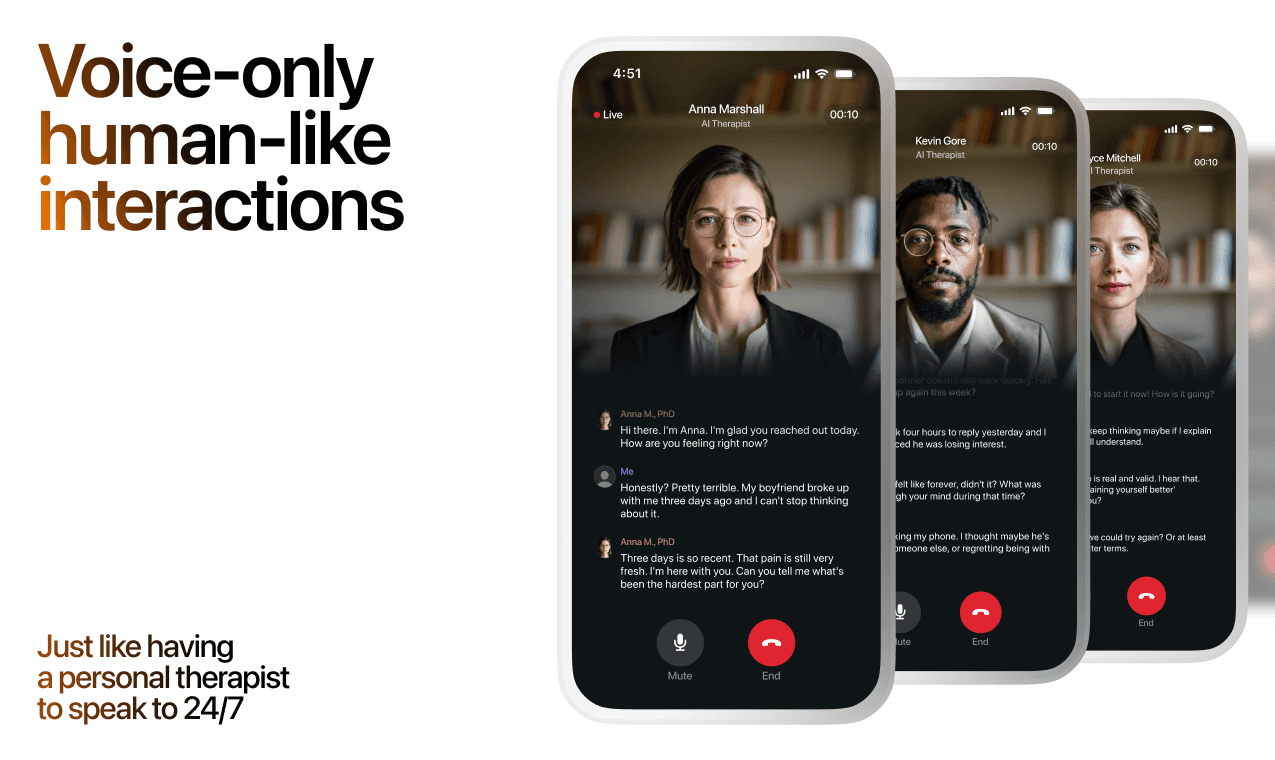
Here's what happens in a typical Lovon session:
You share what's on your mind
There's no script, no intake form, no waiting room. You speak or type whatever you're feeling — in your own words, at your own pace.
Lovon validates and explores
Using frameworks from CBT (Cognitive Behavioral Therapy) and motivational interviewing, Lovon acknowledges your feelings first, then gently helps you explore them. No dismissive "just move on" advice.
You build coping skills together
Lovon doesn't just listen — it actively works with you on evidence-based techniques: thought reframing, urge surfing, behavioral experiments, and more.
What a Session with Lovon Looks Like
When to Seek Professional Help
AI support is a valuable tool, but it's not a replacement for professional care. Please consider reaching out to a licensed therapist if you experience any of the following:
- Persistent thoughts of self-harm or suicide
- Inability to perform daily activities (work, eating, sleeping) for more than 2 weeks
- Turning to alcohol or substances to cope
- Intense anger or desire to harm your ex-partner
- Complete emotional numbness that doesn't improve over time
Crisis Resources (US): If you're in immediate danger, call 988 (Suicide & Crisis Lifeline) or text HOME to 741741 (Crisis Text Line). Available 24/7, free, and confidential.
Outside the US? Find a crisis line in your country
Ready to Start?
Your healing journey can begin right now
A 7-day trial. No judgment. Just a safe space to process what you're going through.
Frequently Asked Questions
Is Lovon a replacement for a real therapist?
Is my conversation with Lovon AI private?
How is Lovon different from ChatGPT for emotional support?
Can I use Lovon if I'm already seeing a therapist?
Can I try Lovon before subscribing?
About the Author
The Lovon Editorial Team
Mental Health & Wellness Content Team
The Lovon Editorial Team develops mental health and wellness content designed to make psychological concepts accessible and actionable. Our goal is to bridge the gap between clinical research and everyday life - helping you understand why your mind works the way it does and what you can do about it....
Related articles
- Best AI apps for teen mental health support in 2026
Compare the best AI apps for teen mental health in 2026. Put safety first: check age rules, privacy, voice versus text…
- Enmeshment Trauma: How to Untangle It in 2026
Enmeshment trauma explained: signs, causes, and 6 steps to rebuild your sense of self in adult relationships. Practical…
- Stepparent Stress Blended Family: 2026 Coping Guide
Stepparent stress in a blended family peaks around authority and loyalty conflicts. Get 6 steps to cope, troubleshooting…
- AI Relationship Coach for Adoptive Parent Bonding 2026
Lovon's AI relationship coach helps adoptive parents process bonding stress daily in 2026 - a companion between therapy…
See also
Quizzes
- Toxic Femininity Test: Are You Running an Old Script?
See which learned script is running your relationship.
- Emotional Intelligence Test: Your EQ in a Relationship
Find where your EQ slips when things get tense.
Free tools
- AI Relationship Coach
Get free relationship advice and family counselling guidance with our AI Relationship Coach.
- Write a Letter to Your Mom or Dad
A chat, not a template, for a letter to your mom or dad. Tell it the occasion, one or two things you remember, and what…
From the wiki
- What is a break in a relationship?
A break is a temporary, agreed pause in a relationship where both people expect to come back. In practice it usually…
Disclaimer: This article is for informational purposes only and does not constitute medical advice, diagnosis, or treatment. Always seek the advice of your physician or other qualified health provider with any questions you may have regarding a medical condition. If you are in crisis or think you may have an emergency, call 988 (Suicide & Crisis Lifeline) or go to the nearest emergency room. Outside the US? Find a crisis line in your country.