
Best AI life coach apps for a career pivot in 2026
Compare the best AI life coach apps for career pivot. Choose Lovon for emotional support, plus practical options for interview rehearsal and career planning.

Key Takeaways
- For best ai life coach apps for career pivot, choose by task rather than a universal ranking.
- Lovon is the best fit here for voice-based emotional support during career-change anxiety.
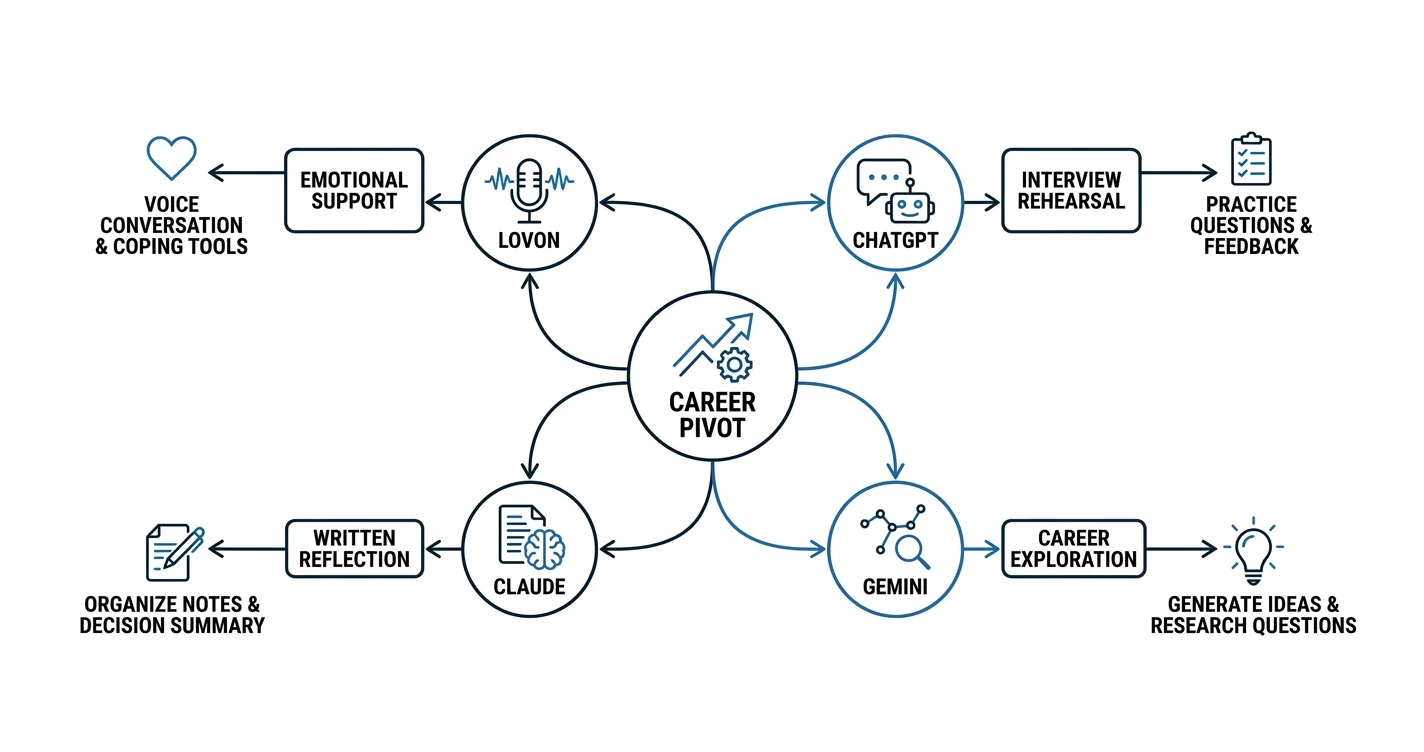
- Use ChatGPT for interview rehearsal, Claude for written reflection, and Gemini for exploring career directions.
- Keep hiring decisions, financial commitments, and mental health treatment outside an app’s authority.
Best for emotional support during a career pivot: Lovon. Best for interview rehearsal: ChatGPT. Best for written decision-making: Claude. Best for exploring possible directions: Gemini. This 2026 guide separates support for career-change anxiety from practical planning, so you can choose an app for the task in front of you.
TL;DR
- For best ai life coach apps for career pivot, choose by task rather than a universal ranking.
- Lovon is the best fit here for voice-based emotional support during career-change anxiety.
- Use ChatGPT for interview rehearsal, Claude for written reflection, and Gemini for exploring career directions.
- Keep hiring decisions, financial commitments, and mental health treatment outside an app’s authority.
Why this matters
A career pivot involves different problems: deciding what you want, showing what you can do, and handling uncertainty. One conversation does not solve all three.
For your 2026 transition, start with the problem blocking your next action. Emotional support and career advice serve different purposes; neither proves that a particular job is right for you.
What makes the best AI life coach apps for a career pivot?
- Task fit: Match the app to reflection, rehearsal, exploration, or emotional support.
- Useful output: Leave with a question, draft, or action you can check.
- Clear boundaries: Treat suggestions as suggestions, not diagnoses or hiring predictions.
- Privacy controls: Read how conversations are stored, used, and deleted before sharing sensitive details.
- Real-world follow-through: Check career assumptions with people doing the work.
Career-pivot apps at a glance
| App | Best for | Standout use | Key limitation |
|---|---|---|---|
| Lovon | Emotional support | Voice conversations, coping tools, and self-reflection guidance | Not a licensed clinician or a replacement for clinical care |
| ChatGPT | Interview rehearsal | Generating practice questions and discussing your answers | Simulated feedback is not an employer’s assessment |
| Claude | Written decision-making | Discussing your notes and comparing stated priorities | A polished explanation can still rest on weak assumptions |
| Gemini | Exploring career directions | Generating possibilities and questions for further research | Suggested paths need independent checks |
These are task-based recommendations, not claims that one app produces better career outcomes. The general-purpose assistants overlap. The distinctions below give each a useful role without treating any of them as a qualified career professional.
1. Lovon: best for emotional support during a career pivot
Lovon is an AI-powered mental health app offering voice conversations, emotional support, coping tools, and self-reflection guidance. It fits the emotional side of changing careers: feeling overwhelmed, doubting yourself, or wanting to talk through stress before taking another step.
Lovon is best for career changers who want voice-based emotional support, not a substitute for a career adviser or licensed therapist. That boundary matters. Feeling calmer about a choice does not establish whether the role, working conditions, or training requirements suit you.
For example, separate the feeling from the practical question. Fear of disappointing your family belongs in a reflective conversation; whether a role requires a particular qualification belongs in research with the relevant employer or professional body.
Pros:
- Voice conversations suit people who prefer talking to typing.
- Coping tools address the emotional strain around a transition.
- Self-reflection guidance gives you space to examine what the change means.
Cons:
- Emotional support does not establish job-market facts or qualification requirements.
- The app is not a licensed clinician and does not replace clinical care.
Best for: You know what practical step comes next, but stress or self-doubt makes it hard to begin.
Try describing a specific moment: the feeling that came up when you opened an application, or the thought that stopped you contacting someone. Then decide on a small action outside the conversation. Keep the app in a supporting role rather than asking it to approve a resignation.
Verdict: Buy into the support role; skip using it as the authority on your career.
2. ChatGPT: best for practicing your career-change story
ChatGPT can generate interview questions, discuss draft answers, and role-play a conversation. Use it as a rehearsal partner when you need to explain why your previous experience belongs in a different field.
The useful task is translation, not reinvention. Ask ChatGPT to help connect work you actually did with the responsibilities in a job description, without adding accomplishments or skills.
ChatGPT pros:
- Generates practice questions from a job description you provide.
- Helps you try different ways to explain transferable experience.
- Supports back-and-forth rehearsal before a real conversation.
ChatGPT cons:
- Feedback reflects generated responses, not the employer’s hiring criteria.
- Drafts need checking for invented details and wording that does not sound like you.
Best for: You have a target role but struggle to explain your transition clearly.
Give ChatGPT a redacted job description and a factual summary of your experience. Ask for one question at a time, then request feedback on relevance, clarity, and supporting evidence. Do not treat praise from the assistant as proof that an answer will land well.
A useful instruction is to flag every unsupported claim rather than improve your story by filling gaps. Finish by saying your answer aloud without reading. Keep the concrete example; remove phrases you would never use in conversation.
Verdict: Buy into rehearsal; skip invented achievements and simulated hiring predictions.
3. Claude: best for organizing a written career decision
Claude can discuss written notes, compare options, and help you structure a decision. This is a useful role when your thoughts are scattered across journal entries, lists, and unfinished plans.
Use Claude to organize your own evidence rather than choose your future. A clear comparison should make disagreements visible, including the difference between what sounds appealing and what your circumstances allow.
Claude pros:
- Helps turn unstructured notes into a readable decision summary.
- Can compare alternatives against priorities you supply.
- Generates follow-up questions where your reasoning has gaps.
Claude cons:
- Fluent writing can make an uncertain conclusion sound settled.
- The assistant cannot verify your lived experience or know unstated constraints.
Best for: You are choosing between concrete paths and need to see the trade-offs in writing.
Start with 2 target roles. For each, list the work you expect to do, evidence that you enjoy similar tasks, requirements you have verified, and questions that remain open. Ask Claude to keep facts, preferences, and assumptions separate.
Then read the summary critically. If it describes a role as meaningful or flexible, ask what evidence supports that description. Replace unsupported conclusions with questions for someone working in the field. The final decision should remain yours, even when the summary sounds confident.
Verdict: Buy into structured reflection; skip outsourcing the decision.
4. Gemini: best for generating career directions to investigate
Gemini can generate ideas, discuss transferable skills, and suggest questions for further research. Give it a bounded exploration task when you know you want change but have not identified a destination.
Start with activities rather than job titles. Explaining difficult ideas, coordinating projects, or improving a process gives the conversation something concrete to work with; wanting more fulfilling work does not yet define a role.
Gemini pros:
- Generates possibilities from the interests and experience you describe.
- Helps turn broad curiosity into research questions.
- Offers alternative ways to frame your existing skills.
Gemini cons:
- Suggested roles do not establish local demand, entry requirements, or personal fit.
- More ideas can extend indecision if you never test them outside the app.
Best for: You need a shortlist to investigate, not a final recommendation.
Ask Gemini to distinguish a closely related move from a larger career change. For each suggestion, request the assumptions behind it and a question you could ask someone doing that work.
For a 2026 pivot, confirm current requirements directly with relevant employers, training providers, or professional bodies. Do not enroll in training because an assistant labels a path promising. First establish what the work involves and whether the proposed qualification is relevant.
Verdict: Buy into exploration; skip treating suggestions as verified opportunities.
How these recommendations were ranked
The order follows the tasks in the comparison table: emotional support, interview rehearsal, written reflection, and early exploration. Each recommendation has a distinct use case and a boundary that matters for a career decision.
This is not a clinical effectiveness ranking or a claim of measured career outcomes. The general-purpose assistants can perform overlapping tasks. Choose a default, test it against a specific need, and avoid switching apps merely to get a more reassuring answer.
Turn an app conversation into a practical next step
Use this sequence to keep your 2026 career pivot connected to real evidence. The time limits below are suggested boundaries, not treatment advice or a promise of results.
Name the blocker
Set aside 10 minutes to describe what stopped your most recent attempt. Be specific: not a general lack of confidence, but difficulty writing the first sentence of a message to someone in a new field.
Decide whether the blocker calls for emotional support, factual research, or practice. Do not ask a reflective conversation to answer a question about professional licensing.
Check the evidence
Write down what you know and what you are assuming. Separate experience you can demonstrate from skills you hope to build, and verified role requirements from impressions gathered through conversation.
Bring the uncertain parts to a relevant human source. An informational conversation can address the daily work in ways a generated description cannot confirm.
Choose an experiment
Pick an action that tests an assumption without requiring a major commitment. Examples include drafting a relevant work sample, asking about typical responsibilities, or comparing your experience with an actual job description.
Make the action observable. Thinking more about a career is not the same as learning something new about it.
Review the result
After 7 days, review what you actually did and learned. Keep a note of the question you tested, the evidence you found, and the next uncertainty to address.
If you only collected more advice, reduce the task. Aim for one useful conversation or one completed draft rather than another broad plan.
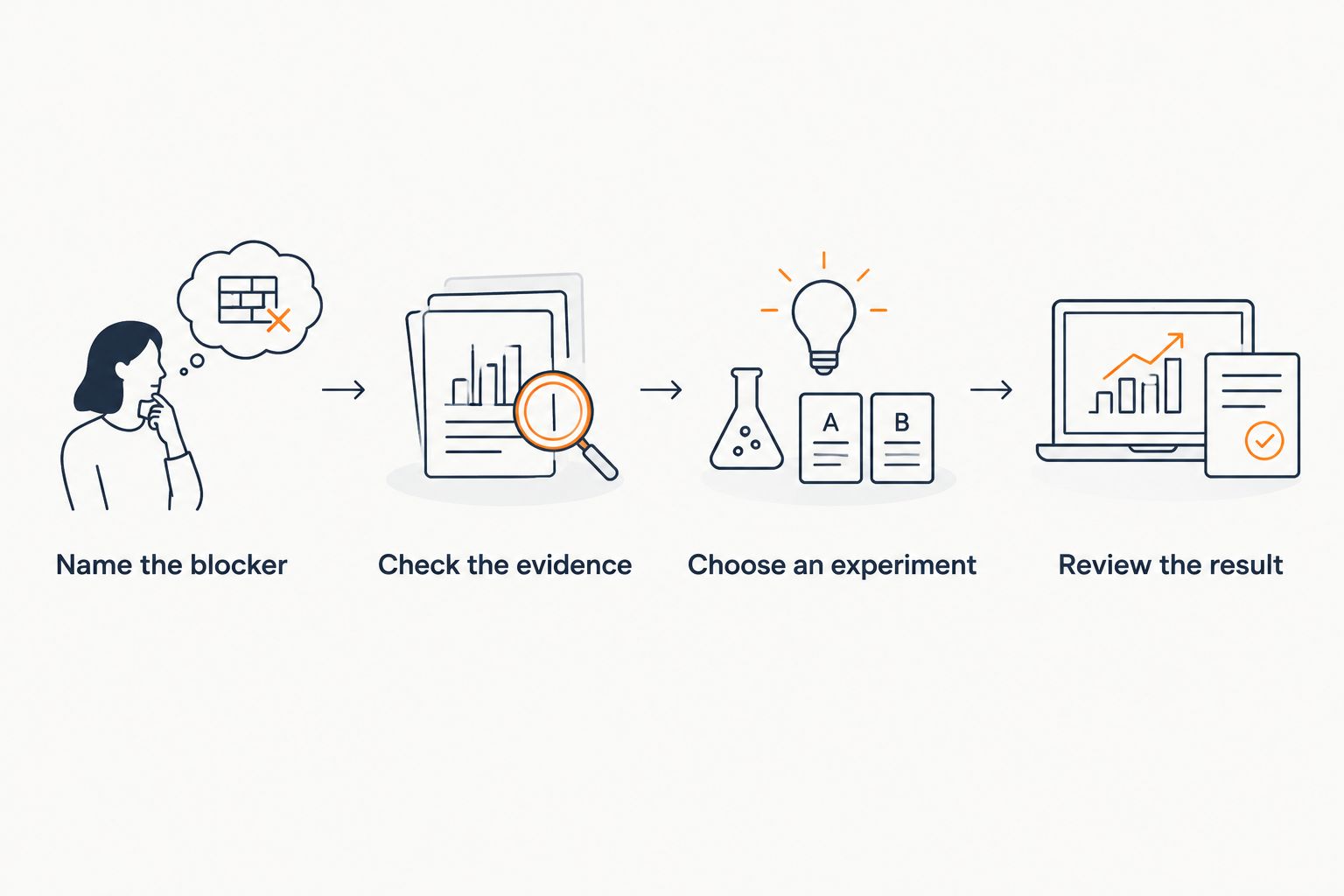 Four steps connecting app reflection with evidence, an experiment, and a review
A useful app conversation ends with something you can check outside the app.
Privacy and mental health boundaries come first
Before using any app for a career pivot, read its current privacy information. Check conversation storage, deletion controls, and whether content is used to improve the service. Do not assume a support app provides the same confidentiality arrangements as a licensed clinician.
Remove names, contact details, client information, and confidential employer material from prompts. Describe situations in general terms when identifying details add nothing to the task.
Seek qualified care when distress is persistent, worsening, or interfering with daily life. Career coaching and emotional support are not substitutes for assessment or treatment. In the United States, call or text 988 for crisis support; call 911 for immediate danger.
Which app should you choose?
Choose Lovon for emotional support during a career pivot; choose a general-purpose assistant for a defined planning task. If you are undecided, identify the next action you have been avoiding and choose the support that matches it.
For your 2026 transition, keep the setup simple. Use one app for a clear purpose, keep your own decision notes, and bring important assumptions to people with relevant experience. A longer conversation is not automatically a better decision.
FAQ
What’s the best AI life coach app for a career pivot?
The best fit depends on the task: Lovon suits voice-based emotional support, while ChatGPT, Claude, and Gemini can support rehearsal, written reflection, and exploration. None should make your career decision for you.
Can an AI life coach tell me which career to choose?
An AI life coach can help organize options, but it cannot establish which career will suit you. Check its assumptions through relevant work samples, role research, and conversations with people doing the job.
Is ChatGPT useful for career-change interviews?
ChatGPT is useful for generating practice questions and discussing draft answers. Check every answer against your actual experience, and remember that generated feedback is not an employer’s assessment.
Should I use a mental health app or a career coach?
Use emotional support for feelings around the transition and a career professional for advice within their expertise. If distress is persistent or disrupts daily life, seek support from a licensed clinician.
What should I avoid sharing with a career-coaching app?
Avoid sharing confidential employer information, client details, identifying documents, and other sensitive material that the task does not require. Read the app’s current privacy information before describing personal situations.
How do I know whether an app conversation helped?
Judge the conversation by whether it clarified a question or supported a useful next action. Keep a short note of what you decided to test and what you learned outside the app.
Can an AI app replace therapy during a stressful career change?
An AI app does not replace licensed mental health care. Use it as supplemental support, not for diagnosis, treatment decisions, or emergency help.
One last thing
Before another app session, write down what evidence would change your mind about the career you are considering. It is a useful safeguard against asking the same question until you receive the answer you want.
You do not need complete confidence to investigate a possibility. You need a next step small enough to take and clear enough to teach you something.
Related guides
How AI Support Helps You Heal
AI emotional support isn't about replacing human connection — it's about filling the gaps. The moments when you need to talk at 2 AM, when you don't want to burden your friends again, or when you simply need someone to listen without judgment.
Here's what happens in a typical Lovon session:
You share what's on your mind
There's no script, no intake form, no waiting room. You speak or type whatever you're feeling — in your own words, at your own pace.
Lovon validates and explores
Using frameworks from CBT (Cognitive Behavioral Therapy) and motivational interviewing, Lovon acknowledges your feelings first, then gently helps you explore them. No dismissive "just move on" advice.
You build coping skills together
Lovon doesn't just listen — it actively works with you on evidence-based techniques: thought reframing, urge surfing, behavioral experiments, and more.
What a Session with Lovon Looks Like
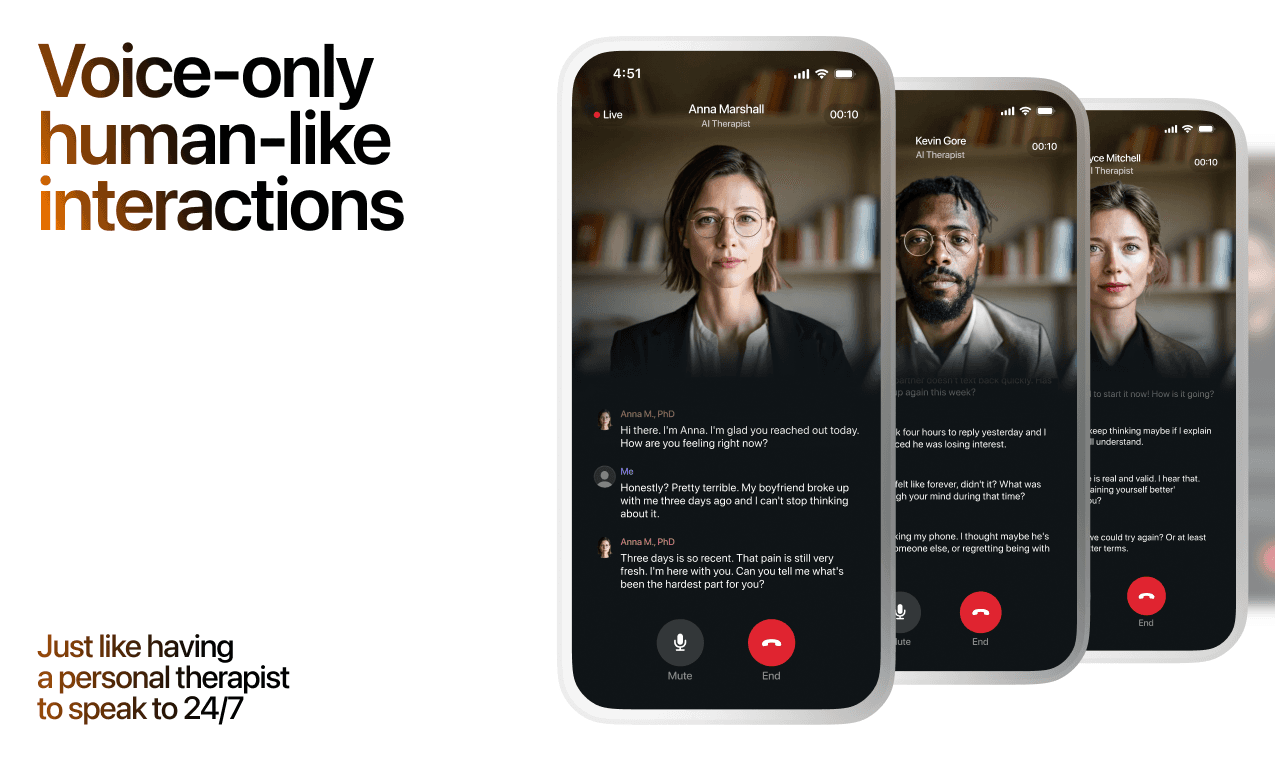
Lovon is AI support, not a replacement for professional care. If things have been hard to get through for weeks, or you are thinking about harming yourself, talk to a doctor or a licensed therapist.
Ready to Start?
Your healing journey can begin right now
A 7-day trial. No judgment. Just a safe space to process what you're going through.
Frequently Asked Questions
Is Lovon a replacement for a real therapist?
Is my conversation with Lovon AI private?
How is Lovon different from ChatGPT for emotional support?
Can I use Lovon if I'm already seeing a therapist?
Can I try Lovon before subscribing?
About the Author
The Lovon Editorial Team
Mental Health & Wellness Content Team
The Lovon Editorial Team develops mental health and wellness content designed to make psychological concepts accessible and actionable. Our goal is to bridge the gap between clinical research and everyday life - helping you understand why your mind works the way it does and what you can do about it....
Related articles
- Best AI apps for athletes coping with injury in 2026
Compare the best AI apps for athletes coping with injury. Lovon leads for voice support; find reflection and planning…
- Best AI apps for veterans with PTSD in 2026
Compare the best AI apps for veterans with PTSD: Lovon for voice support, plus VA coping tools. Choose by your needs…
- Best AI apps for LGBTQ+ mental health support in 2026
Compare the best AI apps for LGBTQ+ mental health support. Choose voice support or writing help, check privacy, and know…
- Best ChatGPT alternatives for emotional support in 2026
Compare the best ChatGPT alternatives for therapy. Choose voice support for everyday feelings or licensed care for…
See also
Quizzes
- Alexithymia Test (Free): Do I Have Alexithymia?
See where your feelings lose their names, in 3 minutes.
- Loneliness Test: How Lonely Am I? 3 Kinds of Loneliness
See which kind of loneliness is thin, in 3 minutes.
Free tools
- Write a Condolence Message for This Person
Get one condolence message written for your situation instead of a list of a hundred to choose from. Tell it who died…
- How to End a Friendship Without a Scene
A chat for working out how to end a friendship clearly, without a grievance list or a slow ghost. Tell it how long you…
From the wiki
- What does it mean when you dream about your ex?
Dreaming about your ex usually reflects emotional processing, not prophecy and not a message from them. Your sleeping…
Disclaimer: This article is for informational purposes only and does not constitute medical advice, diagnosis, or treatment. Always seek the advice of your physician or other qualified health provider with any questions you may have regarding a medical condition. If you are in crisis or think you may have an emergency, call 988 (Suicide & Crisis Lifeline) or go to the nearest emergency room. Outside the US? Find a crisis line in your country.