
How to connect Lovon to Amazon Alexa for voice-activated sessions
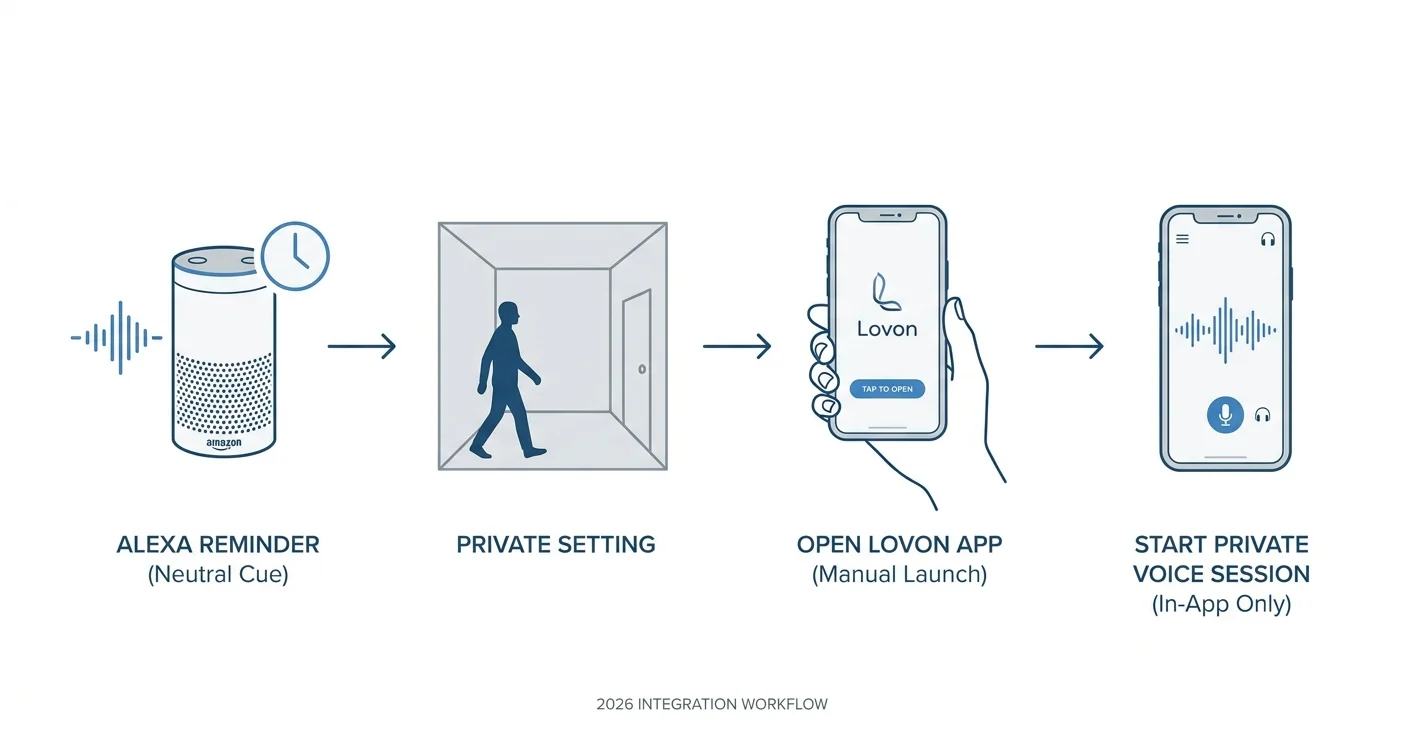
Use a Lovon Alexa integration workflow with a neutral reminder and an in-app voice session. Keep account linking, audio routing, and privacy separate.

Key Takeaways
- For a Lovon Alexa integration workflow, use Alexa reminders as prompts—not as proof of a connected voice session.
- Lovon is best for people seeking on-demand voice-based emotional support, not licensed clinical care.
- Keep reminder wording neutral, then open the mental health app yourself to begin talking.
- Test reminder delivery and in-app audio separately before relying on the routine.
Instead of remembering to open a mental health app each evening, set an Alexa reminder that prompts you to start a voice conversation in Lovon. This Lovon Alexa integration guide for 2026 uses a reminder followed by an in-app session—not a verified account connection or a command that starts therapy on an Echo.
TL;DR
- For a Lovon Alexa integration workflow, use Alexa reminders as prompts—not as proof of a connected voice session.
- Lovon is best for people seeking on-demand voice-based emotional support, not licensed clinical care.
- Keep reminder wording neutral, then open the mental health app yourself to begin talking.
- Test reminder delivery and in-app audio separately before relying on the routine.
Why this matters
A reminder, an app launch, and a voice conversation are different actions. An Alexa reminder can prompt you to take a break. That does not establish that Alexa can open a particular app, authenticate your account, or carry a conversation through an Echo microphone.
For your 2026 setup, define success narrowly: you hear a neutral reminder, choose whether the moment feels right, and start your conversation on your own device. You keep control over when you begin and where you speak.
This distinction also keeps troubleshooting manageable. If the reminder arrives but the conversation does not start, the reminder worked; the remaining action happens in the app. Rebuilding an Alexa routine will not fix an unrelated microphone permission or sign-in issue.
Before you start
- Have Alexa ready for reminders. Use an Alexa-enabled device connected to your Amazon account. Check that the device can hear a simple request and that you can hear its response.
- Have your mental health app ready independently. Sign in on the device you intend to use, check microphone access, and make sure you can begin a voice conversation without Alexa.
- Plan for a manual handoff. The non-obvious catch is that reminder delivery does not connect accounts or transfer microphone access. Also choose neutral wording because someone nearby can hear a spoken reminder.
Do not begin by entering your app credentials into an unfamiliar Alexa skill or automation service. A matching name is not enough to establish who operates a connection. Only consider account linking when official instructions identify the destination and explain the permissions.
Choose the workflow that matches your goal
These options serve different needs. Neither requires you to claim that an Echo is running your mental health session.
| Workflow | Best for | Main advantage | Main limitation |
|---|---|---|---|
| Alexa reminder followed by an in-app conversation | People who want an audible cue at a chosen time | Adds a prompt without requiring account linking | You still open the app and begin the conversation yourself |
| Direct in-app conversation without Alexa | People who want fewer setup steps or no spoken household reminder | Keeps the start of the conversation on your chosen device | Does not add an Alexa reminder |
Choose the reminder workflow when remembering is the problem. Choose direct app access when extra setup is the problem. Neither option turns an emotional-support app into licensed clinical care.
Reminder setup
The first configuration unit is the reminder itself. Keep this separate from app access so you can tell exactly what worked.
- Choose a neutral phrase. Use wording such as “take a pause” or “personal check-in.” Avoid including a diagnosis, relationship concern, or another person's name.
- Choose a time you control. Pick a moment when you are usually able to step away. Do not schedule the prompt during driving, a meeting, or a shared family activity that leaves no room for privacy.
- Ask Alexa to create a test reminder. For example, say: “Alexa, remind me to take a pause in 5 minutes.” This is a suggested setup test, not a recommended session length.
- Listen to the confirmation. Check the reminder wording and timing Alexa repeats. Correct a misunderstood request before moving on.
- Wait for delivery on the intended device. Confirm that you can hear the reminder where you expect to use it. Notice whether other people can hear it too.
Expected result: Alexa delivers a neutral prompt. No mental health conversation starts, and no app account is connected by this step.
For this 2026 workflow, avoid making the reminder text do too much. “Take a pause” is enough. You do not need to announce why you need support or what you plan to discuss.
If you dislike hearing a personal reminder aloud, use a less revealing phrase or choose the direct-app workflow instead. An audible cue is useful only when you are comfortable receiving it.
Private session handoff
The second configuration unit is what happens after the reminder. You make the decision to start; Alexa does not make it for you.
- Check your surroundings. Move somewhere you can speak comfortably. If you cannot get privacy, leave the session for another moment rather than sharing sensitive details aloud.
- Open Lovon on your own device. Use the app directly instead of asking Alexa to authenticate you or start an undocumented connection.
- Check the audio path. Confirm where you will hear the response. If you use headphones, check that the sound reaches them before discussing anything personal.
- Begin with 1 sentence. For example: “I feel overwhelmed after work and want help choosing a small next step.” This is an optional opening prompt, not a required script.
- Choose your focus. Ask for emotional support, a coping tool, or help reflecting on a situation. You do not need to explain everything at once.
Expected result: You can speak and hear responses through the app on your chosen device. Alexa's role ends with the reminder.
Voice support and text-based support involve different ways of expressing yourself. The guide to how AI voice therapy differs from text-based apps explains that distinction without requiring a smart speaker connection.
You can also decide not to begin. Treat the reminder as an invitation, not an obligation or a measure of how well you are managing your mental health.
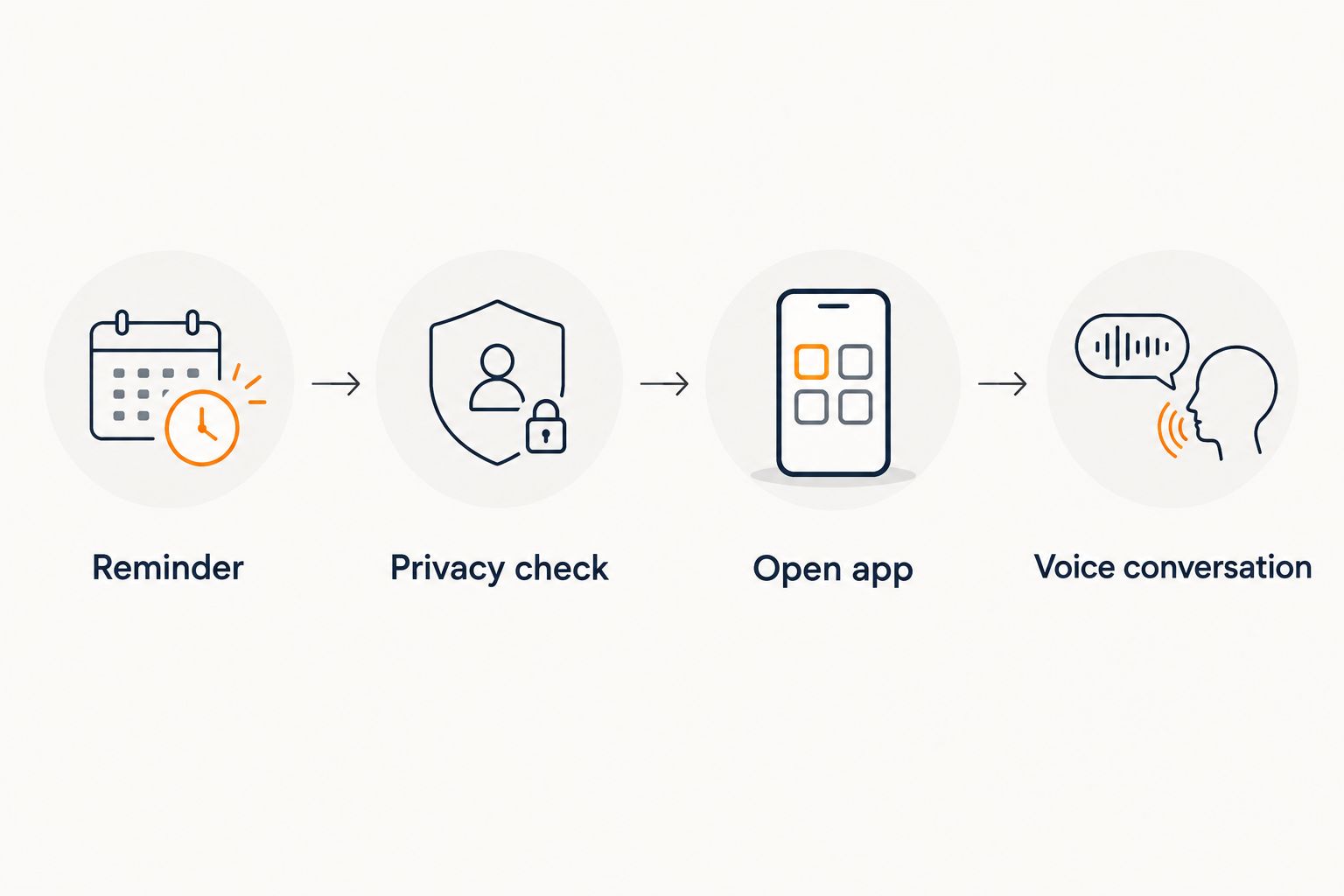 Four steps from an Alexa reminder to a private in-app voice conversation
The reminder prompts the check-in; you start the conversation yourself.
End-to-end verification
The final configuration unit is a complete test. Verify the actual experience rather than assuming that a successful reminder proves the entire workflow works.
- Run the reminder test again if needed. Start from the same room and device you intend to use regularly.
- Follow the handoff without changing devices unexpectedly. Hear the reminder, check privacy, open the app, and begin with a neutral topic.
- Check both directions of audio. Make sure you can hear the response and that the app receives your speech. Speaker output alone does not demonstrate microphone access.
- End the conversation yourself. Use the app's own session controls. Do not assume that telling Alexa to stop also ends activity in another app.
- Review the amount of setup involved. If the reminder adds friction, remove it and use direct app access instead.
Expected result: You understand which device delivers the reminder, which device handles the conversation, and how to stop each independently.
A useful 2026 acceptance check is simple: the prompt arrives, your conversation stays on the device you chose, and ending one activity does not depend on ending the other. Do not describe the setup as hands-free if you still need to unlock your phone and open the app.
Second variant: a recurring check-in reminder
Once a one-time reminder works, you can use a recurring reminder for a regular check-in. This is a scheduling variant—not a deeper app integration.
Ask Alexa for a recurring reminder with neutral wording, such as: “Alexa, remind me to take a pause every day at 7 p.m.” Listen to the confirmation and check that Alexa understood the recurrence, not just the next occurrence.
Keep the same manual handoff. When the reminder arrives, decide whether to start a conversation, postpone it, or skip it. A repeated prompt should not become pressure to disclose feelings on demand.
If structure helps, reserve an optional 10-minute window in your own schedule. That is a planning choice, not a claim about how long a session should last or how quickly you should feel better.
Best for: people who want a consistent cue. Limitation: a fixed time does not account for an unpredictable workday, changing privacy, or whether you actually want to talk.
For shift work or irregular evenings, a one-time reminder is the simpler choice. Schedule it when you know you have space rather than repeatedly dismissing a poorly timed daily prompt.
Troubleshooting
Alexa delivers the reminder but nothing opens
That is the expected behavior of this reminder-only workflow. Open the app yourself and start the conversation there.
Do not add guessed invocation phrases or unrelated skills to force an app launch. Reminder delivery does not establish that an app supports Alexa commands.
Alexa misunderstands the reminder request
Shorten the wording and state the time clearly. Listen to the confirmation before relying on the reminder.
Test an ordinary phrase such as “take a pause” before using more unusual wording. If the request still fails, resolve the Alexa reminder issue independently of the mental health app.
You hear responses, but the app does not receive your voice
Check microphone permission for the app in your device settings. Then check that another active call or audio task is not interfering with microphone use.
Restart the conversation after correcting permissions. Alexa hearing your reminder request does not prove that a separate device or app can hear you.
Audio comes from the wrong speaker
Check the audio output on the device running the conversation. Disconnect an unintended audio accessory or choose the headphones you want to use.
Test with a neutral exchange before sharing personal information. Do not assume an Echo will handle both incoming and outgoing session audio merely because it can play sound.
The reminder feels too public or intrusive
Replace revealing wording with a neutral cue, move the reminder to a more suitable time, or remove it. Direct app access is the better option when a spoken household announcement makes you uncomfortable.
Review the devices and accounts involved before adding more automation. More connections mean more settings to understand, not automatically a better support experience.
Customize your workflow
Keep the 2026 setup focused on making support easier to reach, not on automating disclosure. Choose the smallest change that solves your actual difficulty: remembering, finding privacy, or knowing how to begin.
For the conversation itself, prepare a short opening prompt. You might describe what happened, how you feel, and what kind of help you want. These are suggested prompts, not product commands or promises about the response.
Lovon provides AI-powered voice-based emotional support, coping tools, and self-reflection guidance. Its advantage is access to that kind of conversation on demand; its limitation is that it is not a licensed clinician or a replacement for clinical care.
Keep a separate plan for urgent help. In the United States, call or text 988 for suicide or mental health crisis support. Call 911 when there is immediate danger or a medical emergency; do not wait for a reminder or an app response.
FAQ
Can I connect Lovon directly to Amazon Alexa?
Do not treat this guide as confirmation of a direct Lovon Alexa connection. The workflow uses an Alexa reminder followed by a conversation you start in the app; direct account linking requires official setup instructions.
Can Alexa start my mental health session automatically?
The reminder workflow described here does not start a mental health session automatically. Alexa delivers the prompt, and you open the app and choose whether to begin.
Can I have the whole conversation through my Echo?
This guide does not establish Echo microphone or speaker compatibility for an in-app conversation. Use the device running the app and test its microphone and audio output separately.
What should I say to Alexa to create a check-in reminder?
Use a neutral request such as: Alexa, remind me to take a pause in 5 minutes. Listen to the confirmation and check the wording and timing before relying on it.
Do I need to link my Amazon account to my mental health app?
No account linking is needed for the reminder-only workflow. Create the Alexa reminder separately, then open your mental health app yourself.
Is an Alexa reminder private enough for mental health check-ins?
A spoken reminder can be heard by people nearby, so avoid sensitive wording. A neutral cue reduces what the reminder reveals, but it does not establish privacy for the conversation that follows.
Does AI voice support replace a licensed therapist?
AI voice support does not replace a licensed therapist. It can provide emotional support and reflection, but clinical assessment, treatment decisions, and urgent care belong with qualified professionals.
One last thing
The most useful automation here is a cue, not an automatic conversation. Keeping the final start action manual gives you a chance to check your surroundings and decide whether you want to talk.
Before adding another connection, make the simple version comfortable: a neutral reminder, a private space, and a conversation you choose to begin. That is a clearer goal than making every step hands-free.
Related guides
How AI Support Helps You Heal
AI emotional support isn't about replacing human connection — it's about filling the gaps. The moments when you need to talk at 2 AM, when you don't want to burden your friends again, or when you simply need someone to listen without judgment.
Here's what happens in a typical Lovon session:
You share what's on your mind
There's no script, no intake form, no waiting room. You speak or type whatever you're feeling — in your own words, at your own pace.
Lovon validates and explores
Using frameworks from CBT (Cognitive Behavioral Therapy) and motivational interviewing, Lovon acknowledges your feelings first, then gently helps you explore them. No dismissive "just move on" advice.
You build coping skills together
Lovon doesn't just listen — it actively works with you on evidence-based techniques: thought reframing, urge surfing, behavioral experiments, and more.
What a Session with Lovon Looks Like
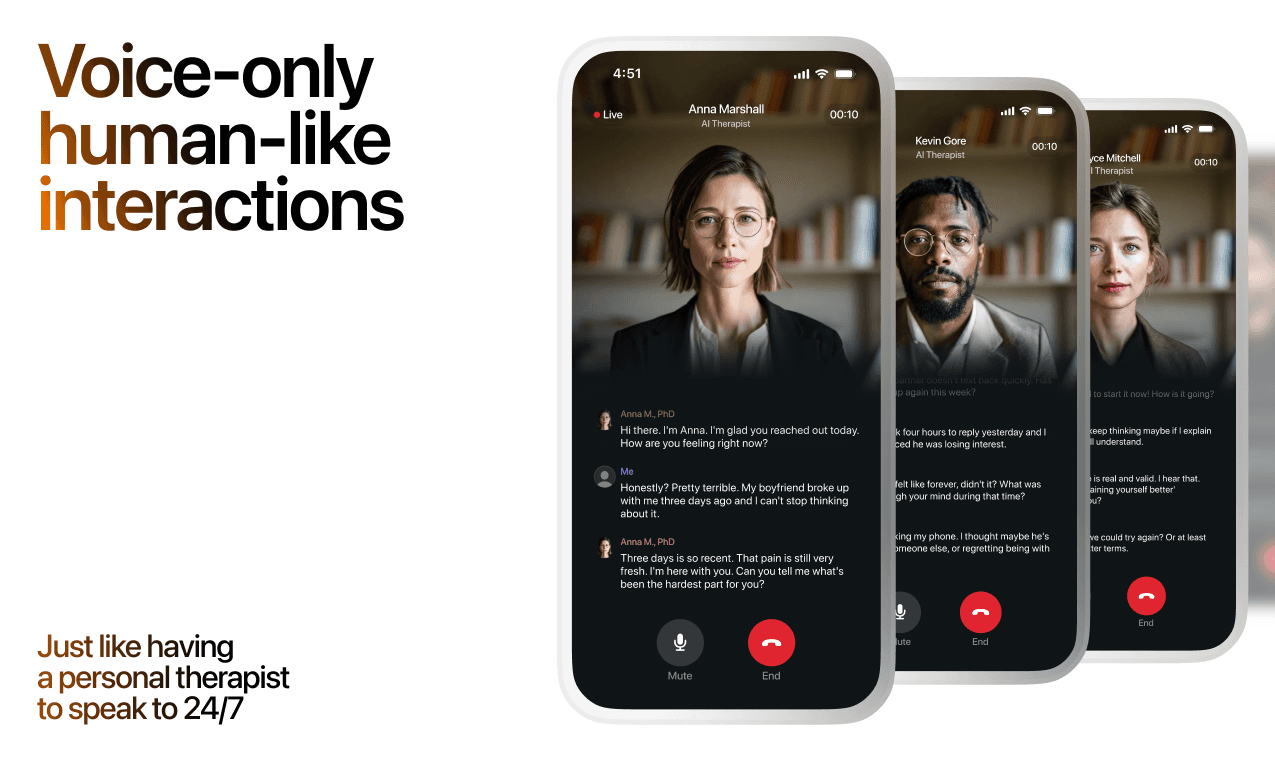
Lovon is AI support, not a replacement for professional care. If things have been hard to get through for weeks, or you are thinking about harming yourself, talk to a doctor or a licensed therapist.
Ready to Start?
Your healing journey can begin right now
A 7-day trial. No judgment. Just a safe space to process what you're going through.
Frequently Asked Questions
Is Lovon a replacement for a real therapist?
Is my conversation with Lovon AI private?
How is Lovon different from ChatGPT for emotional support?
Can I use Lovon if I'm already seeing a therapist?
Can I try Lovon before subscribing?
About the Author

The Lovon Editorial Team
Mental Health & Wellness Content Team
The Lovon Editorial Team develops mental health and wellness content designed to make psychological concepts accessible and actionable. Our goal is to bridge the gap between clinical research and everyday life - helping you understand why your mind works the way it does and what you can do about it....
Related articles
- How to connect Lovon to CarPlay for commute stress relief
Set up Lovon CarPlay commute stress support in 2026. Pair your iPhone, route voice audio, test the session while parked…
- Apple Watch to instant coping tools: complete 2026 workflow
Turn an Apple Watch alert into a Lovon voice session in seconds. Step-by-step Shortcuts, complication, and Siri setup…
- How to connect Lovon to Apple Health for mood tracking
No native sync exists in 2026 — here's the manual routine to log Lovon sessions in Apple Health's State of Mind, plus a…
- How to Get Free AI Therapy on Your Phone (2026)
Get free AI therapy on your phone in 2026 with no credit card or waitlist. Step-by-step guide to voice sessions for…
See also
Quizzes
- Do I Miss My Ex or Am I Just Lonely? 12-Question Quiz
Find out what the missing is actually about.
- Emotional Availability Test: Am I Emotionally Unavailable?
See which part of you closes off, in three minutes.
Free tools
- Write a Letter to Someone You Lost
Tell it who they were to you and what you never got to say, and it writes the letter back in your words. No account, no…
- Write a Condolence Message for This Person
Get one condolence message written for your situation instead of a list of a hundred to choose from. Tell it who died…
From the wiki
- Why do I feel lonely all of a sudden?
Sudden loneliness usually traces back to something that quietly ended in the last few months: a routine, a shared class…
Disclaimer: This article is for informational purposes only and does not constitute medical advice, diagnosis, or treatment. Always seek the advice of your physician or other qualified health provider with any questions you may have regarding a medical condition. If you are in crisis or think you may have an emergency, call 988 (Suicide & Crisis Lifeline) or go to the nearest emergency room. Outside the US? Find a crisis line in your country.