
How to connect Lovon to CarPlay for commute stress relief
Set up Lovon CarPlay commute stress support in 2026. Pair your iPhone, route voice audio, test the session while parked, and follow clear safety limits.

Key Takeaways
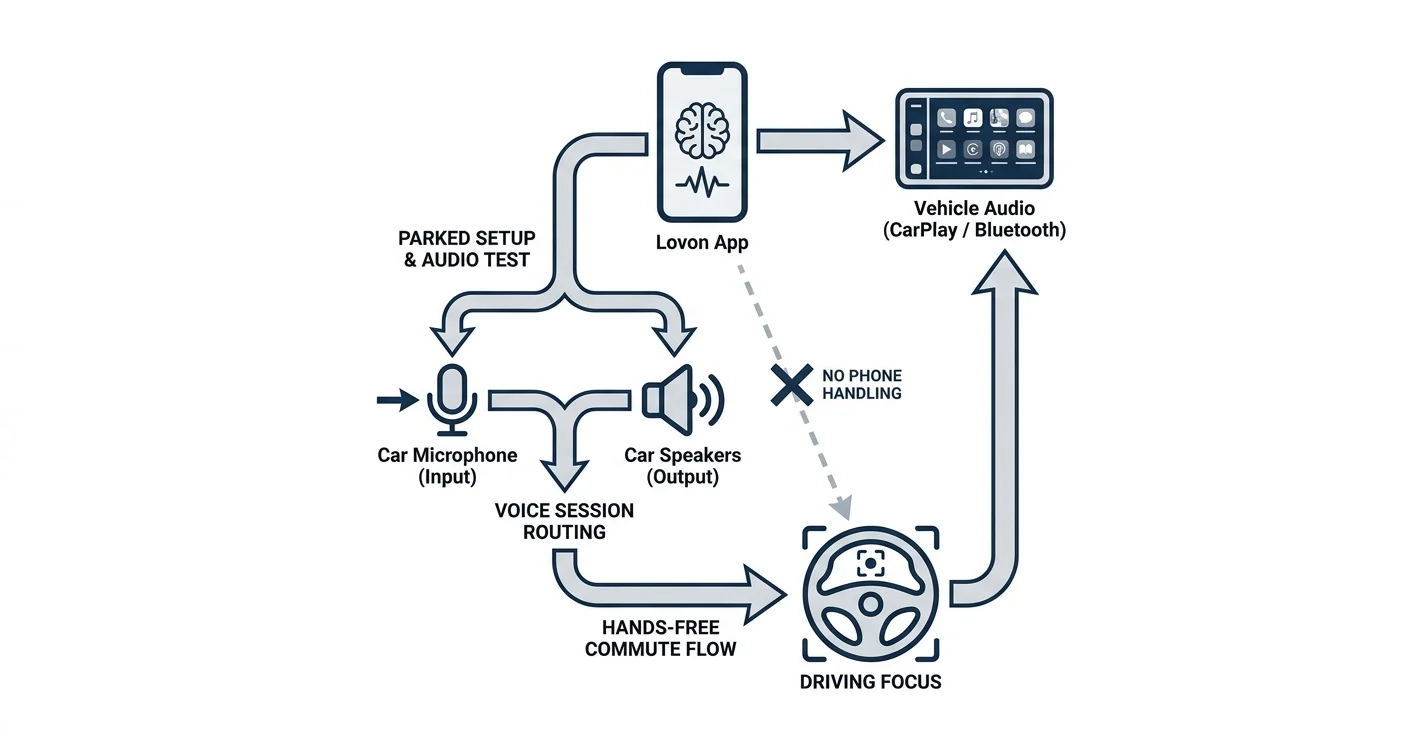
- For Lovon CarPlay commute stress support in 2026, pair your iPhone and route the live session through car audio.
- Start and test Lovon while parked; do not troubleshoot or process intense emotions while driving.
- Use Bluetooth when CarPlay does not carry the audio; both routes need microphone access.
- Lovon supports everyday emotional reflection, not emergencies or replacement clinical care.
Commute stress can follow you from traffic into the rest of your day. Instead of reaching for your phone while driving, pair your iPhone with CarPlay, start Lovon while parked, and route the voice session through your car audio for a hands-free check-in.
TL;DR
- For Lovon CarPlay commute stress support in 2026, pair your iPhone and route the live session through car audio.
- Start and test Lovon while parked; do not troubleshoot or process intense emotions while driving.
- Use Bluetooth when CarPlay does not carry the audio; both routes need microphone access.
- Lovon supports everyday emotional reflection, not emergencies or replacement clinical care.
Why this matters
CarPlay can carry audio from an iPhone, but you should not assume Lovon will appear as a dedicated icon on the dashboard. The practical 2026 setup is to connect the phone to the car, open Lovon while parked, start the voice conversation, and confirm that sound and microphone input use the car audio system.
Lovon is best for drivers who want a voice-first check-in before or after a stressful commute, not intense emotional processing while the car is moving. Lovon offers on-demand emotional support and coping tools, but it is not a licensed clinician or a replacement for clinical care.
The voice format matters because it does not require typing. The difference between AI voice therapy and text-based apps is especially relevant in a car, where reading and writing are unsafe while driving.
Keep the boundary clear in 2026: set up and troubleshoot while parked. If a conversation becomes upsetting, end or pause it and pull over somewhere safe. Call or text 988 in the United States for crisis support, and call 911 when there is immediate danger.
Before you start
- Install Lovon on your iPhone and sign in before entering traffic.
- Confirm your car supports wired or wireless Apple CarPlay. The vehicle manual identifies the supported connection method and any required USB port.
- Give Lovon microphone access under Settings > Privacy & Security > Microphone. Without that permission, you can hear audio but the voice conversation cannot receive your side clearly.
- Park in a safe place for the first setup and audio test. Do not attempt pairing, permission changes, or audio troubleshooting at a stoplight.
The non-obvious issue is audio routing. A connected CarPlay screen does not guarantee that every app will appear on the dashboard or immediately use the car microphone. Complete a short two-way test while parked so you know whether Lovon can hear you and whether its response comes through the car speakers.
Connect your iPhone to CarPlay
The exact vehicle controls differ, but the iPhone side uses Apple’s CarPlay settings.
- Start the car and leave it in park.
- For wired CarPlay, connect the iPhone to the vehicle’s supported USB port with a suitable cable.
- For wireless CarPlay, place the vehicle in its wireless pairing mode. Follow the vehicle manual because the button sequence and menu names vary by manufacturer.
- On the iPhone, open Settings > General > CarPlay.
- Select the vehicle when it appears under Available Cars.
- Accept the connection prompts on the iPhone and vehicle display.
- Wait for the CarPlay dashboard to load before opening Lovon.
Expected result: the CarPlay dashboard appears on the vehicle display, and the iPhone identifies the car as its active CarPlay connection.
If the car does not appear, disconnect other phones that are already paired to the vehicle. Some systems automatically reconnect to the last phone used, which can prevent a new iPhone from completing setup.
Configure microphone access
Lovon needs microphone permission for a voice conversation. Grant the permission before you start the commute rather than waiting for a prompt on the road.
- Open Settings on the iPhone.
- Select Privacy & Security.
- Select Microphone.
- Find Lovon in the app list.
- Turn microphone access on.
- Open Lovon while the car remains parked.
- Begin a voice session and say a short test phrase.
- Wait for a response before moving the car.
Expected result: Lovon receives your voice and responds without asking for microphone permission again.
If Lovon does not appear under Microphone, open the app and begin a voice session to trigger the permission request. Select Allow when iOS displays the prompt, then repeat the parked test.
Start the commute session
Set the purpose of the conversation before you drive. A narrow prompt reduces the chance that the session becomes distracting or emotionally intense.
- Park the car and open Lovon on the iPhone.
- Start the voice conversation from within the app.
- Use a direct opening such as: Help me settle before this drive, or help me reflect on work after I park.
- Confirm that the response plays through the vehicle speakers.
- Place the phone in a secure mount or storage area where it will not move around the cabin.
- Use the vehicle’s physical volume control if the audio needs adjustment.
- End or pause the conversation if it takes attention away from traffic.
Expected result: the conversation is audible through the car system, Lovon receives your voice, and the phone does not need to be handled while the vehicle is moving.
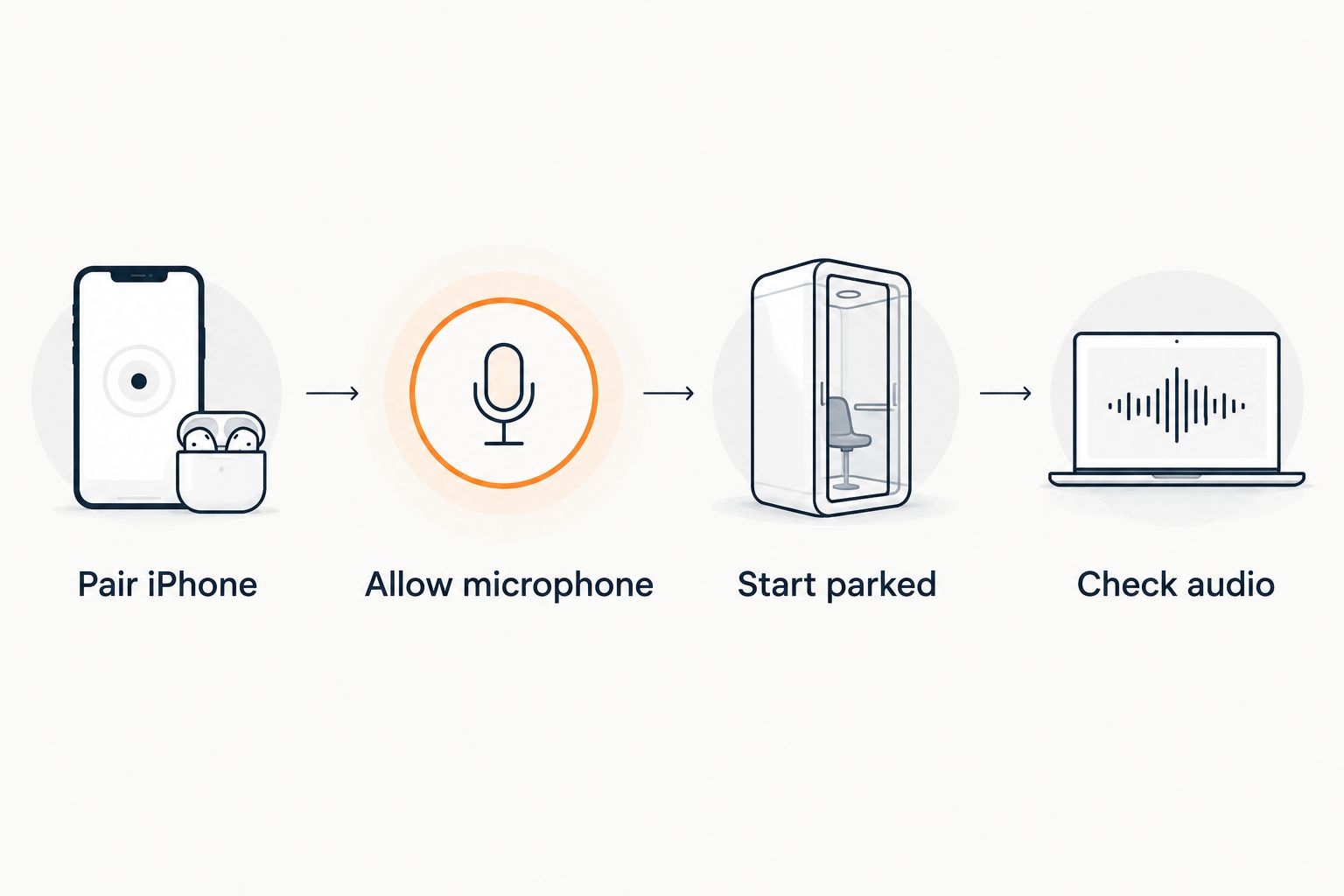 Four steps for setting up a Lovon voice session with car audio
Complete pairing, permission, and audio checks before the car moves.
Avoid using a driving session for trauma processing, crisis support, or any subject that makes it harder to focus on the road. Save deeper reflection for after you park. Lovon is an always-available companion for everyday support, not a substitute for emergency or licensed clinical care.
Choose CarPlay or Bluetooth audio
CarPlay and standard Bluetooth are two routes to the same basic goal: carrying phone audio through the vehicle. Neither option changes what Lovon does inside the app.
| Connection | Best for | Advantages | Limitations |
|---|---|---|---|
| Apple CarPlay | Cars with supported wired or wireless CarPlay | Integrates the iPhone with the vehicle display and audio controls | Lovon may not appear as a dedicated dashboard icon; setup varies by vehicle |
| Bluetooth audio | Cars without CarPlay or when CarPlay does not route the session correctly | Uses the existing phone-to-car audio connection | The vehicle may separate call audio from media audio, requiring a parked test |
Use CarPlay when it carries the full two-way conversation reliably. Use Bluetooth when CarPlay connects but Lovon audio does not reach the correct speakers or microphone. The winning option is the one that passes a parked listening and speaking test without requiring phone handling.
Use Bluetooth when CarPlay is unavailable
A Bluetooth-only setup is the adjacent workflow for an older car, a rental, or a CarPlay connection that does not carry Lovon correctly.
- Leave the vehicle parked.
- Open Settings > Bluetooth on the iPhone.
- Put the vehicle audio system into Bluetooth pairing mode.
- Select the vehicle under Other Devices on the iPhone.
- Confirm any matching pairing code shown on both screens.
- Select Bluetooth as the vehicle’s active audio source.
- Open Lovon and start a voice session.
- Complete a two-way audio test before driving.
Expected result: Lovon audio plays through the vehicle speakers, and the app receives your voice through the active microphone route.
If the car connects for calls but not other audio, review the vehicle’s Bluetooth source settings while parked. Some systems treat phone calls and app audio as separate sources. The exact setting name depends on the vehicle, so use the manual instead of changing menus while moving.
Troubleshooting
Lovon cannot hear you
Open Settings > Privacy & Security > Microphone and confirm Lovon has access. Then close and reopen the app while parked. If the problem continues, disconnect the car audio and test the microphone directly on the phone; this separates an app permission issue from a vehicle routing issue.
Audio plays from the iPhone
Confirm that CarPlay or Bluetooth is still connected. Use the iPhone’s audio destination control while parked to select the vehicle, then restart the voice session. If navigation audio uses the car speakers but Lovon does not, test Bluetooth as the alternative route.
Lovon does not appear on the CarPlay screen
Do not treat the missing icon as a failed connection. CarPlay only displays supported app categories and interfaces. Open Lovon on the iPhone while parked, start the session there, and check whether the conversation still routes through the vehicle audio.
An incoming call interrupts the session
Phone calls can take control of the car audio connection. Finish the call, park safely, reopen Lovon, and confirm the session state before continuing. Do not attempt to restore the conversation while moving.
The connection drops during the drive
A voice session depends on the phone’s active connection. If service drops, leave the phone alone and continue driving. Restart the session only after reaching a safe parking place; repeated reconnection attempts create more distraction than the original stress.
Customize your commute workflow
Use different prompts for the drive to work and the drive home. A morning prompt can focus on one manageable priority. An evening prompt can help you name what happened, separate work stress from home life, and decide what can wait until tomorrow.
Keep moving conversations light. Ask for a simple grounding cue, a brief reflection question, or help naming an emotion. The on-demand coping tools for anxiety are better used with the same safety rule: prepare while parked and stop any exercise that competes with driving attention.
A useful 2026 routine has three boundaries:
- Before driving: connect the phone, test audio, and set the topic.
- While driving: keep the conversation light and hands-free.
- After parking: finish the reflection, write down any next step, or continue somewhere quiet.
The limitation is important. Lovon can provide coping tools and self-reflection guidance, but it cannot assess road conditions, take control of the vehicle, provide emergency intervention, or replace a licensed mental health professional.
Start while safely parked
Open Lovon, allow microphone access, and test both sides of the conversation before driving.
FAQ
How do I connect Lovon to CarPlay for commute stress?
Pair your iPhone through Settings > General > CarPlay, open Lovon while parked, start a voice session, and confirm that audio uses the car system. Do not begin driving until both speaking and listening work without phone handling.
Does Lovon appear as an app on the CarPlay dashboard?
Do not assume Lovon will appear as a dedicated CarPlay icon in 2026. You can open it on the iPhone while parked and test whether the voice session routes through the vehicle audio.
Can I use Lovon through Bluetooth without CarPlay?
Yes, Bluetooth is the practical alternative when CarPlay is unavailable or does not route the session correctly. Pair the phone, select Bluetooth as the car audio source, and complete a parked two-way test.
Why can I hear Lovon when it cannot hear me?
Microphone permission or the active input route is usually the issue. Check Settings > Privacy & Security > Microphone, allow Lovon access, and retest while parked.
Is it safe to use Lovon while driving?
Only use a fully hands-free, preconfigured session that does not take attention from driving. Stop the conversation and pull over safely if it becomes distracting, upsetting, or requires screen interaction.
Can Lovon replace a therapist for severe commute anxiety?
No, Lovon is not a licensed clinician and does not replace clinical care. It provides on-demand emotional support, coping tools, and self-reflection guidance for everyday mental health struggles.
What should I do if I feel unsafe or in crisis during the drive?
Pull over safely and seek immediate human support. In the United States, call or text 988 for crisis support and call 911 when there is immediate danger.
What is the best Lovon prompt for a stressful commute in 2026?
Use a narrow prompt that supports driving focus, such as asking for help settling before the trip or reflecting after you park. Save intense emotional processing for a safe, stationary setting.
One last thing
The most useful part of a Lovon CarPlay commute stress routine happens while the car is still parked. Start with a calm intention before pulling away, then finish the conversation after the engine is off instead of forcing a breakthrough in traffic.
That boundary makes the 2026 workflow simpler and safer: CarPlay handles the connection, Lovon handles the voice conversation, and you keep your attention on driving. If the session needs tapping, reading, troubleshooting, or deeper emotional work, it waits until you park.
Related guides
How AI Support Helps You Heal
AI emotional support isn't about replacing human connection — it's about filling the gaps. The moments when you need to talk at 2 AM, when you don't want to burden your friends again, or when you simply need someone to listen without judgment.
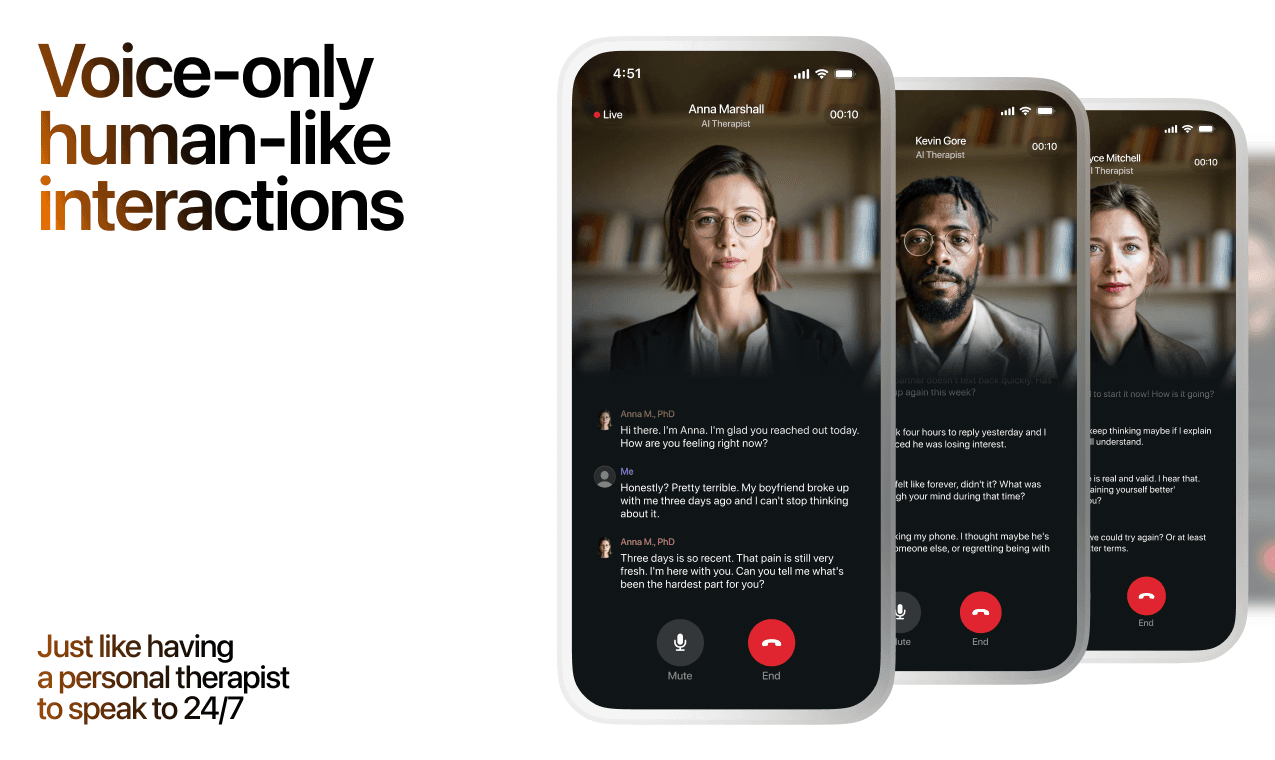
Here's what happens in a typical Lovon session:
You share what's on your mind
There's no script, no intake form, no waiting room. You speak or type whatever you're feeling — in your own words, at your own pace.
Lovon validates and explores
Using frameworks from CBT (Cognitive Behavioral Therapy) and motivational interviewing, Lovon acknowledges your feelings first, then gently helps you explore them. No dismissive "just move on" advice.
You build coping skills together
Lovon doesn't just listen — it actively works with you on evidence-based techniques: thought reframing, urge surfing, behavioral experiments, and more.
What a Session with Lovon Looks Like
Lovon is AI support, not a replacement for professional care. If things have been hard to get through for weeks, or you are thinking about harming yourself, talk to a doctor or a licensed therapist.
Ready to Start?
Your healing journey can begin right now
A 3-day trial. No judgment. Just a safe space to process what you're going through.
Frequently Asked Questions
Is Lovon a replacement for a real therapist?
Is my conversation with Lovon AI private?
How is Lovon different from ChatGPT for emotional support?
Can I use Lovon if I'm already seeing a therapist?
Can I try Lovon before subscribing?
About the Author

The Lovon Editorial Team
Mental Health & Wellness Content Team
The Lovon Editorial Team develops mental health and wellness content designed to make psychological concepts accessible and actionable. Our goal is to bridge the gap between clinical research and everyday life - helping you understand why your mind works the way it does and what you can do about it....
Related articles
- How to test Lovon session audio on a Google Home speaker
Lovon does not connect to Google Home. Run the session on your phone, test whether its audio plays on a Google Home…
- AI Coping Tools for Postpartum Rage: 2026 Verdict
Postpartum rage needs faster help than a therapy waitlist. See which AI coping tools for postpartum rage actually work…
- Best App for Stress Relief in 2026: Ranked and Rated
The best app for stress relief in 2026, ranked: Lovon wins for real-time voice support, plus how Calm, Headspace, and…
- How to connect Lovon to your iPhone home screen widget
Add the Lovon iPhone widget in under a minute. Home Screen and Lock Screen setup steps, size comparison, and fixes for…
See also
Quizzes
- Am I Codependent? 12-Question Self-Check
See how much of you is left over, in 2 minutes.
- Emotion Recognition Test: Do You Read Feelings Right?
See where your reading of feelings slips, in 3 minutes.
Free tools
- Am I Overreacting, or Is This a Big Deal?
A chat for the small thing you cannot stop turning over. Say what happened and what you have already told yourself about…
- 4-7-8 Breathing
Breathe in for four, hold for seven, breathe out for eight. The long out-breath is the point. Follow the circle; no…
From the wiki
- How to stop maladaptive daydreaming?
Maladaptive daydreaming is immersive waking fantasy that eats hours, usually with music and pacing attached. You rarely…
Disclaimer: This article is for informational purposes only and does not constitute medical advice, diagnosis, or treatment. Always seek the advice of your physician or other qualified health provider with any questions you may have regarding a medical condition. If you are in crisis or think you may have an emergency, call 988 (Suicide & Crisis Lifeline) or go to the nearest emergency room. Outside the US? Find a crisis line in your country.