
How to connect Lovon to Samsung Health for Android mood tracking
Use a manual lovon samsung health integration workflow for mood tracking. Review health context, reflect by voice, and avoid assuming automatic data sync.


Key Takeaways
- Treat a Lovon Samsung Health integration as unconfirmed until both apps document the connection and supported data.
- Use Samsung Health observations as context for mood tracking, not as a diagnosis or an automatic emotional assessment.
- Keep a short dated note, reflect by voice, and record your own mood afterward.
- Share only the health details you choose; a manual routine does not require connecting health records.
Instead of retyping your whole day to make sense of your mood, use a short Android check-in that pairs Samsung Health observations with a Lovon voice conversation. This is a manual workflow, not an automatic connection: only enable syncing when both apps explicitly document support for the connection and the data you want to share.
TL;DR
- Treat a Lovon Samsung Health integration as unconfirmed until both apps document the connection and supported data.
- Use Samsung Health observations as context for mood tracking, not as a diagnosis or an automatic emotional assessment.
- Keep a short dated note, reflect by voice, and record your own mood afterward.
- Share only the health details you choose; a manual routine does not require connecting health records.
Why this matters
A health record and a mood record answer different questions. Sleep or activity information describes part of your day; your own words describe how that day felt. Keeping the two alongside each other gives you something specific to reflect on without treating a device reading as an explanation for every emotion.
Lovon is best for people seeking voice-based emotional support, not clinical assessment or treatment. It offers coping tools and self-reflection guidance, but it is not a licensed clinician or a replacement for licensed care. You can explore Lovon without assuming it receives information from another app.
For your 2026 setup, separate two goals: building a useful check-in habit and transferring data automatically. The first does not depend on the second. Start with the habit rather than granting permissions to make an uncertain connection work.
Before you start
- Access: Have your Android phone, access to Samsung Health, and access to the voice-support app you intend to use. Open each separately before building the routine.
- Materials: Choose a private place for a conversation and a note you control. Plan a 2-minute check-in as a starting point, not a required session length.
- The gotcha: Two apps being on Android does not mean they exchange mood records. Health Connect is an Android health-data sharing service, not a universal connector; each participating app must support the relevant sharing functions.
Stop the connection setup if you cannot confirm support. Do not search for a guessed integration button, install an unofficial connector, or grant broad health access just to follow a tutorial. The steps below work through deliberate, manual review and do not depend on undocumented menus.
The bold note labels below are labels you create yourself. They are not app buttons or claims about either app's interface.
Choose the workflow before changing permissions
Use this comparison to decide what you actually need. These are complementary tools, not interchangeable forms of mental health care.
| Tool or approach | Best for | Useful contribution | Limitation |
|---|---|---|---|
| Samsung Health | Reviewing health information already recorded there | Gives you concrete observations to discuss | A health measurement does not establish your mood or its cause |
| Lovon voice support | Talking through everyday emotional struggles | Offers emotional support, coping tools, and self-reflection guidance | Is not a licensed clinician; do not assume access to Samsung Health records |
| A private dated note | Keeping your own mood record | Lets you put observations and feelings in one place manually | Requires you to enter and review information yourself |
For a simple 2026 routine, use the dated note as your record. Let the health app provide selected context and the conversation provide space to reflect. This avoids treating a conversation transcript, a device measurement, and a self-reported feeling as the same kind of information.
Your daily check-in note
Build the smallest record that answers your question. If you want to understand stressful evenings, you do not need a detailed inventory of every health measurement.
- Create a note in a place you already know how to use. Choose storage and device access settings that fit your privacy needs.
- Add the labels Date and time, Mood before, Health context, What happened, Next step, and Mood after.
- Under Mood before, write an ordinary word such as tense, sad, settled, frustrated, or unsure. Add a short description if a single word feels too narrow.
- Under Health context, leave room for one observation you deliberately choose from Samsung Health. Leave it blank when nothing feels relevant.
- Pick one daily cue, such as after breakfast or before your evening wind-down. Try 1 check-in per day rather than checking every time a number changes.
Expected result: You have a reusable note with a date, a feeling, and space for context. No information needs to move automatically between apps.
Keep the language neutral. Write that you felt tense after a difficult meeting, rather than deciding that a health reading proves something is wrong. Your note is a reflection aid, not a diagnostic report.
Your health-context review
Open Samsung Health separately and review only the information already recorded in your account. You do not need to add a wearable or collect a new type of measurement for this routine.
- Choose the same date as your mood entry. If you are reviewing sleep, specify that you mean the sleep before that day.
- Select one relevant observation, such as recorded sleep or activity information, if it is present. Avoid gathering extra measurements just to fill the note.
- Copy a brief description into Health context. Identify it as recorded information rather than a feeling or a conclusion.
- Add a separate sentence under What happened about your day: an argument, a deadline, time outside, or another event you want to reflect on.
- Mark anything uncertain as uncertain. Do not reconstruct an exact measurement from memory or replace a missing record with a guess.
Expected result: Your mood note distinguishes a health observation from a life event and from your emotional experience. You can explain which is which without needing a combined dashboard.
For your 2026 tracking habit, keep the scope steady. Comparing different kinds of information each day makes the notes harder to interpret. Choose a narrow question, such as whether your evenings feel different after disrupted sleep, without assuming the answer in advance.
Your voice reflection and follow-up
Use Lovon voice support to discuss the context you choose to share. A spoken description is manual sharing; it does not establish a health-data integration or authorize background access.
- Read your Mood before entry and decide what you want from the conversation. Choose reflection, help naming a feeling, or a coping tool rather than asking for a diagnosis.
- Start a voice conversation through the app's available session controls. Describe your feeling first, then add the selected health observation if it helps explain your question.
- Ask for one manageable next step. For example, request help separating the facts of a difficult day from the conclusions you are drawing about yourself.
- End the conversation when you have enough to work with. Under Next step, write an action you have chosen, not a task you feel obliged to accept.
- Record Mood after in your own words. If nothing changed, say so; a check-in does not have to produce immediate relief to be an accurate record.
Expected result: You have a before-and-after reflection and one chosen action. You have not relied on automatic mood scoring, imported conversation history, or an undocumented sync function.
The routine is simple: Review context, Name feelings, Talk it through, and Choose action. Keep those stages separate so a device reading does not become a verdict about your mental health.
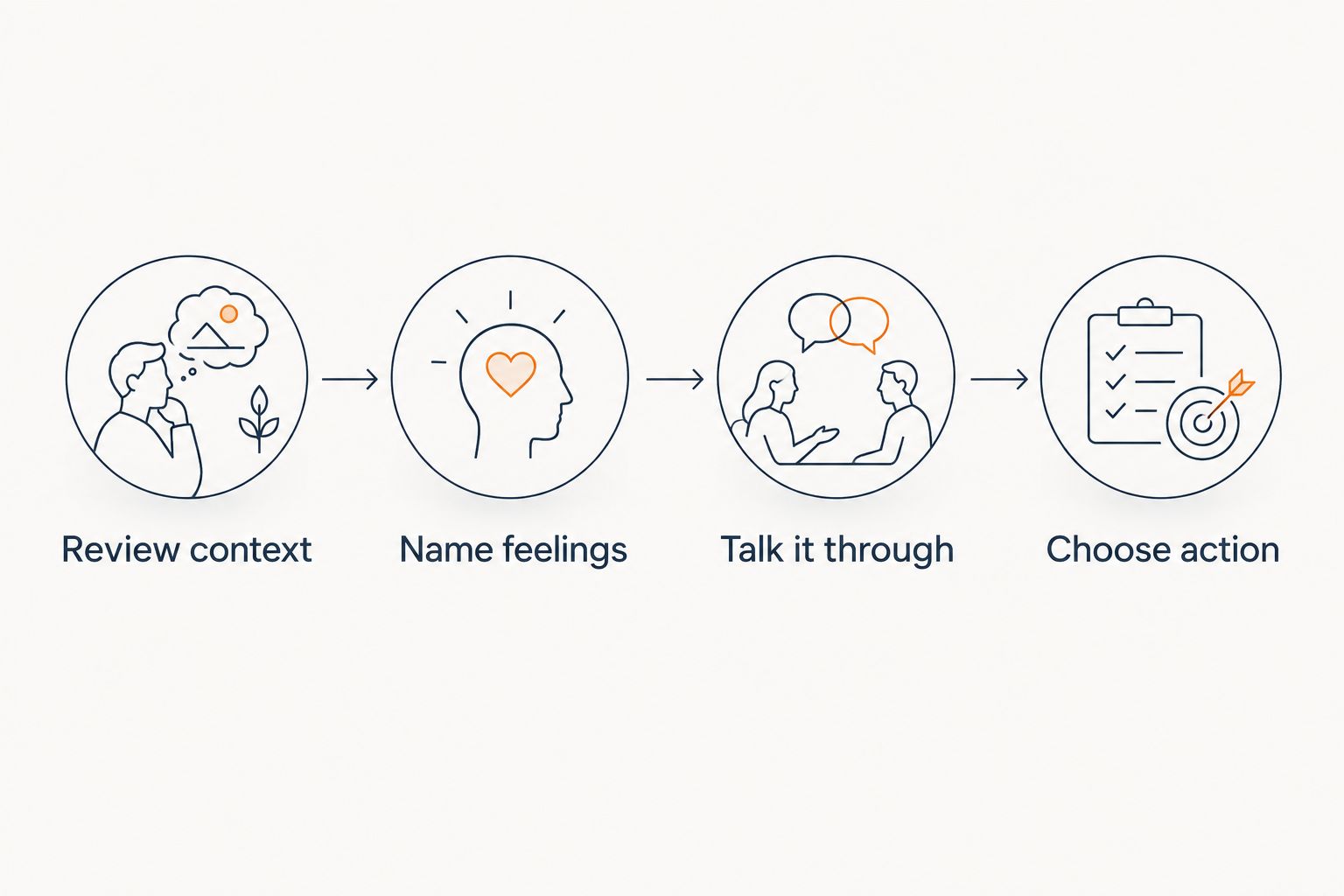 Four steps from reviewing health context to choosing an action after reflection
Health context starts the reflection; your own words describe how you feel.
Second variant: check in after a difficult moment
A scheduled daily review is not the only useful routine. You can also use an event-based check-in after a stressful conversation, a hard workday, or a moment when you notice yourself becoming overwhelmed.
This variant starts with your experience, not an automated health alert. It does not require a background trigger or permission to monitor health records.
- Pause somewhere safe and name what happened. If you are driving or handling equipment, wait until you can give the check-in your attention safely.
- Write a brief Mood before entry. Skip Samsung Health if reviewing measurements would distract you or increase worry.
- Choose between a voice reflection and a simple offline action, such as stepping away from a stressful exchange. You do not have to open an app every time you feel upset.
- Add a short follow-up later if useful. Keep the event-based entry separate from your scheduled daily entry so you do not mistake them for duplicate records.
Expected result: You have a record tied to a specific situation without pretending a device detected your emotional state. Keep this optional in 2026; the routine should serve you, not create another obligation.
Troubleshooting
You cannot find a connection setting
Do not assume you overlooked it. Check the current official help available through each app for the exact connection and supported data type. If support is not explicitly documented, continue manually rather than following menu names from another app or device.
Your conversation does not appear in Samsung Health
A voice conversation is not automatically a health record. Keep your own short mood entry unless a documented connection specifically explains what gets transferred and where it appears. Repeating the conversation is not a sync fix.
Your entries seem to describe different days
Check the dates and the meaning of each record before comparing them. Sleep before a morning check-in and feelings recorded that evening refer to different parts of the day. Add a plain-language time reference rather than forcing everything under one unexplained date.
The tracking makes you more anxious
Reduce the detail or pause the health review. Use words for feelings instead of repeatedly checking measurements, and keep only information that helps you make a practical decision. Discuss persistent distress or compulsive checking with a licensed mental health professional.
You cannot speak privately
Postpone the voice conversation or use your private note alone. Do not assume headphones prevent people nearby from hearing your side of the conversation. You can reflect later without losing the value of the original observation.
Customize your workflow
Review your notes after 7 days as a practical trial, not a clinical assessment period. Ask whether the routine helped you name feelings, choose actions, or remember concerns you want to discuss with a professional. Remove fields you consistently find unhelpful.
For your next 2026 adjustment, change the routine before adding more data. Move the check-in to a quieter time, shorten the note, or focus on one recurring situation. More permissions and more measurements do not automatically make the record more useful.
If speaking helps you express what a short note misses, the guide to using voice journaling to reduce anxiety daily offers a related direction for your routine. Keep the aim modest: understanding your experience, not explaining every fluctuation.
FAQ
Can I connect Lovon directly to Samsung Health for mood tracking?
Only treat a direct connection as supported when both apps explicitly document it and identify the data exchanged. Otherwise, use a manual check-in: review selected health information, talk through your feelings, and keep your own dated mood note.
Does installing Health Connect automatically sync my mood?
No. Health Connect does not make every Android app exchange every kind of health information; participating apps must support the relevant sharing functions and permissions.
Can Samsung Health tell me why I feel anxious?
A health measurement alone cannot establish why you feel anxious. Use recorded information as context alongside your own experience, and seek licensed care for assessment or persistent symptoms.
Will Lovon automatically read my sleep records during a conversation?
Do not assume automatic access to sleep records. Describe only the context you choose to share unless an explicitly documented connection explains the access you have authorized.
Do I need a smartwatch for this mood-tracking routine?
No smartwatch is required for the manual routine described here. Use your own mood words and any relevant information already recorded in Samsung Health, or leave the health-context field blank.
What should I do if mood tracking makes me feel worse?
Pause or simplify tracking if it increases distress. You can stop reviewing measurements, use a brief written reflection instead, and speak with a licensed mental health professional about continuing difficulties.
One last thing
A blank entry is better than an invented one. If you missed yesterday's check-in, start with what you know today rather than assigning a precise feeling to a day you barely remember. Your record does not need to look complete to be useful.
If you are in immediate danger, contact emergency services. In the United States, call or text 988 for crisis support; a mood log or support app is not emergency care.
Related guides
How AI Support Helps You Heal
AI emotional support isn't about replacing human connection — it's about filling the gaps. The moments when you need to talk at 2 AM, when you don't want to burden your friends again, or when you simply need someone to listen without judgment.
Here's what happens in a typical Lovon session:
You share what's on your mind
There's no script, no intake form, no waiting room. You speak or type whatever you're feeling — in your own words, at your own pace.
Lovon validates and explores
Using frameworks from CBT (Cognitive Behavioral Therapy) and motivational interviewing, Lovon acknowledges your feelings first, then gently helps you explore them. No dismissive "just move on" advice.
You build coping skills together
Lovon doesn't just listen — it actively works with you on evidence-based techniques: thought reframing, urge surfing, behavioral experiments, and more.
What a Session with Lovon Looks Like
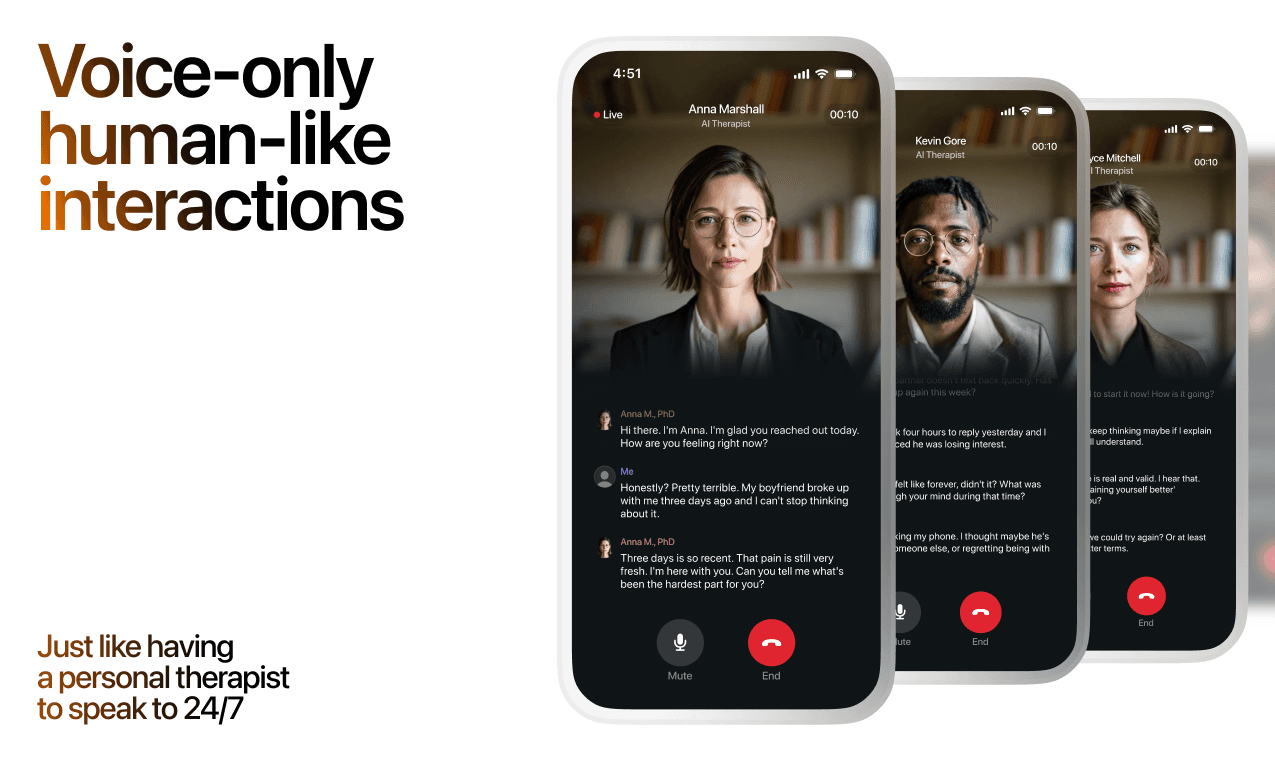
Lovon is AI support, not a replacement for professional care. If things have been hard to get through for weeks, or you are thinking about harming yourself, talk to a doctor or a licensed therapist.
Ready to Start?
Your healing journey can begin right now
A 7-day trial. No judgment. Just a safe space to process what you're going through.
Frequently Asked Questions
Is Lovon a replacement for a real therapist?
Is my conversation with Lovon AI private?
How is Lovon different from ChatGPT for emotional support?
Can I use Lovon if I'm already seeing a therapist?
Can I try Lovon before subscribing?
About the Author

The Lovon Editorial Team
Mental Health & Wellness Content Team
The Lovon Editorial Team develops mental health and wellness content designed to make psychological concepts accessible and actionable. Our goal is to bridge the gap between clinical research and everyday life - helping you understand why your mind works the way it does and what you can do about it....
Related articles
- Cyclothymic Disorder as an Overlooked Mood Condition
When most people think of mood disorders, two conditions typically come to mind: major depression and bipolar disorder.
- Mental health app for medical residents: complete 2026 guide
Choose a mental health app for medical residents that fits shift work. Compare voice support and licensed care, protect…
- Most Private AI Therapy App in 2026: Full Ranking
Lovon ranks as the most private AI therapy app in 2026 for anonymous voice sessions, ahead of Wysa, Youper, Replika, and…
- How to connect Lovon to Amazon Alexa for voice-activated sessions
Use a Lovon Alexa integration workflow with a neutral reminder and an in-app voice session. Keep account linking, audio…
See also
Quizzes
- Am I Codependent? 12-Question Self-Check
See how much of you is left over, in 2 minutes.
- Do I Miss My Ex or Am I Just Lonely? 12-Question Quiz
Find out what the missing is actually about.
Free tools
- Write a Letter to Your Best Friend
A chat for a letter to your best friend that only they could have received. Tell it how long you have been friends, one…
- Words of Encouragement for Him When He Is Struggling
Words of encouragement for him that fit what he is actually going through, for when your usual lines are not landing…
From the wiki
- Why do I have no friends?
Usually nothing is wrong with you. Adult friendship runs on proximity and repetition, and most people lose both at once…
Disclaimer: This article is for informational purposes only and does not constitute medical advice, diagnosis, or treatment. Always seek the advice of your physician or other qualified health provider with any questions you may have regarding a medical condition. If you are in crisis or think you may have an emergency, call 988 (Suicide & Crisis Lifeline) or go to the nearest emergency room. Outside the US? Find a crisis line in your country.