
How to connect Lovon to your iPhone home screen widget
Add the Lovon iPhone widget in under a minute. Home Screen and Lock Screen setup steps, size comparison, and fixes for 2026 iOS versions.

Key Takeaways
- A Lovon iPhone widget gets you one tap from your Home Screen into a voice session, instead of opening the app and tapping through it.
- Home Screen widgets need iOS 14 or later; Lock Screen widgets need iOS 16 or later.
- iOS offers Small, Medium, and Large widget sizes for Lovon through the standard widget gallery.
- If Lovon isn't showing up when you search the widget gallery, open the app once first — that's the fix almost every time.
Tapping the Lovon icon, waiting for the app to open, then tapping through to start talking eats up the first 20 seconds of exactly the moment you don't have 20 seconds to spare. Set up a Home Screen widget instead, and getting into a voice session with Lovon takes one tap from wherever your thumb already is.
TL;DR
- A Lovon iPhone widget gets you one tap from your Home Screen into a voice session, instead of opening the app and tapping through it.
- Home Screen widgets need iOS 14 or later; Lock Screen widgets need iOS 16 or later.
- iOS offers Small, Medium, and Large widget sizes for Lovon through the standard widget gallery.
- If Lovon isn't showing up when you search the widget gallery, open the app once first — that's the fix almost every time.
Why this matters
Anxiety and low mood don't wait for you to unlock your phone, find the app, and click through a menu. The whole appeal of an AI companion you can talk to anytime falls apart if reaching it takes more effort than reaching for a distraction instead.
A Lovon widget on your Home Screen or Lock Screen removes that friction. You still get the same voice conversations built around coping tools and self-reflection prompts, informed by input from PhD psychologists — the widget just shortens the distance between noticing you need it and actually using it. It doesn't replace a licensed clinician, and it isn't meant to; it's a faster door into support that's already there.
Before you start
- An iPhone running iOS 14 or later. That's when Apple introduced Home Screen widgets. Lock Screen widgets need iOS 16 or later — check under Settings > General > Software Update if you're not sure which version you're on.
- Lovon installed from the App Store, and opened at least once. iOS won't list an app in the widget gallery until it's been launched a single time, even if the install finished minutes ago.
- The gotcha: if you just installed Lovon and go straight to the widget gallery, it may not show up yet. Open the app once, back out to the Home Screen, and search again — that single launch is what triggers iOS to catalog it as widget-ready.
Add the Lovon widget to your Home Screen
- Touch and hold any empty space on your Home Screen until the icons start to jiggle.
- Tap the + button in the top-left corner of the screen.
- Type Lovon into the search field at the top of the widget gallery.
- Swipe through the available sizes and tap Add Widget.
- Tap Done in the top-right corner to stop the jiggle and lock the layout.
Expected result: the Lovon widget sits on your Home Screen where you placed it, ready to open straight into the app the moment you tap it.
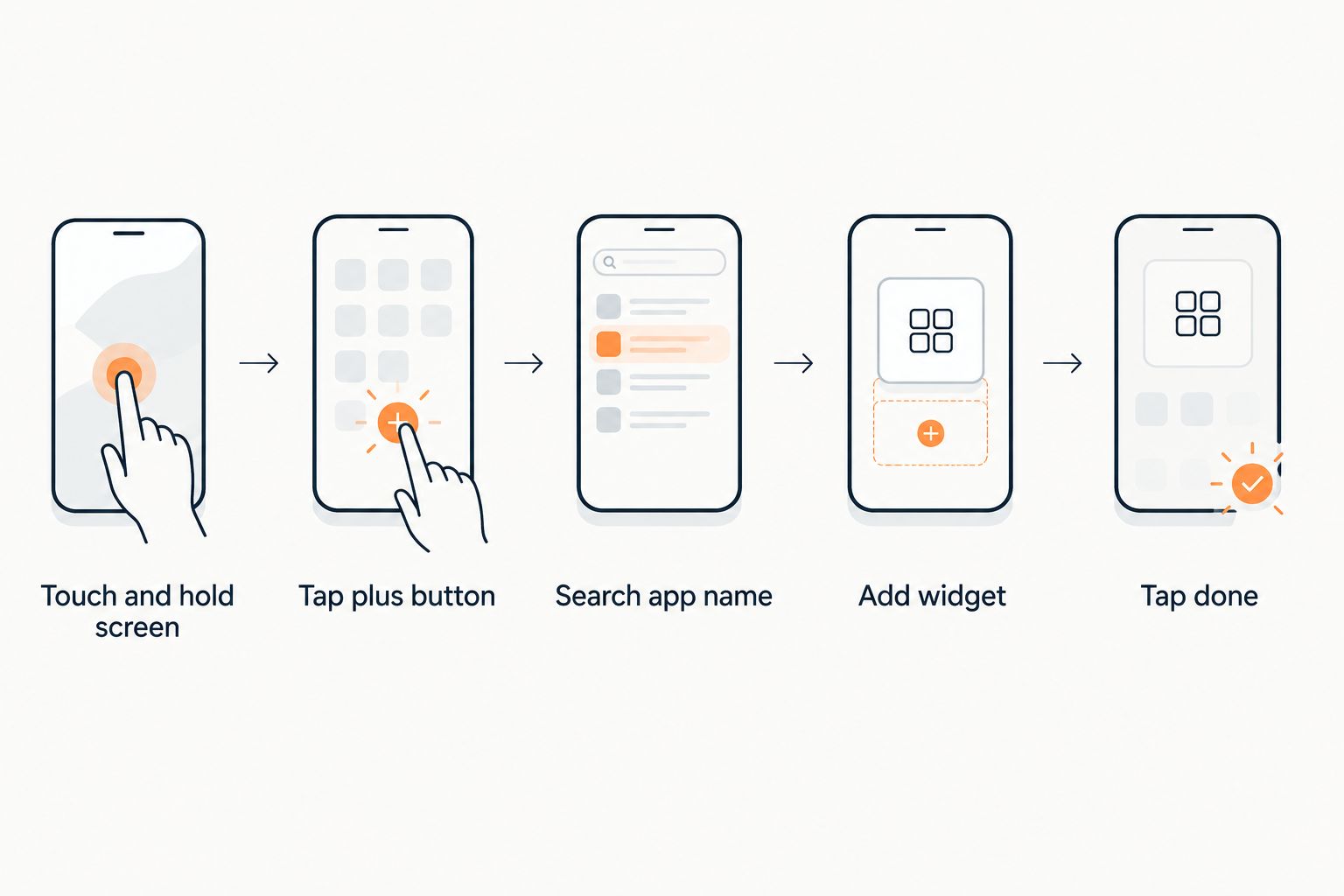 Five steps for adding an app widget to an iPhone Home Screen
The whole setup takes under a minute once Lovon has been opened at least once.
Choose the right widget size
| Size | Best for |
|---|---|
| Small | Glanceable, one-tap access without taking up much room — best for a main Home Screen you keep clean |
| Medium | A bit more visual space, sits well next to two or three app icons — best for a mixed screen with other widgets |
| Large | Takes up the most room — best for a dedicated widget screen with fewer icons overall |
If you're only adding one widget, Small does the job — it takes the least real estate and still opens straight into Lovon.
Add a Lock Screen widget (iOS 16 and later)
The Home Screen widget isn't the only option. On iOS 16 or later, you can add a Lovon shortcut to your Lock Screen, so you don't even need to unlock your phone into the Home Screen first.
- Touch and hold your Lock Screen until Customize appears, then tap it.
- Tap the Lock Screen you want to edit.
- Tap the widget area below the clock.
- Search for Lovon and tap it to add it.
- Tap Done, then tap anywhere on the screen to exit customization.
Expected result: a Lovon shortcut appears on your Lock Screen, giving you a faster route in than swiping to the Home Screen and finding the icon.
Running both — a Home Screen widget for when you're already scrolling through apps, and a Lock Screen widget for the moments you just glance at your phone — covers more of the situations where you'd actually reach for support in 2026.
Set up your first voice session
Open Lovon once so it's ready to add as a widget.
Troubleshooting the Lovon widget
- Lovon doesn't show up in the widget gallery search. Open the app once, then search again — iOS only indexes apps for widgets after their first launch, not immediately after install.
- The widget looks blank or stuck loading. iOS refreshes widgets on a schedule the system controls, not the instant you glance at your phone. Tap it once to open the app directly, then remove and re-add the widget if it's still blank afterward.
- The widget disappeared after an iOS update. Major iOS updates occasionally reset parts of a Home Screen layout. Re-add it using the steps above — it takes under a minute.
- The Lock Screen widget option isn't there at all. That means your iPhone is running an iOS version older than 16. Check Settings > General > Software Update to confirm which version you have.
- The widget opens the app but not straight into a session. Some widget layouts open Lovon's main screen rather than launching a voice session immediately — tap through once to confirm which behavior your chosen size gives you.
Customize your setup
Once the widget is in place, the bigger question is what you do with the extra half-second you just saved. If you're new to talking through an AI voice session at all, it helps to know how AI voice therapy differs from typing into a chat before your first tap. For a broader look at what a widget-fast setup is actually good for, see what on-demand support between therapy sessions can and can't cover.
FAQ
What's the fastest way to add a Lovon widget to my iPhone?
Touch and hold your Home Screen, tap the + button, search Lovon, pick a size, and tap Add Widget. It takes under a minute once the app has been opened at least once.
Do I need a specific iOS version for the Lovon widget?
Home Screen widgets require iOS 14 or later. Lock Screen widgets require iOS 16 or later, since Apple introduced that feature separately.
Why isn't Lovon showing up when I search the widget gallery?
iOS only lists apps for widgets after they've been launched once. Open Lovon, then search the widget gallery again.
Can I add more than one Lovon widget to my iPhone?
Yes. iOS allows multiple widgets from the same app across different screens or sizes — you can run a Small widget on your main screen and a Large one on a secondary screen.
Does the Lovon widget work without opening the app first?
No. The app needs to be installed and opened at least once before iOS will index it as an available widget.
Is the Lovon widget a replacement for therapy?
No. Lovon is an AI voice companion built with input from PhD psychologists for emotional support and coping tools, not a replacement for a licensed clinician.
Can I remove the Lovon widget without deleting the app?
Yes. Touch and hold the widget, then tap Remove Widget. The Lovon app stays installed and untouched.
Does a Lovon iPhone widget use extra battery?
iOS widgets refresh on a system-managed schedule rather than continuously, which keeps the battery impact minimal regardless of which app the widget belongs to.
One last thing
The widget only refreshes on the schedule iOS decides, not the second you glance at it — so in the middle of an actual anxious moment, tapping straight into the app is still the most reliable move, with the widget as the shortcut that gets you there faster. Set both the Home Screen and Lock Screen versions up once in 2026, and you'll stop thinking about the setup at all.
Related guides
How AI Support Helps You Heal
AI emotional support isn't about replacing human connection — it's about filling the gaps. The moments when you need to talk at 2 AM, when you don't want to burden your friends again, or when you simply need someone to listen without judgment.
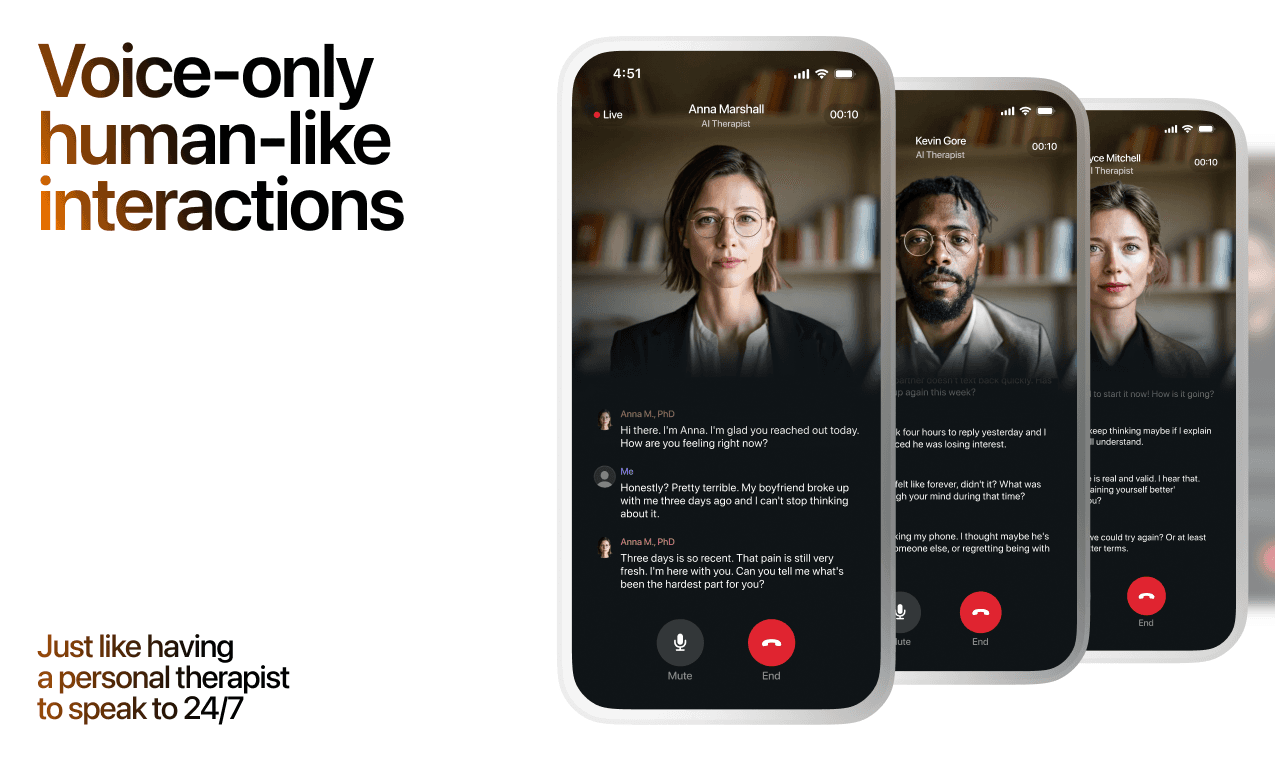
Here's what happens in a typical Lovon session:
You share what's on your mind
There's no script, no intake form, no waiting room. You speak or type whatever you're feeling — in your own words, at your own pace.
Lovon validates and explores
Using frameworks from CBT (Cognitive Behavioral Therapy) and motivational interviewing, Lovon acknowledges your feelings first, then gently helps you explore them. No dismissive "just move on" advice.
You build coping skills together
Lovon doesn't just listen — it actively works with you on evidence-based techniques: thought reframing, urge surfing, behavioral experiments, and more.
What a Session with Lovon Looks Like
Lovon is AI support, not a replacement for professional care. If things have been hard to get through for weeks, or you are thinking about harming yourself, talk to a doctor or a licensed therapist.
Ready to Start?
Your healing journey can begin right now
A 3-day trial. No judgment. Just a safe space to process what you're going through.
Frequently Asked Questions
Is Lovon a replacement for a real therapist?
Is my conversation with Lovon AI private?
How is Lovon different from ChatGPT for emotional support?
Can I use Lovon if I'm already seeing a therapist?
Can I try Lovon before subscribing?
About the Author
The Lovon Editorial Team
Mental Health & Wellness Content Team
The Lovon Editorial Team develops mental health and wellness content designed to make psychological concepts accessible and actionable. Our goal is to bridge the gap between clinical research and everyday life - helping you understand why your mind works the way it does and what you can do about it....
Related articles
- How to use iOS Focus Mode with Lovon for quiet sessions
Set up lovon ios focus mode for quieter voice sessions. Choose allowed contacts, reduce app alerts, and test manual or…
- Automatically start a Lovon session when your heart rate spikes
A Lovon Apple Watch heart rate trigger uses iOS Shortcuts automation to open Lovon the moment your heart rate spikes, no…
- Free AI Therapist for Stress & Burnout (2026)
AI mental health support for stress in 2026: Lovon leads with voice sessions and burnout coping tools. Ranked picks…
- How to connect Lovon to Apple Health for mood tracking
No native sync exists in 2026 — here's the manual routine to log Lovon sessions in Apple Health's State of Mind, plus a…
See also
Quizzes
- Anger Issues Test: Do I Have an Anger Problem?
See where your anger is costing you most, in 3 minutes.
- Toxic Masculinity Test: Which of 3 Rules Run You?
See which learned rules cost you most, in 3 minutes.
Free tools
- What to Say When They Are Struggling
A chat, not a list. Tell the coach who this person is to you, what they are going through, and what you already said…
- Feelings Wheel
Tap the broad feeling in the middle and the wheel zooms in until you reach the word that fits. Each word opens a short…
From the wiki
- What to do if you have no friends?
Pick one activity that repeats weekly with the same people, and go for six to eight weeks straight. Repetition, not…
Disclaimer: This article is for informational purposes only and does not constitute medical advice, diagnosis, or treatment. Always seek the advice of your physician or other qualified health provider with any questions you may have regarding a medical condition. If you are in crisis or think you may have an emergency, call 988 (Suicide & Crisis Lifeline) or go to the nearest emergency room. Outside the US? Find a crisis line in your country.