
How to connect Lovon to Android Auto for commute anxiety
Set up Lovon for hands-free voice support on your commute using Android Auto's Bluetooth connection. Step-by-step 2026 setup plus troubleshooting fixes.

Key Takeaways
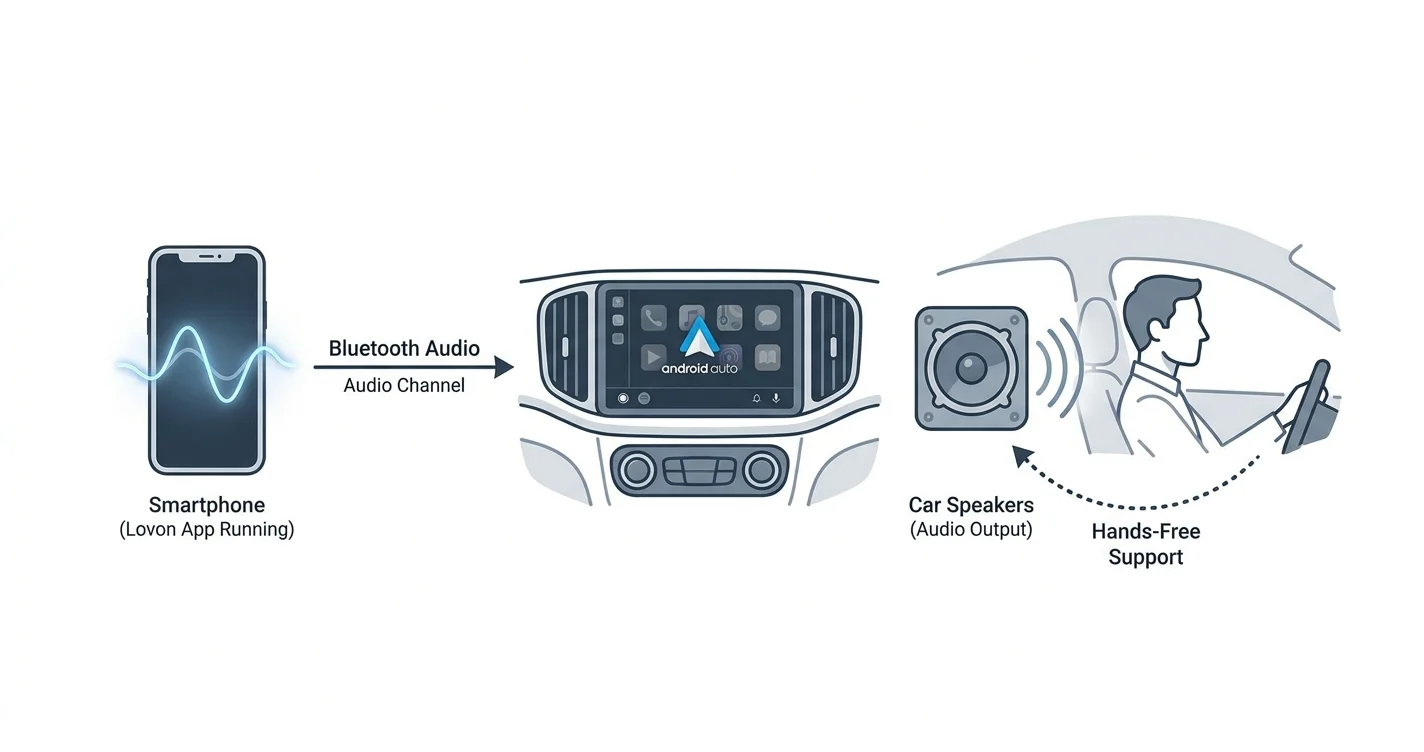
- Lovon Android Auto commute anxiety support works through your phone's existing Bluetooth audio channel, not a dedicated Android Auto app icon.
- Start your Lovon session before you back out of the driveway — Android Auto doesn't list Lovon in its app grid because voice support apps sit outside Auto's supported categories.
- Once a session is running, audio and mic input route through the car the same way a phone call does — no screen touching required at speed.
- Best for short-to-medium commutes where a 10 to 20 minute voice check-in fits between driveway and parking lot.
- Lovon is not a replacement for licensed clinical care — it's a hands-free way to get coping support between appointments.
Commute anxiety doesn't wait for a therapy appointment — it shows up at the on-ramp, during a stalled merge, or right before you walk into a meeting. Instead of white-knuckling the drive or pulling over to text a friend, pair your phone's Bluetooth connection with a Lovon voice session so support runs through your car speakers the whole way in.
TL;DR
- Lovon Android Auto commute anxiety support works through your phone's existing Bluetooth audio channel, not a dedicated Android Auto app icon.
- Start your Lovon session before you back out of the driveway — Android Auto doesn't list Lovon in its app grid because voice support apps sit outside Auto's supported categories.
- Once a session is running, audio and mic input route through the car the same way a phone call does — no screen touching required at speed.
- Best for short-to-medium commutes where a 10 to 20 minute voice check-in fits between driveway and parking lot.
- Lovon is not a replacement for licensed clinical care — it's a hands-free way to get coping support between appointments.
Why this matters
Anxiety that spikes on a predictable schedule — every weekday, same route, same merge — responds well to a tool you can reach without opening an app menu. Talking through it out loud, at driving volume, beats silently ruminating for 20 minutes straight.
Lovon runs as a normal Android app, and it has no dedicated Android Auto integration listed in its app description — nothing here claims otherwise. What actually gets you hands-free support is simpler: Android phones route audio to a connected car over Bluetooth regardless of whether an app appears in Android Auto's own launcher grid. That's the workaround this guide walks through, and it works for Lovon's voice sessions the same way it works for a phone call.
Before you start
- A Bluetooth or wired connection to Android Auto already working in your car — test navigation or a phone call first so you know the audio path is solid.
- Lovon installed and signed in before you drive — first-time sign-in and microphone permission prompts need screen taps, and you don't want that at a stoplight.
- The gotcha: Android Auto won't show a Lovon icon in its own app grid. Voice therapy apps fall outside Auto's supported categories (media, messaging, navigation, video calling). That's expected — you're not missing a setting. The workaround below uses the phone's own Bluetooth audio channel instead of Auto's app launcher.
Set up your Bluetooth connection for Android Auto
- On your phone, open Settings, then Connected devices, then Connection preferences, then Android Auto.
- Tap Pair new device and select your car from the list. If your car doesn't support wireless Android Auto, connect the USB cable instead.
- Confirm the prompt on your car's touchscreen — it usually reads Use Android Auto or Allow Android Auto the first time.
Expected result: your car's display switches to the Android Auto home screen with navigation, phone, and media tiles visible.
Prepare Lovon before you pull out of the driveway
- Open Lovon while the car is still parked and confirm you're signed in.
- Start a check-in or pick a coping-tool session from the home screen so the microphone permission prompt is cleared before you're moving.
- Lock the phone screen or set brightness low once the session is running — audio keeps playing in the background.
Expected result: the Lovon session keeps running with its audio output going through the same Bluetooth line your car uses for calls, so you hear it through the car speakers, not the phone's tiny speaker.
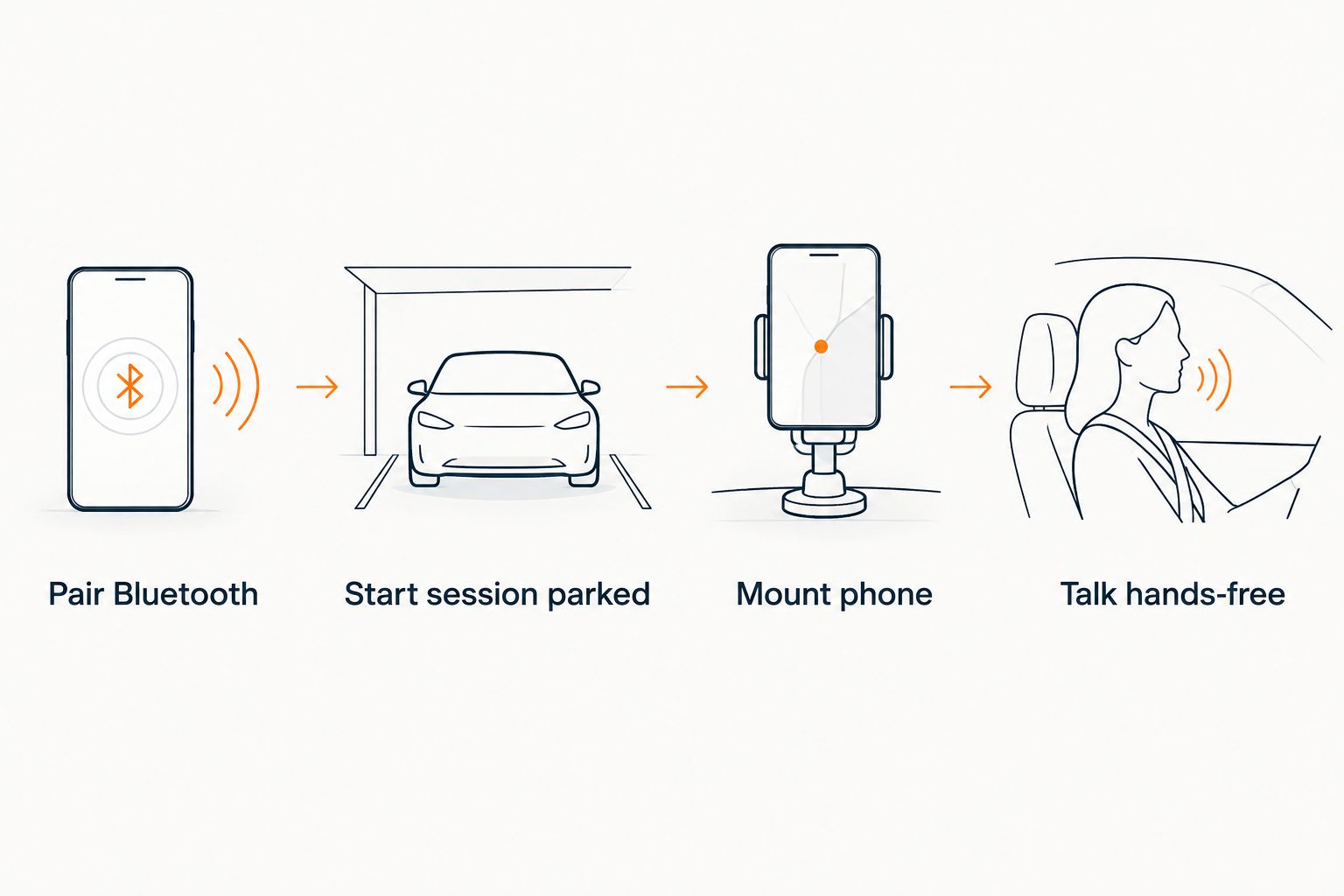 Four-step flow for connecting Lovon to Android Auto during a commute
Everything screen-related happens before the car moves — the drive itself stays hands-free.
Start a commute session hands-free
- Once Android Auto's home screen is up, resume the Lovon session you already started, or ask your phone's voice assistant to open Lovon by name if your device supports launching apps by voice.
- Leave the phone mounted or in a pocket. Lovon doesn't need the screen once a voice session is running — this is a conversation, not a chat window.
- Speak at normal volume. The mic picks you up over the same Bluetooth connection a phone call would use.
Expected result: you get through a tense merge, a rough traffic jam, or a pre-meeting spiral without touching the phone again until you park. For structured breathing between talking points, the guided coping exercises for anxiety work the same way over the car speakers.
The drive-home variant
The morning setup and the evening setup are nearly identical, but the goal shifts. Morning commutes call for a short check-in to get your nervous system settled before you walk into work. The drive home is better suited to a longer wind-down session — processing what happened during the day out loud instead of carrying it into the house.
Same pairing, same hands-free routine — just start the session with a different goal in mind before you leave the parking lot, not mid-merge on the highway.
Start a hands-free session today
Open Lovon before you drive and keep it running through your car's speakers.
Troubleshooting
- Audio plays through the phone speaker instead of the car. Reopen Bluetooth settings and confirm the phone shows "Connected" with the media audio profile checked, not just the hands-free profile.
- You expected a Lovon icon in Android Auto's app grid and don't see one. That's normal — voice therapy apps aren't a supported Android Auto category as of 2026. Run the session from the phone's own screen before driving instead.
- A navigation prompt interrupts the session mid-sentence. Android Auto ducks other audio for turn-by-turn directions; the Lovon session usually resumes automatically once the prompt ends, but check the phone if it doesn't.
- The mic struggles to pick you up over road or fan noise. Lower the fan speed or close a window during the conversation — the same fix that helps phone calls sound clearer.
- Lovon asks for microphone permission again mid-drive. Pull over safely first, then re-grant the permission in phone settings; don't tap through permission screens while moving.
Customize your workflow
Once the basic hands-free setup is working, tune it to the kind of anxiety that actually shows up on your drive. If it's more relationship rumination than traffic stress, a session built around how AI voice therapy differs from text-based apps explains why talking out loud works differently than typing. If panic symptoms show up specifically at merges or in stopped traffic, keep a grounding routine ready as a backup for the moments a full conversation isn't practical.
The honest limit here: Lovon is a self-guided tool, not a licensed clinician, and it's not built for crisis situations. If a drive ever turns into a genuine safety concern, pull over and call emergency services — this setup is for everyday commute stress, not acute crises.
FAQ
Does Lovon have a dedicated Android Auto app?
No — Lovon doesn't appear as an icon inside Android Auto's own app grid because voice support apps fall outside Auto's supported categories in 2026. You start the session on your phone before driving and the audio routes through the car's Bluetooth connection instead.
Is it safe to use Lovon while driving?
Start the session before you pull out of the driveway or a parking spot, then keep the conversation going hands-free. Never operate the phone screen while the car is moving.
Why does Lovon's audio play through my phone instead of the car speakers?
Check that Bluetooth shows the media audio profile connected, not just the hands-free calling profile. Reconnecting Bluetooth from your phone's settings usually fixes it.
Can I use Lovon for a short commute under 10 minutes?
Yes — a short check-in before a stressful meeting or right after a tense one fits into a 10-minute drive without needing a full session.
What's the best way to handle commute anxiety without an app?
Slow breathing paced to a count and naming what you see out the windshield both help in the moment; Lovon's guided coping tools build on the same approach with a voice walking you through it.
Does Android Auto interrupt a Lovon session for navigation prompts?
Turn-by-turn directions duck other audio briefly, and the session typically resumes on its own once the prompt finishes.
Is Lovon a replacement for a therapist during a hard commute?
No. Lovon is built with input from PhD psychologists as an always-available companion for everyday stress, not a replacement for licensed clinical care.
Can I switch between a morning check-in and an evening wind-down session?
Yes — the Bluetooth and Android Auto setup stays the same; only the goal of the conversation changes between the drive in and the drive home.
One last thing
The single biggest point of friction isn't the drive itself — it's trying to start a Lovon session for the first time at a red light. Every setup step that needs the screen belongs in the driveway, before Android Auto even connects. Get that part boring and routine, and the actual commute stays hands-free every single time in 2026.
Related guides
How AI Support Helps You Heal
AI emotional support isn't about replacing human connection — it's about filling the gaps. The moments when you need to talk at 2 AM, when you don't want to burden your friends again, or when you simply need someone to listen without judgment.
Here's what happens in a typical Lovon session:
You share what's on your mind
There's no script, no intake form, no waiting room. You speak or type whatever you're feeling — in your own words, at your own pace.
Lovon validates and explores
Using frameworks from CBT (Cognitive Behavioral Therapy) and motivational interviewing, Lovon acknowledges your feelings first, then gently helps you explore them. No dismissive "just move on" advice.
You build coping skills together
Lovon doesn't just listen — it actively works with you on evidence-based techniques: thought reframing, urge surfing, behavioral experiments, and more.
What a Session with Lovon Looks Like
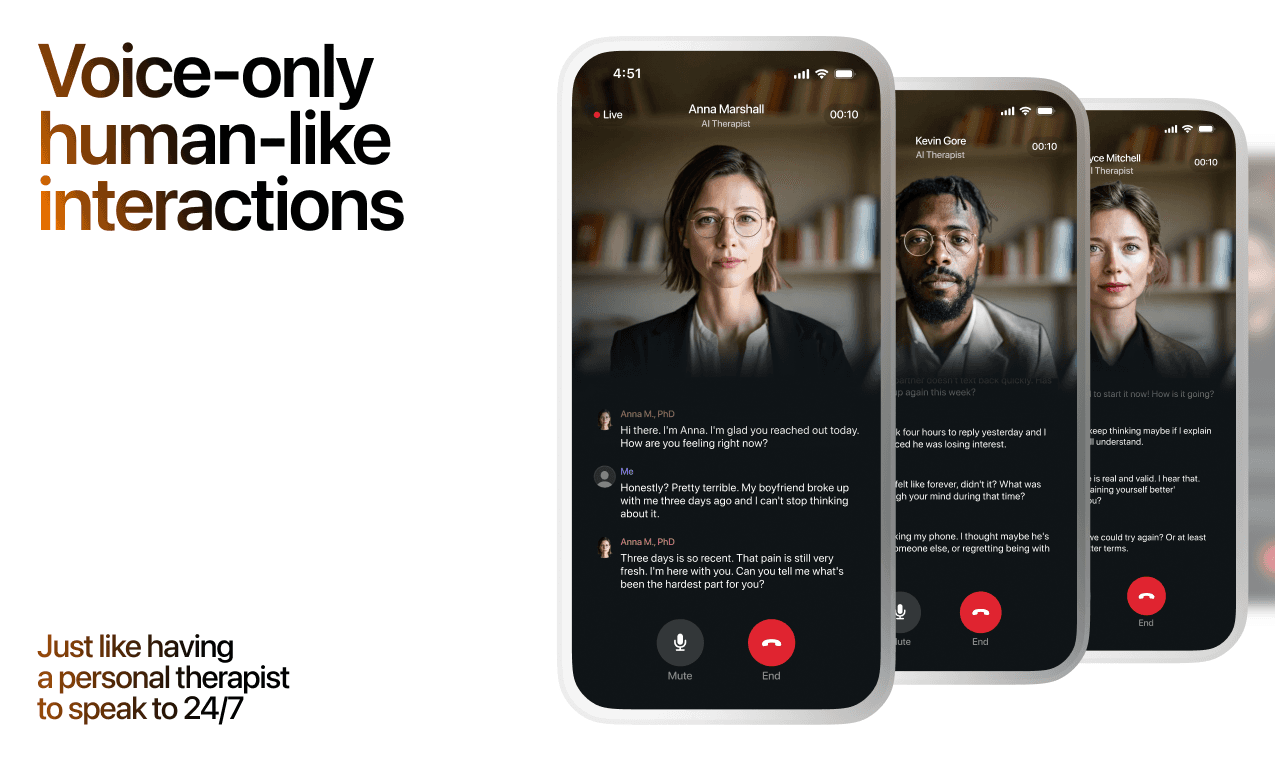
Lovon is AI support, not a replacement for professional care. If things have been hard to get through for weeks, or you are thinking about harming yourself, talk to a doctor or a licensed therapist.
Ready to Start?
Your healing journey can begin right now
A 3-day trial. No judgment. Just a safe space to process what you're going through.
Frequently Asked Questions
Is Lovon a replacement for a real therapist?
Is my conversation with Lovon AI private?
How is Lovon different from ChatGPT for emotional support?
Can I use Lovon if I'm already seeing a therapist?
Can I try Lovon before subscribing?
About the Author

The Lovon Editorial Team
Mental Health & Wellness Content Team
The Lovon Editorial Team develops mental health and wellness content designed to make psychological concepts accessible and actionable. Our goal is to bridge the gap between clinical research and everyday life - helping you understand why your mind works the way it does and what you can do about it....
Related articles
- Best App for Stress Relief in 2026: Ranked and Rated
The best app for stress relief in 2026, ranked: Lovon wins for real-time voice support, plus how Calm, Headspace, and…
- Best Mood Tracker Apps (2026): An Honest Comparison
The best mood tracker app for you, compared honestly: Daylio, How We Feel, Bearable, eMoods, Apple State of Mind and…
- How to use Amazon Alexa reminders to start a Lovon voice session
Lovon does not connect to Alexa. Use a neutral Alexa reminder as a cue, then open the Lovon app on your phone and start…
- AI Coping Tools for Sensory Overload: 2026 Buyer's Guide
AI coping tools for sensory overload in neurodivergent adults, ranked by speed and setup time. See what to buy…
See also
Quizzes
- Aromantic Test: Where Do You Sit on the Spectrum?
See where you sit on the aromantic spectrum, in 3 min.
- Toxic Positivity Test: Does Your Cheer Shut People Out?
See what you say, hide and shut out, in 3 minutes.
Free tools
- Body Scan Meditation
Ten minutes, from your toes to the top of your head, noticing what is there without trying to fix it. Follow the voice…
- How to Reconnect With an Old Friend
A chat for how to reconnect with an old friend, starting with the text you have been meaning to send for a year. Tell it…
From the wiki
- Why do I feel lonely all of a sudden?
Sudden loneliness usually traces back to something that quietly ended in the last few months: a routine, a shared class…
Disclaimer: This article is for informational purposes only and does not constitute medical advice, diagnosis, or treatment. Always seek the advice of your physician or other qualified health provider with any questions you may have regarding a medical condition. If you are in crisis or think you may have an emergency, call 988 (Suicide & Crisis Lifeline) or go to the nearest emergency room. Outside the US? Find a crisis line in your country.