
How to connect Lovon to Siri for instant voice sessions
Set up the Lovon Siri shortcut in under 5 minutes. Step-by-step iOS Shortcuts guide for instant voice sessions plus a nightly check-in automation for 2026.

Key Takeaways
- The lovon siri shortcut opens the app with one voice command through Apple's Shortcuts app — no special integration required.
- It launches Lovon; it does not auto-start a conversation, so budget a few seconds to tap in once the app opens.
- A separate personal automation can open Lovon on a schedule, like a 9:00 PM check-in.
- Setup takes under 5 minutes on any iPhone running a supported iOS version.
Unlock your phone, find the Lovon icon, tap it, wait for it to load — that's three steps too many when you're already anxious. Set up a Siri Shortcut once, and a single voice command opens Lovon directly, cutting the fumbling out of the moment you actually need it.
TL;DR
- The lovon siri shortcut opens the app with one voice command through Apple's Shortcuts app — no special integration required.
- It launches Lovon; it does not auto-start a conversation, so budget a few seconds to tap in once the app opens.
- A separate personal automation can open Lovon on a schedule, like a 9:00 PM check-in.
- Setup takes under 5 minutes on any iPhone running a supported iOS version.
Why this matters
Anxiety and low-mood moments don't wait for you to unlock your phone calmly. The gap between 'I need to talk to someone' and actually opening Lovon is where a lot of people give up and just keep scrolling instead.
A Siri Shortcut removes that gap. Say the phrase, the screen lights up on Lovon, and you're one tap from a voice conversation instead of three. It's a small mechanical fix, but for someone mid-spiral, small mechanical fixes are the ones that actually get used — the same reason starting AI therapy for the first time works better when the first step is nearly frictionless.
Before you start
- An iPhone with the Shortcuts app installed — it ships with every modern iOS version, so you likely already have it.
- The Lovon app installed and signed in at least once. Siri can open the app, but it can't do your account setup for you.
- Siri & Search access turned on for Shortcuts in your iPhone's Settings app, or the Add to Siri button simply won't appear.
The gotcha worth knowing before you start: the shortcut opens Lovon, it doesn't start a session. If you've never launched the app before, saying the phrase drops you into onboarding, not a live conversation. Open Lovon manually once first so the shortcut has somewhere useful to land.
Set up the Shortcut
- Open the Shortcuts app on your iPhone.
- Tap the + in the top right corner to start a new shortcut.
- Tap Add Action.
- Search for Open App in the actions library and tap it.
- Tap Choose next to the app field, then select Lovon from your installed apps.
- Tap the shortcut's name field at the top and rename it to something you'd actually say out loud — 'Talk to Lovon' works better than the default name Shortcuts assigns.
Expected result: tapping the play button inside Shortcuts should open Lovon immediately, right where you last left off.
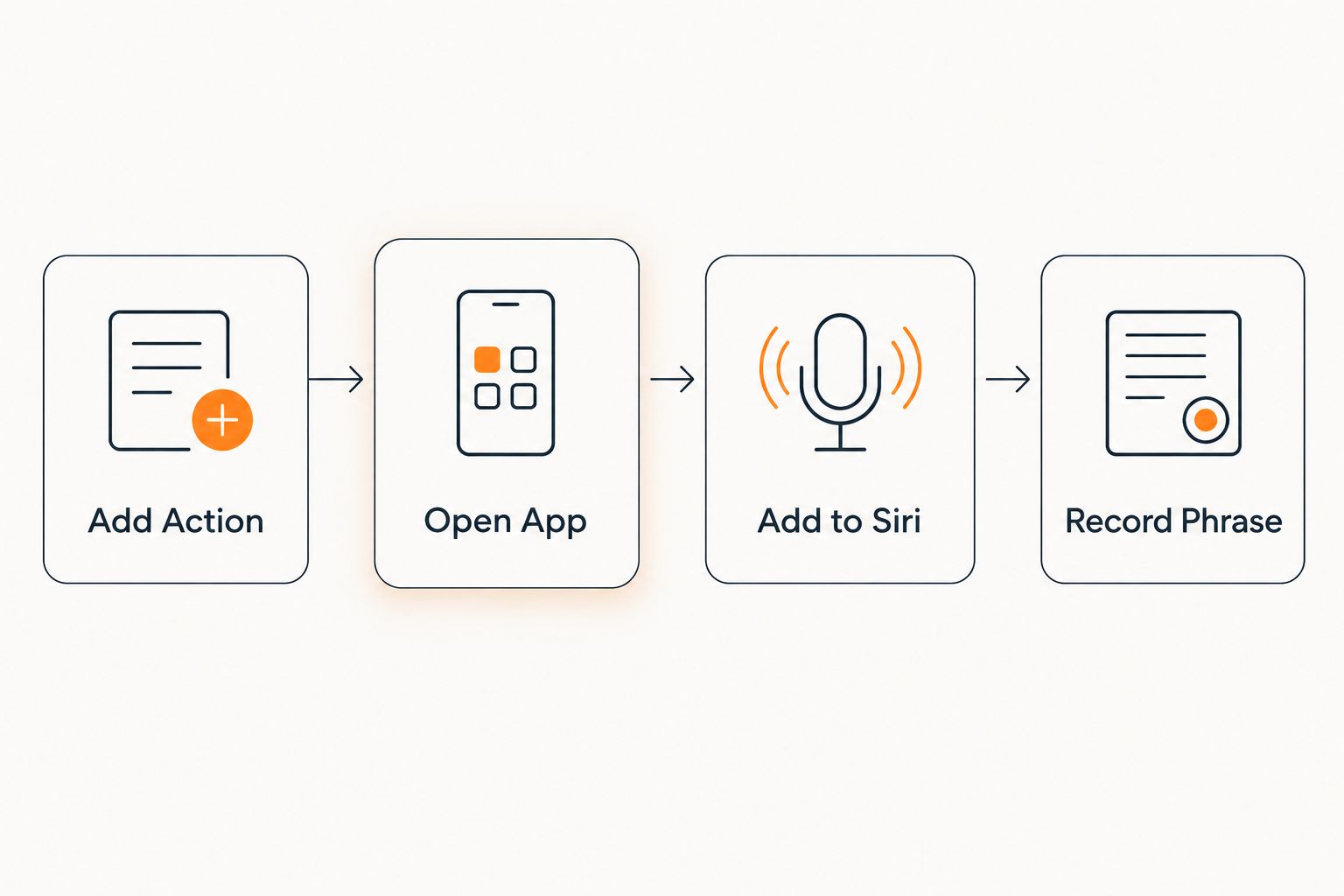 Four-step flow for building a Siri shortcut that opens an app
Four taps in Shortcuts get you from a blank shortcut to a voice command.
Assign a Siri Phrase
- Tap the settings icon on your new shortcut — the three dots or the small i, depending on your iOS version.
- Tap Add to Siri.
- Record your phrase. Something distinct works best: 'Hey Siri, talk to Lovon' beats a generic phrase Siri might confuse with another app.
- Tap Done to save the recording.
Expected result: say the phrase out loud, and Lovon should open within a couple of seconds — no unlocking, no home screen hunting.
Open Lovon on a schedule (nightly check-in automation)
The same Open App action works inside a time-based automation, not just a spoken shortcut. This is the setup for a nightly wind-down check-in instead of an on-demand one.
- In Shortcuts, tap the Automation tab at the bottom.
- Tap +, then Create Personal Automation.
- Choose Time of Day and set the hour — 9:00 PM is a common choice for a wind-down routine.
- Tap Next, then Add Action, search Open App, and select Lovon.
- Turn off Ask Before Running so the app opens automatically instead of waiting for confirmation.
- Tap Done.
Expected result: at the set time, your phone opens Lovon on its own — useful if you're trying to build a consistent voice journaling habit rather than relying on willpower each night.
Troubleshooting
- The 'Add to Siri' button never shows up. Siri & Search permission is off for Shortcuts. Fix it in Settings under Siri & Search, then rebuild the shortcut.
- Siri says it doesn't understand the phrase. Re-record it with a phrase that doesn't overlap a system command like 'open messages.' Longer, more distinct phrases get recognized more reliably.
- The shortcut opens Lovon but drops you on a blank or onboarding screen. That means the app hasn't been opened and set up manually yet — do that once, then the shortcut lands on your usual screen going forward.
- The nightly automation doesn't fire. Check that Ask Before Running is off; with it on, the automation waits for a tap you might miss if your phone is locked.
- The phrase works sometimes and not others. Background app refresh or low battery mode on iPhone can delay app launches triggered by Siri — disable low power mode if this happens often.
Customize your workflow
Once the basic shortcut works, there's room to build around it. Pair the shortcut with a Focus Mode so saying the phrase during a tagged 'wind down' Focus also silences notifications first. Or stack a second automation tied to leaving a specific location — useful if a commute or a particular room is a recurring trigger point.
If the goal is steadier use rather than just faster access, read up on on-demand emotional support between scheduled sessions — the shortcut is the access mechanism, but what you do once you're in the app is the part that actually matters.
Set up Lovon before you build the shortcut
Sign in once so the Siri shortcut has a session ready to open.
One thing worth saying plainly: Lovon is a voice AI you talk to for support, coping tools, and reflection — it is not a licensed clinician and doesn't replace one. The Siri shortcut just makes it faster to reach in a moment when reaching for anything at all feels hard. That's the whole point of the setup, in 2026 as much as any other year.
FAQ
What is the lovon siri shortcut?
It's a custom Siri Shortcut built in Apple's Shortcuts app that uses the Open App action to launch Lovon by voice. It's not a separate feature inside Lovon itself — it's a standard iOS shortcut pointed at the app.
Does saying the Siri phrase start a Lovon session automatically?
No. It opens the app to wherever you last left it. You still tap to begin talking once Lovon is open.
Can I use a Siri shortcut to open Lovon on a schedule instead of by voice?
Yes. Build a Personal Automation in Shortcuts with a Time of Day trigger and the same Open App action, then turn off Ask Before Running so it opens without a confirmation tap.
Why doesn't the 'Add to Siri' button show up in Shortcuts?
Siri & Search access is likely turned off for the Shortcuts app. Enable it in your iPhone's Settings under Siri & Search, then rebuild the shortcut.
Is the Lovon Siri shortcut available on Android?
Shortcuts is an Apple iOS feature, so this specific setup applies to iPhone. Android users open Lovon through the app icon or a home screen widget instead.
Can I change the Siri phrase after I set it up?
Yes. Open the shortcut in the Shortcuts app, tap the settings icon, tap Add to Siri again, and record a new phrase to overwrite the old one.
How long does it take to set up a Siri shortcut for Lovon?
Under 5 minutes for the basic voice shortcut. The scheduled automation variant adds another minute or two.
One last thing
If you share your phone or your lock screen is visible to others, rename the shortcut to something neutral. iOS sometimes surfaces recent shortcut names in Siri suggestions on the lock screen, and 'Talk to Lovon' showing up there isn't the privacy you want during a hard week.
Related guides
How AI Support Helps You Heal
AI emotional support isn't about replacing human connection — it's about filling the gaps. The moments when you need to talk at 2 AM, when you don't want to burden your friends again, or when you simply need someone to listen without judgment.
Here's what happens in a typical Lovon session:
You share what's on your mind
There's no script, no intake form, no waiting room. You speak or type whatever you're feeling — in your own words, at your own pace.
Lovon validates and explores
Using frameworks from CBT (Cognitive Behavioral Therapy) and motivational interviewing, Lovon acknowledges your feelings first, then gently helps you explore them. No dismissive "just move on" advice.
You build coping skills together
Lovon doesn't just listen — it actively works with you on evidence-based techniques: thought reframing, urge surfing, behavioral experiments, and more.
What a Session with Lovon Looks Like
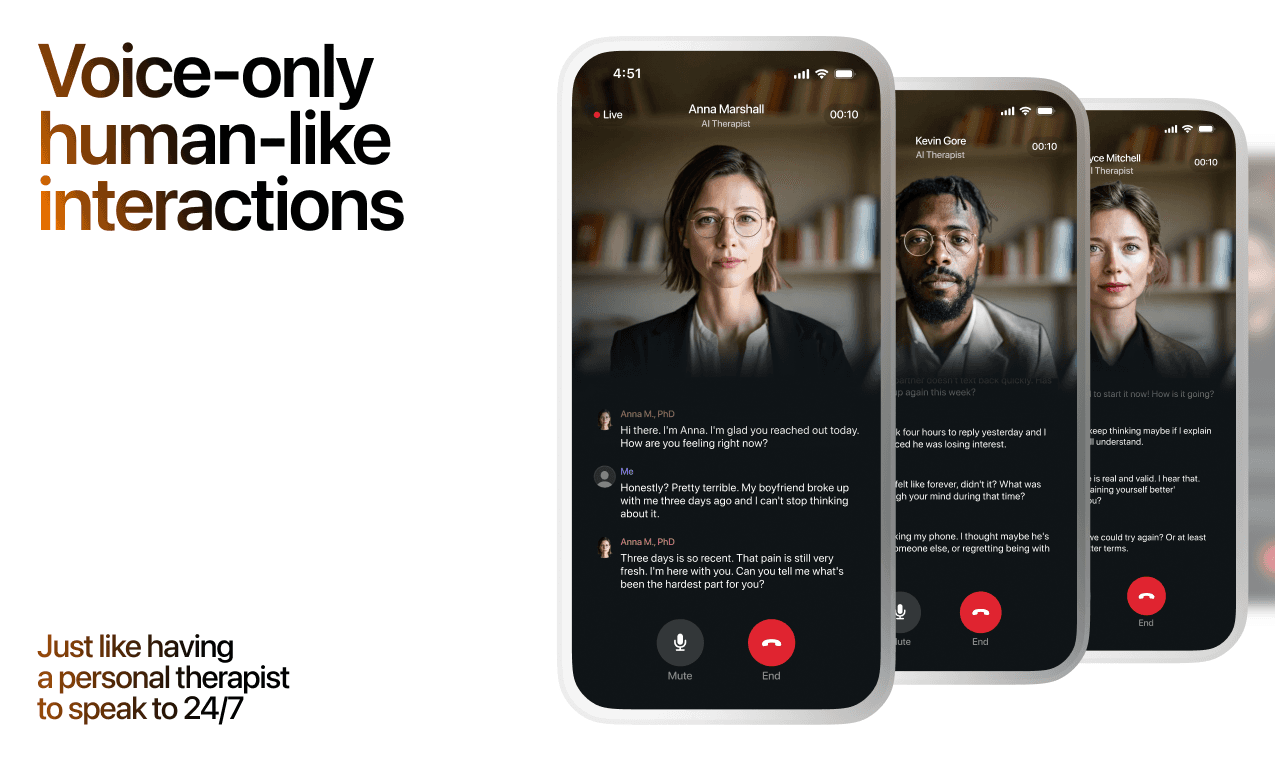
Lovon is AI support, not a replacement for professional care. If things have been hard to get through for weeks, or you are thinking about harming yourself, talk to a doctor or a licensed therapist.
Ready to Start?
Your healing journey can begin right now
A 3-day trial. No judgment. Just a safe space to process what you're going through.
Frequently Asked Questions
Is Lovon a replacement for a real therapist?
Is my conversation with Lovon AI private?
How is Lovon different from ChatGPT for emotional support?
Can I use Lovon if I'm already seeing a therapist?
Can I try Lovon before subscribing?
About the Author
The Lovon Editorial Team
Mental Health & Wellness Content Team
The Lovon Editorial Team develops mental health and wellness content designed to make psychological concepts accessible and actionable. Our goal is to bridge the gap between clinical research and everyday life - helping you understand why your mind works the way it does and what you can do about it....
Related articles
- Automatically start a Lovon session when your heart rate spikes
A Lovon Apple Watch heart rate trigger uses iOS Shortcuts automation to open Lovon the moment your heart rate spikes, no…
- How to test Lovon session audio on a Google Home speaker
Lovon does not connect to Google Home. Run the session on your phone, test whether its audio plays on a Google Home…
- Best Mood Tracker Apps (2026): An Honest Comparison
The best mood tracker app for you, compared honestly: Daylio, How We Feel, Bearable, eMoods, Apple State of Mind and…
- AI Coping Tools for Seasonal Affective Disorder (2026)
AI coping tools for seasonal affective disorder ranked for 2026: what to use daily, what to skip, and where AI voice…
See also
Quizzes
- Am I Too Clingy? Quiz + How to Stop Being Clingy
Kind, honest, 3 minutes. Plus how to stop.
- Relationship Dependency Test: Am I Too Dependent?
Healthy reliance or leaning too hard? Find out in 3 minutes.
Free tools
- Feelings Wheel
Tap the broad feeling in the middle and the wheel zooms in until you reach the word that fits. Each word opens a short…
- Stress Score Checker
Enter the stress or recovery number from your watch or ring and see what the maker says it means. Then answer three…
From the wiki
- Why do I feel sad when I'm alone?
Being alone does not create the sadness. It removes the noise that was keeping it out of earshot, so whatever queued up…
Disclaimer: This article is for informational purposes only and does not constitute medical advice, diagnosis, or treatment. Always seek the advice of your physician or other qualified health provider with any questions you may have regarding a medical condition. If you are in crisis or think you may have an emergency, call 988 (Suicide & Crisis Lifeline) or go to the nearest emergency room. Outside the US? Find a crisis line in your country.