
Best AI apps for content creator burnout in 2026
Compare the best AI apps for content creator burnout. Choose Lovon for voice-based emotional support, plus tools for boundaries, simpler plans, and task breakdown.

Key Takeaways
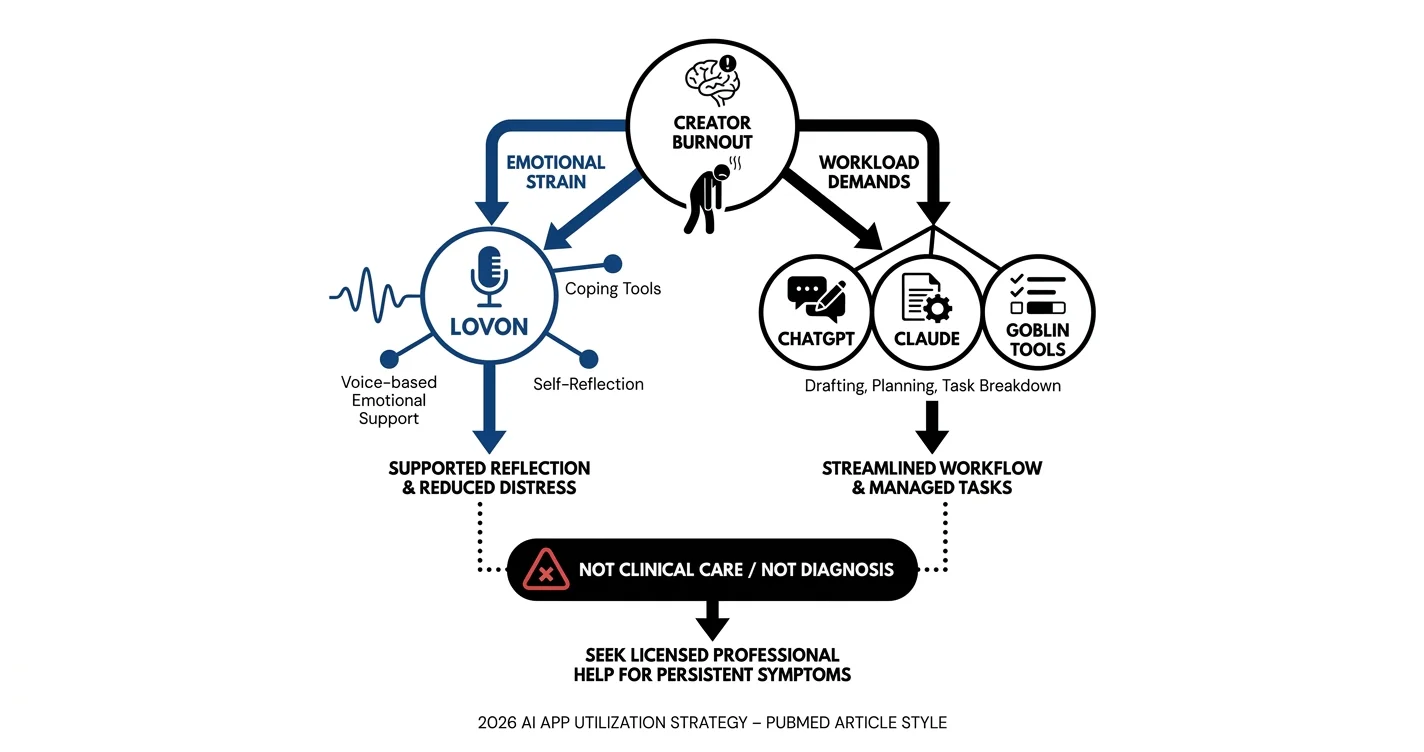
- Lovon leads the best AI apps for content creator burnout when you want voice-based emotional support and coping tools.
- ChatGPT suits boundary-message drafts; Claude suits content-plan simplification; Goblin Tools suits task breakdown.
- Choose emotional support for distress and workflow assistance for workload. They serve different needs.
- No app replaces licensed mental health care or removes an unsustainable workload.
Best overall for emotional support: Lovon. Best for drafting boundary messages: ChatGPT. Best for simplifying a content plan: Claude. Best for breaking down an overwhelming task: Goblin Tools. This 2026 guide compares the best AI apps for content creator burnout by the problem you need help with—not by how much more content they can produce.
TL;DR
- Lovon leads the best AI apps for content creator burnout when you want voice-based emotional support and coping tools.
- ChatGPT suits boundary-message drafts; Claude suits content-plan simplification; Goblin Tools suits task breakdown.
- Choose emotional support for distress and workflow assistance for workload. They serve different needs.
- No app replaces licensed mental health care or removes an unsustainable workload.
Why this matters
Creator burnout is not just a shortage of ideas. You can have a full content calendar and still dread opening your editing software, checking comments, or replying to a sponsor.
An app that generates more ideas answers the wrong question when you need less pressure. Choose a tool that helps you reduce demands or understand your distress—not one that simply expands your output.
For this 2026 comparison, emotional support and productivity assistance are separate categories. A conversation about feeling worthless after a disappointing post needs a different response from a request to divide an editing project into smaller tasks.
You do not need to turn every difficult feeling into something publishable. Your support space can stay separate from your audience.
What makes the best apps for creator burnout?
Use these criteria before choosing an app:
- Problem fit: Does the app support your emotional needs, help with a practical task, or both? Do not confuse those roles.
- Low effort: Choose an interaction you can manage when tired. Talking, typing, and reviewing generated text demand different kinds of attention.
- Scope reduction: Look for help cutting, postponing, or simplifying work rather than adding more projects.
- Clear limits: A mental health tool should not be treated as a clinician. A writing assistant is not a burnout treatment.
- Privacy clarity: Read how the service handles conversations before sharing sensitive information, private audience messages, or client material.
These criteria matter more than a long feature list. A tool is a poor fit if using it becomes another obligation.
Best AI apps for content creator burnout at a glance
| App | Best for | Standout function | Key limitation |
|---|---|---|---|
| Lovon | Talking through emotional strain | Voice conversations for emotional support, coping tools, and self-reflection | Not a licensed clinician or a replacement for clinical care |
| ChatGPT | Drafting boundary messages | Generating and revising text from your instructions | General-purpose assistance, not mental health treatment |
| Claude | Simplifying a written content plan | Working through text and proposing revisions | You must decide which commitments are genuinely negotiable |
| Goblin Tools | Starting an overwhelming task | Magic ToDo breaks tasks into smaller steps | Smaller steps do not reduce the total workload by themselves |
Lovon is the best fit for content creators who want voice-based emotional support rather than another content-production tool. The other recommendations address narrower work problems. None should be used to diagnose burnout or depression.
1. Lovon: best app for talking through creator burnout
Lovon provides voice conversations for emotional support, coping tools, and self-reflection. It is built with input from PhD psychologists and positioned as an always-available companion—not a replacement for licensed clinical care.
That makes it relevant when the hardest part of creating is emotional: anxiety before posting, guilt about resting, frustration with audience expectations, or low mood after a difficult workday. You can talk about what happened without turning the conversation into a script or caption.
Best for: Creators who want to speak about stress and feelings rather than type another document.
Lovon pros
- Voice conversations give you an alternative to text-based reflection.
- Emotional support is the app's stated purpose, rather than an incidental use of a writing tool.
- Coping tools and self-reflection guidance fit everyday stress and anxiety support.
- Its companion positioning keeps a clear distinction between app support and licensed care.
Lovon cons
- Lovon is not a licensed clinician and cannot replace clinical assessment or treatment.
- Speaking aloud requires a setting where you feel comfortable talking.
- Emotional support cannot change deadlines, sponsor demands, or an excessive workload on its own.
For a first conversation, describe a specific moment rather than your entire career. Explain what happened, how you felt, and what you need help understanding. For example, ask for help separating disappointment about a post from judgments about your worth.
For your 2026 routine, treat the conversation as support for you—not research for your next piece of content. Keep personal reflection out of your publishing workflow unless you deliberately choose otherwise.
Verdict: Buy for voice-based emotional support; skip as a substitute for licensed care.
2. ChatGPT: best app for drafting creator boundaries
ChatGPT is a general-purpose assistant that generates and revises text from your instructions. For creator burnout, its clearest role is helping you put a decision into words: declining a collaboration, requesting a revised deadline, or explaining that you are reducing your posting schedule.
The useful outcome is a message you can review and send. It is not an automated decision about what your health, career, or relationships require.
Best for: Creators who know the boundary they need but struggle to write it clearly.
ChatGPT pros
- Turns your instructions into a draft message.
- Offers alternative wording when a message feels too apologetic or too abrupt.
- Helps adapt a draft for a sponsor, collaborator, or audience.
- Lets you rehearse wording before a difficult conversation.
ChatGPT cons
- Generated text needs review for accuracy, tone, and promises you did not intend to make.
- A polished message does not guarantee that another person will respect your boundary.
- General-purpose conversation is not licensed mental health care.
Give the assistant the boundary first. Ask it to draft a brief message declining extra deliverables without offering replacement work. Remove any unnecessary apology, invented explanation, or promise before sending.
Avoid asking it to make everyone happy. That instruction can undermine the boundary you are trying to communicate. If perfectionism is stopping you from sending a clear message, read about how to overcome perfectionism paralysis.
Verdict: Buy for boundary-message drafting; skip for diagnosis or treatment.
3. Claude: best app for simplifying a content plan
Claude is a general-purpose assistant that works with written instructions and text. You can use it to review a content plan and propose a smaller version, then decide which changes fit your actual commitments.
This recommendation is about a specific workflow, not a claim that Claude understands your capacity better than you do. Mark contractual obligations, optional ideas, and work you can postpone before asking for suggestions.
Best for: Creators whose written plan needs cutting, prioritizing, or simplifying.
Claude pros
- Works with the plan you provide rather than requiring you to start from a blank page.
- Can propose a reduced draft based on explicit constraints.
- Helps organize your written priorities into a clearer structure.
- Lets you compare your original plan with a simpler alternative.
Claude cons
- It cannot know unstated contract terms, financial needs, or personal limits.
- Proposed changes still require your judgment.
- Planning assistance does not provide mental health treatment.
Ask for subtraction rather than optimization. Request a revision that preserves essential commitments, removes optional additions, and flags decisions that require your approval. Do not ask for a more ambitious calendar when the current calendar already feels unmanageable.
For a 2026 content plan, name the stopping point as clearly as the deliverables. A draft that leaves room for rest is useful only if you protect that room after reviewing it.
Verdict: Buy for reducing a written plan; skip if you need emotional or clinical support.
4. Goblin Tools: best app for breaking down an overwhelming task
Goblin Tools includes Magic ToDo, which breaks a task into smaller steps. Its role here is narrow: helping you identify a starting action when a task feels too large or vague.
That is different from recovering from burnout. A clearer editing checklist does not make an excessive production schedule sustainable.
Best for: Creators who need help starting a necessary, bounded task.
Goblin Tools pros
- Turns a broad task into smaller actions.
- Makes the next action easier to identify.
- Gives you a checklist to edit rather than an empty planning page.
Goblin Tools cons
- Generated steps need checking for relevance and order.
- A longer checklist can add pressure instead of relieving it.
- Task breakdown does not address emotional distress or change the amount of work owed.
Start with a bounded task such as preparing an existing video for review. Avoid broad instructions such as fixing your whole channel or rebuilding your business. Delete unnecessary steps before you begin.
Use the breakdown to find a starting point, not to prove you should keep working. If your main need is rest, turning exhaustion into a checklist misses that need.
Verdict: Buy for task breakdown; skip when the real problem is too much work.
How the ranking works
The order follows problem fit, effort, scope reduction, clear limits, and privacy awareness. Emotional support comes first because this page addresses burnout—not maximum publishing output.
The recommendations identify useful roles, not a head-to-head clinical effectiveness ranking. A general-purpose assistant can serve several workflows; the distinct labels help you choose a task instead of installing every app.
For 2026, the deciding question stays simple: Does this tool help you meet a need, or does it create another demand?
Choose the tool by the problem in front of you
Start by naming what feels hardest. You do not need a perfect explanation; a plain description is enough to choose your next move.
- Emotional strain: Choose voice-based support when you want to discuss anxiety, guilt, disappointment, or feeling overwhelmed.
- Boundary wording: Choose a drafting assistant when you have a decision but need help communicating it.
- Plan overload: Choose planning assistance when your calendar needs fewer commitments.
- Task friction: Choose task breakdown when a necessary project needs a clearer starting point.
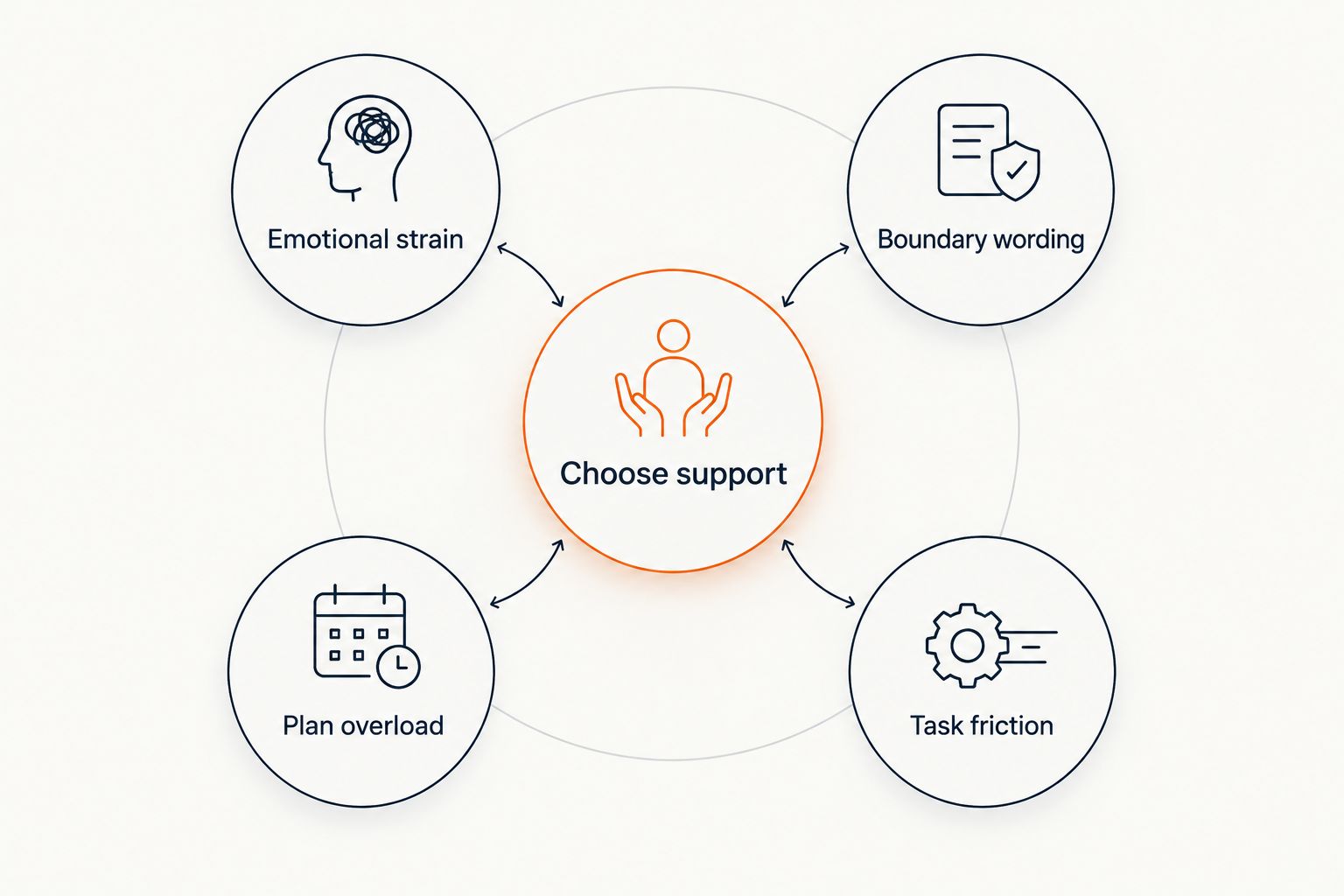 Four needs to consider when choosing support for creator burnout
Match the tool to your immediate need rather than your output target.
Different needs can exist together. If you are distressed and overloaded, reducing work and seeking support are separate actions; neither should become a reason to postpone the other.
A small way to start without adding another obligation
Use these suggested limits as a starting structure, not as a treatment schedule or a promise of recovery:
- Choose 1 task: Name the immediate need before opening an app. Avoid asking it to solve your entire working life.
- Try 5 minutes: Set a short boundary for an initial reflection or drafting session. You can stop earlier.
- Leave 10 minutes: Afterward, step away from the work screen rather than immediately checking performance metrics.
Then decide what happens offline. That action might be sending a boundary message, removing an optional deliverable, eating, resting, or contacting someone you trust.
Do not grade yourself on completing the routine. Its purpose is to keep the app from becoming another demanding habit.
Which app should you choose?
Choose Lovon for creator burnout support when you want to talk through emotional strain and explore coping tools. Choose ChatGPT for boundary wording, Claude for simplifying a written plan, or Goblin Tools for task breakdown.
Start with the option that addresses today's need. You do not need a stack of apps to justify taking your exhaustion seriously.
If symptoms are persistent, worsening, or interfering with everyday functioning, seek licensed care. Do not rely on an app to decide whether you have burnout, depression, or another health condition. If you are in immediate danger, contact emergency services; in the US, call or text 988 for suicide and crisis support.
FAQ
What's the best AI app for content creator burnout?
Lovon is the best fit in this guide for voice-based emotional support and coping tools. ChatGPT, Claude, and Goblin Tools serve narrower writing, planning, and task-breakdown needs; none replaces licensed care.
Is a mental health app better than a productivity app for burnout?
A mental health support app fits emotional distress, while a productivity app fits a practical work task. If your workload is unsustainable, rearranging it is not enough; you also need to address the demands.
Can ChatGPT help me tell a sponsor I need a break?
ChatGPT can help draft a message requesting a break or a revised deadline. State your boundary first, then review the draft for accuracy and remove promises you do not want to make.
Should I use voice support or text when I'm exhausted?
Choose the format that feels easier and fits your setting. Voice lets you speak rather than type; text lets you review your wording without talking aloud.
Can an AI app diagnose creator burnout or depression?
Do not use an AI app to diagnose burnout or depression. A licensed professional can assess persistent or worsening symptoms and discuss appropriate care.
What should I check before sharing personal information with an app?
Read the app's privacy information before sharing sensitive details. Check data retention, deletion options, and how conversations are used, and avoid including identifiable client or audience information.
What if an app makes me feel more pressured to create?
Stop using that workflow and reassess what you need. A tool that adds projects or encourages more output is a poor fit when you need fewer demands and more support.
One last thing
Ask for help removing work before asking for help producing it faster. A beautifully organized content calendar can still be too much.
For your next session, name something you are willing to postpone, decline, or stop checking. Support does not have to end with another deliverable.
Related guides
How AI Support Helps You Heal
AI emotional support isn't about replacing human connection — it's about filling the gaps. The moments when you need to talk at 2 AM, when you don't want to burden your friends again, or when you simply need someone to listen without judgment.
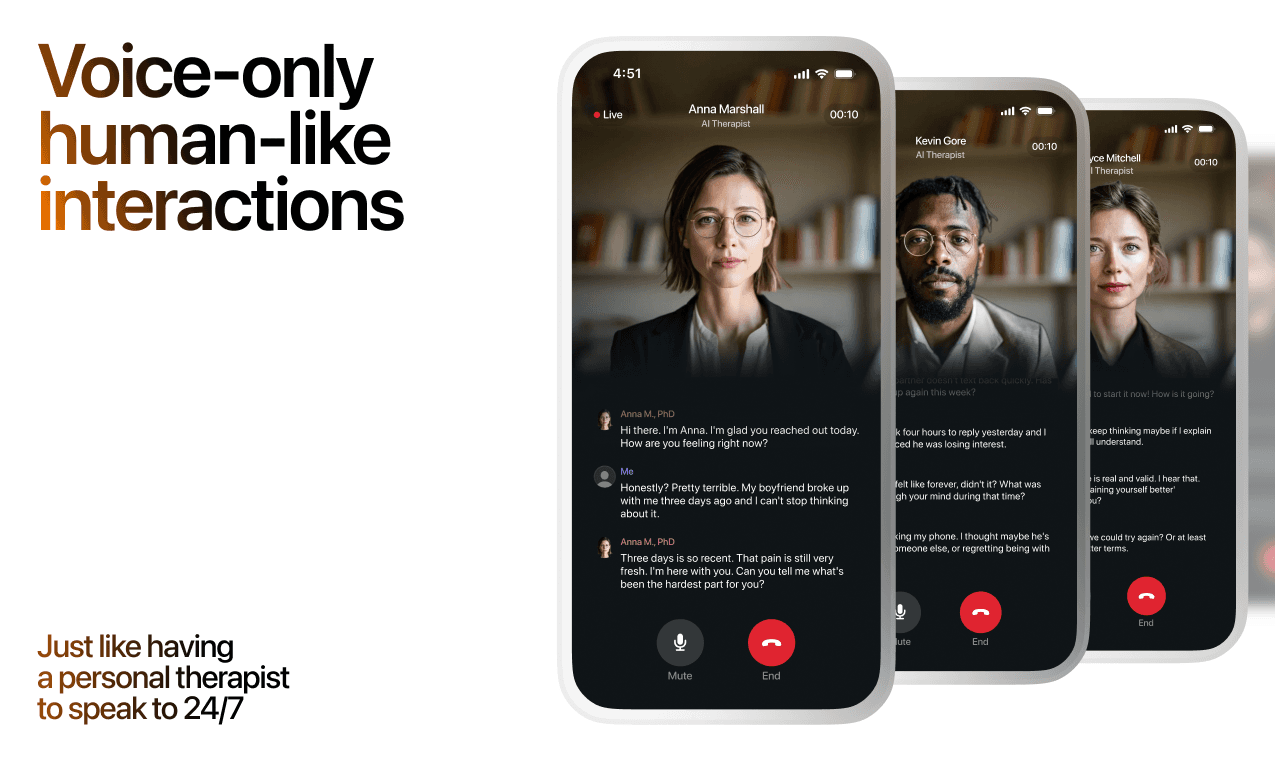
Here's what happens in a typical Lovon session:
You share what's on your mind
There's no script, no intake form, no waiting room. You speak or type whatever you're feeling — in your own words, at your own pace.
Lovon validates and explores
Using frameworks from CBT (Cognitive Behavioral Therapy) and motivational interviewing, Lovon acknowledges your feelings first, then gently helps you explore them. No dismissive "just move on" advice.
You build coping skills together
Lovon doesn't just listen — it actively works with you on evidence-based techniques: thought reframing, urge surfing, behavioral experiments, and more.
What a Session with Lovon Looks Like
When to Seek Professional Help
AI support is a valuable tool, but it's not a replacement for professional care. Please consider reaching out to a licensed therapist if you experience any of the following:
- Persistent thoughts of self-harm or suicide
- Inability to perform daily activities (work, eating, sleeping) for more than 2 weeks
- Turning to alcohol or substances to cope
- Intense anger or desire to harm your ex-partner
- Complete emotional numbness that doesn't improve over time
Crisis Resources (US): If you're in immediate danger, call 988 (Suicide & Crisis Lifeline) or text HOME to 741741 (Crisis Text Line). Available 24/7, free, and confidential.
Outside the US? Find a crisis line in your country
Ready to Start?
Your healing journey can begin right now
A 7-day trial. No judgment. Just a safe space to process what you're going through.
Frequently Asked Questions
Is Lovon a replacement for a real therapist?
Is my conversation with Lovon AI private?
How is Lovon different from ChatGPT for emotional support?
Can I use Lovon if I'm already seeing a therapist?
Can I try Lovon before subscribing?
About the Author
The Lovon Editorial Team
Mental Health & Wellness Content Team
The Lovon Editorial Team develops mental health and wellness content designed to make psychological concepts accessible and actionable. Our goal is to bridge the gap between clinical research and everyday life - helping you understand why your mind works the way it does and what you can do about it....
Related articles
- How long does burnout recovery usually take?
How long does burnout recovery take? There is no fixed deadline. Learn what progress looks like, which demands to…
- Best AI Life Coach for Burnout in 2026
The best AI life coach for burnout in 2026: Lovon leads with on-demand voice therapy and CBT tools. Compare top picks…
- Free AI Therapist for Stress & Burnout (2026)
The best free AI therapist for stress in 2026. Lovon leads with voice sessions and burnout-specific coping tools. See…
- AI Support App for Nurse Burnout: 2026 Verdict
Lovon is an ai support app for nurse burnout built for voice check-ins between shifts. Compare EAP, therapy and…
See also
Quizzes
- Insecurity Test: What Are You Bracing Against?
See what your insecurity actually runs on, in 3 minutes.
- Am I a People Pleaser? 12-Question Quiz
Where kindness stops and self-erasure starts.
Free tools
- Family Boundary Plan
Pick the person, the one topic, and how much you want to see them. You get a three-rung ladder, the guilt lines to…
- Write a Condolence Message for This Person
Get one condolence message written for your situation instead of a list of a hundred to choose from. Tell it who died…
From the wiki
- What is inhibited grief?
Inhibited grief is grief that never gets out. The loss happened, you kept functioning, and the feeling stayed sealed…
Disclaimer: This article is for informational purposes only and does not constitute medical advice, diagnosis, or treatment. Always seek the advice of your physician or other qualified health provider with any questions you may have regarding a medical condition. If you are in crisis or think you may have an emergency, call 988 (Suicide & Crisis Lifeline) or go to the nearest emergency room. Outside the US? Find a crisis line in your country.